Moz Q&A is closed.
After more than 13 years, and tens of thousands of questions, Moz Q&A closed on 12th December 2024. Whilst we’re not completely removing the content - many posts will still be possible to view - we have locked both new posts and new replies. More details here.
Page Indexing without content
-
Hello.
I have a problem of page indexing without content. I have website in 3 different languages and 2 of the pages are indexing just fine, but one language page (the most important one) is indexing without content. When searching using site: page comes up, but when searching unique keywords for which I should rank 100% nothing comes up.
This page was indexing just fine and the problem arose couple of days ago after google update finished. Looking further, the problem is language related and every page in the given language that is newly indexed has this problem, while pages that were last crawled around one week ago are just fine.
Has anyone ran into this type of problem?
-
I've encountered a similar indexing issue on my website, https://sunasusa.com/. To resolve it, ensure that the language markup and content accessibility on the affected pages are correct. Review any recent changes and the quality of your content. Utilize Google Search Console for insights, or consider reaching out to Google support for assistance.
-
To remove hacked URLs in bulk from Google's index, clean up your website, secure it, and then use Google Search Console to request removal of the unwanted URLs. Additionally, submit a new sitemap containing only valid URLs to expedite re-indexing.
-
It seems that after a recent Google update, one language version of your website is experiencing indexing issues, while others remain unaffected. This could be due to factors like changes in algorithms or technical issues. To address this:
- Check h reflag tags and content quality.
- Review technical aspects like crawlability and indexing directives. Deck Services in Duluth GA
- Monitor Google Search Console for errors.
- Consider seeking expert assistance if needed.
-
@AtuliSulava Re: Website blog is hacked. Whats the best practice to remove bad urls
something similar problem also happened to me. many urls are indexed but they have no content in actual. My website(scaleme) was hacked and thousands of URLs with Japanese content were added to my site. These URLs are now indexed by Google. How can I remove them in bulk? (ScreenShoot attached)
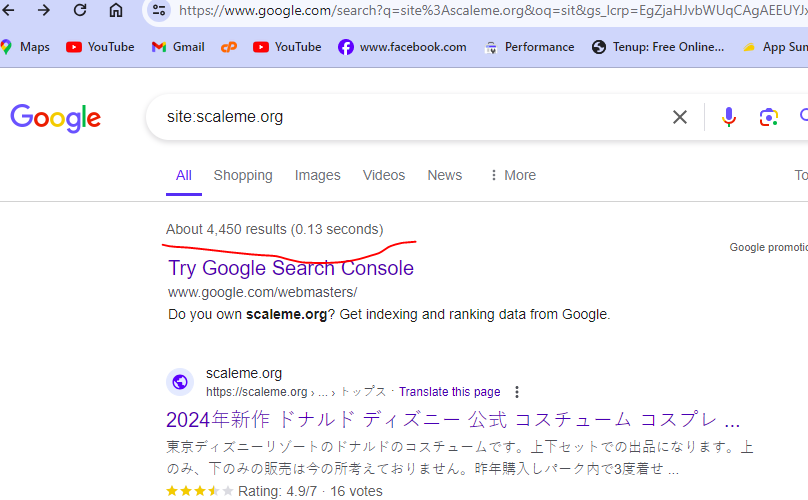
I am the owner of this website. thousands of Japanese-language URLs (more than 4400) were added to my site. i am aware with google url remover tool but adding one by one url and submitting for removing is not possible because there are large number of url indexed by google.
Is there a way to find these url , downlaod a list and remove these URLs in bulk? is Moz have any tool to solve this problem?
-
I've faced a similar indexing issue on my website https://mobilespackages.in/ myself. To resolve it, ensure correct language markup and content accessibility on the affected pages. Review recent changes and content quality. Utilize Google Search Console for insights or reach out to Google support.
-
@AtuliSulava It sounds like you're experiencing a frustrating issue with your website's indexing. I have faced this issue. Unfortunately, I have prevented my website from indexing in google by mistake. Here are some steps you can take to troubleshoot and potentially resolve the problem:
Check Robots.txt: Ensure that your site's robots.txt file is not blocking search engine bots from accessing the content on the affected pages.
Review Meta Tags: Check the <meta name="robots" content="noindex"> tag on the affected pages. If present, remove it to allow indexing.
Content Accessibility: Make sure that the content on the affected pages is accessible to search engine bots. Check for any JavaScript, CSS, or other elements that might be blocking access to the content.
Canonical Tags: Verify that the canonical tags on the affected pages are correctly pointing to the preferred version of the page.
Structured Data Markup: Ensure that your pages have correct structured data markup to help search engines understand the content better.
Fetch as Google: Use Google Search Console's "Fetch as Google" tool to see how Googlebot sees your page and if there are any issues with rendering or accessing the content.
Monitor Google Search Console: Keep an eye on Google Search Console for any messages or issues related to indexing and crawlability of your site.
Wait for Re-crawl: Sometimes, Google's indexing issues resolve themselves over time as the search engine re-crawls and re-indexes your site. If the problem persists, consider requesting a re-crawl through Google Search Console.
If the issue continues, it might be beneficial to seek help from a professional SEO consultant who can perform a detailed analysis of your website and provide specific recommendations tailored to your situation. -
@AtuliSulava Perhaps indexing of blank pages is prohibited on this site, look for more information on how to check the ban on indexing in which site files...





Got a burning SEO question?
Subscribe to Moz Pro to gain full access to Q&A, answer questions, and ask your own.
Browse Questions
Explore more categories
-
Moz Tools
Chat with the community about the Moz tools.
-
SEO Tactics
Discuss the SEO process with fellow marketers
-
Community
Discuss industry events, jobs, and news!
-
Digital Marketing
Chat about tactics outside of SEO
-
Research & Trends
Dive into research and trends in the search industry.
-
Support
Connect on product support and feature requests.
Related Questions
-

Staging website got indexed by google
Our staging website got indexed by google and now MOZ is showing all inbound links from staging site, how should i remove those links and make it no index. Note- we already added Meta NOINDEX in head tag
Intermediate & Advanced SEO | | Asmi-Ta0 -

Need help with Meta tags generator
Hello, I am doing SEO for my business website. I am trying to generate Meta Tags here
On-Page Optimization | | webdropyyc
https://webdrop.ca/seo-tools/meta-tag-generator What should I enter for "Search engines should revisit this page after ". We are not going to change content on daily basis. 7 Days or 30 days are good enough?0 -

Is there a way to get a list of all pages of your website that are indexed in Google?
I am trying to put together a comprehensive list of all pages that are indexed in Google and have differing opinions on how to do this.
Technical SEO | | SpodekandCo0 -

Pages are Indexed but not Cached by Google. Why?
Hello, We have magento 2 extensions website mageants.com since 1 years google every 15 days cached my all pages but suddenly last 15 days my websites pages not cached by google showing me 404 error so go search console check error but din't find any error so I have cached manually fetch and render but still most of pages have same 404 error example page : - https://www.mageants.com/free-gift-for-magento-2.html error :- http://webcache.googleusercontent.com/search?q=cache%3Ahttps%3A%2F%2Fwww.mageants.com%2Ffree-gift-for-magento-2.html&rlz=1C1CHBD_enIN803IN804&oq=cache%3Ahttps%3A%2F%2Fwww.mageants.com%2Ffree-gift-for-magento-2.html&aqs=chrome..69i57j69i58.1569j0j4&sourceid=chrome&ie=UTF-8 so have any one solutions for this issues
Technical SEO | | vikrantrathore0 -

Duplicate Content on a Page Due to Responsive Version
What are the implications if a web designer codes the content of the site twice into the page in order to make the site responsive? I can't add the url I'm afraid but the H1 and the content appear twice in the code in order to produce both a responsive version and a desktop version. This is a Wordpress site. Is Google clever enough to distinguish between the 2 versions and treat them individually? Or will Google really think that the content has been repeated on the same page?
Technical SEO | | Wagada0 -

Are image pages considered 'thin' content pages?
I am currently doing a site audit. The total number of pages on the website are around 400... 187 of them are image pages and coming up as 'zero' word count in Screaming Frog report. I needed to know if they will be considered 'thin' content by search engines? Should I include them as an issue? An answer would be most appreciated.
Technical SEO | | MTalhaImtiaz0 -

What are the potential SEO downsides of using a service like unbounce for content pages?
I'm thinking of using unbounce.com to create some content driven pages. Unbounce is simple, easy-to-use, and very easy for non-devs at my company to create variations on pages. I know they allow adding meta descriptions, title tags, etc and allow it to be indexable by Google, but I was wondering if there were any potential downsides to using unbounce as opposed to hosting it myself. Any help would be appreciated!
Technical SEO | | Seiyav0 -

Duplicate content problem from an index.php file
Hi One of my sites is flagging a duplicate content problem which is affecting the search rankings. The duplicate problem is caused by http://www.mydomain.com/index.php which has a page rank of 26 How can I sort the duplicate content problem, as the main page should just be http://www.mydomain.com which has a page rank of 42 and is the stronger page with stronger links etc Many Thanks
Technical SEO | | ocelot0