Moz Q&A is closed.
After more than 13 years, and tens of thousands of questions, Moz Q&A closed on 12th December 2024. Whilst we’re not completely removing the content - many posts will still be possible to view - we have locked both new posts and new replies. More details here.
Page Indexing without content
-
Hello.
I have a problem of page indexing without content. I have website in 3 different languages and 2 of the pages are indexing just fine, but one language page (the most important one) is indexing without content. When searching using site: page comes up, but when searching unique keywords for which I should rank 100% nothing comes up.
This page was indexing just fine and the problem arose couple of days ago after google update finished. Looking further, the problem is language related and every page in the given language that is newly indexed has this problem, while pages that were last crawled around one week ago are just fine.
Has anyone ran into this type of problem?
-
I've encountered a similar indexing issue on my website, https://sunasusa.com/. To resolve it, ensure that the language markup and content accessibility on the affected pages are correct. Review any recent changes and the quality of your content. Utilize Google Search Console for insights, or consider reaching out to Google support for assistance.
-
To remove hacked URLs in bulk from Google's index, clean up your website, secure it, and then use Google Search Console to request removal of the unwanted URLs. Additionally, submit a new sitemap containing only valid URLs to expedite re-indexing.
-
It seems that after a recent Google update, one language version of your website is experiencing indexing issues, while others remain unaffected. This could be due to factors like changes in algorithms or technical issues. To address this:
- Check h reflag tags and content quality.
- Review technical aspects like crawlability and indexing directives. Deck Services in Duluth GA
- Monitor Google Search Console for errors.
- Consider seeking expert assistance if needed.
-
@AtuliSulava Re: Website blog is hacked. Whats the best practice to remove bad urls
something similar problem also happened to me. many urls are indexed but they have no content in actual. My website(scaleme) was hacked and thousands of URLs with Japanese content were added to my site. These URLs are now indexed by Google. How can I remove them in bulk? (ScreenShoot attached)
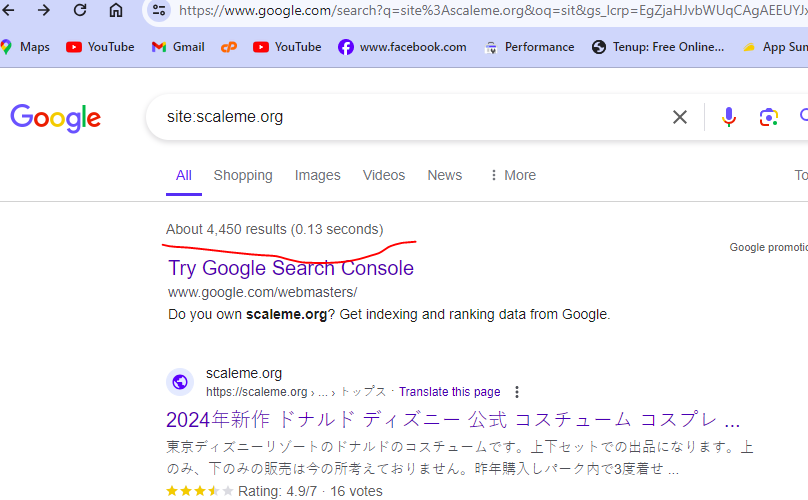
I am the owner of this website. thousands of Japanese-language URLs (more than 4400) were added to my site. i am aware with google url remover tool but adding one by one url and submitting for removing is not possible because there are large number of url indexed by google.
Is there a way to find these url , downlaod a list and remove these URLs in bulk? is Moz have any tool to solve this problem?
-
I've faced a similar indexing issue on my website https://mobilespackages.in/ myself. To resolve it, ensure correct language markup and content accessibility on the affected pages. Review recent changes and content quality. Utilize Google Search Console for insights or reach out to Google support.
-
@AtuliSulava It sounds like you're experiencing a frustrating issue with your website's indexing. I have faced this issue. Unfortunately, I have prevented my website from indexing in google by mistake. Here are some steps you can take to troubleshoot and potentially resolve the problem:
Check Robots.txt: Ensure that your site's robots.txt file is not blocking search engine bots from accessing the content on the affected pages.
Review Meta Tags: Check the <meta name="robots" content="noindex"> tag on the affected pages. If present, remove it to allow indexing.
Content Accessibility: Make sure that the content on the affected pages is accessible to search engine bots. Check for any JavaScript, CSS, or other elements that might be blocking access to the content.
Canonical Tags: Verify that the canonical tags on the affected pages are correctly pointing to the preferred version of the page.
Structured Data Markup: Ensure that your pages have correct structured data markup to help search engines understand the content better.
Fetch as Google: Use Google Search Console's "Fetch as Google" tool to see how Googlebot sees your page and if there are any issues with rendering or accessing the content.
Monitor Google Search Console: Keep an eye on Google Search Console for any messages or issues related to indexing and crawlability of your site.
Wait for Re-crawl: Sometimes, Google's indexing issues resolve themselves over time as the search engine re-crawls and re-indexes your site. If the problem persists, consider requesting a re-crawl through Google Search Console.
If the issue continues, it might be beneficial to seek help from a professional SEO consultant who can perform a detailed analysis of your website and provide specific recommendations tailored to your situation. -
@AtuliSulava Perhaps indexing of blank pages is prohibited on this site, look for more information on how to check the ban on indexing in which site files...





Got a burning SEO question?
Subscribe to Moz Pro to gain full access to Q&A, answer questions, and ask your own.
Browse Questions
Explore more categories
-
Moz Tools
Chat with the community about the Moz tools.
-
SEO Tactics
Discuss the SEO process with fellow marketers
-
Community
Discuss industry events, jobs, and news!
-
Digital Marketing
Chat about tactics outside of SEO
-
Research & Trends
Dive into research and trends in the search industry.
-
Support
Connect on product support and feature requests.
Related Questions
-

What Tools Should I Use To Investigate Damage to my website
I would like to know what tools I should use and how to investigate damage to my website in2town.co.uk I hired a person to do some work to my website but they damaged it. That person was on a freelance platform and was removed because of all the complaints made about them. They also put in backdoors on websites including mine and added content. I also had a second problem where my content was being stolen. My site always did well and had lots of keywords in the top five and ten, but now they are not even in the top 200. This happened in January and feb. When I write unique articles, they are not showing in Google and need to find what the problem is and how to fix it. Can anyone please help
Technical SEO | | blogwoman10 -

Spam Score Of Site Increased from 1 to 31% overnight
Hello There,
Technical SEO | | rohit.c
Few days back, Spam Score of two of my sites drastically increased from 1% to 31% for one site and from 1% to 36% for another site overnight. Here are the two websites https://simpalm.com/ ducknowl.com Site background for 2-3 months ABC link exchange campaign was started for both the sites. Links where built on high quality sites with DA40 above and most of them are Saas sites No reciprocal link exchange was done Same new pages are created on the site for on page SEO Both the sites are hosted on GoDaddy Can someone please tell me what is the reason of this Sudden increase in spam score of both the sites and at same time?1 -

Should I "no-index" two exact pages on Google results?
Hello everyone, I recently started a new wordpress website and created a static homepage. I noticed that on Google search results, there are two different URLs landing on same content page. I've attached an image to explain what I saw. Should I "no-index" the page url? Google url.JPG In this picture, the first result is the homepage and I try to rank for that page. The last result is landing on same content with different URL. So, should I no-index last result as shown in image?
Technical SEO | | amanda59640 -

Will skipping <H> tags affect your SEO?
Will skipping <H> tags on a page have any impact on your SEO, e.g. skipping a <H2> so your page has a <H1> and then goes to a <H3>? Obviously a page must have a <H1>, but does it matter if you skip other headings?
Technical SEO | | ciehmoz0 -

Quick Fix to "Duplicate page without canonical tag"?
When we pull up Google Search Console, in the Index Coverage section, under the category of Excluded, there is a sub-category called ‘Duplicate page without canonical tag’. The majority of the 665 pages in that section are from a test environment. If we were to include in the robots.txt file, a wildcard to cover every URL that started with the particular root URL ("www.domain.com/host/"), could we eliminate the majority of these errors? That solution is not one of the 5 or 6 recommended solutions that the Google Search Console Help section text suggests. It seems like a simple effective solution. Are we missing something?
Technical SEO | | CREW-MARKETING1 -

Car Dealership website - Duplicate Page Content Issues
Hi, I am currently working on a large car dealership website. I have just had a Moz crawl through and its flagging a lot of duplicate page content issues, these are mostly for used car pages. How can I get round this as the site stocks many of the same car, model, colour, age, millage etc. Only unique thing about them is the reg plate. How do I get past this duplicate issue if all the info is relatively the same? Anyone experienced this issue when working on a car dealership website? Thank you.
Technical SEO | | karl621 -

How to deal with duplicated content on product pages?
Hi, I have a webshop with products with different sizes and colours. For each item I have a different URL, with almost the same content (title tag, product descriptions, etc). In order to prevent duplicated content I'am wondering what is the best way to solve this problem, keeping in mind: -Impossible to create one page/URL for each product with filters on colour and size -Impossible to rewrite the product descriptions in order to be unique I'm considering the option to canonicolize the rest of de colours/size variations, but the disadvantage is that in case the product is not in stock it disappears from the website. Looking forward to your opinions and solutions. Jeroen
Technical SEO | | Digital-DMG0 -

How to tell if PDF content is being indexed?
I've searched extensively for this, but could not find a definitive answer. We recently updated our website and it contains links to about 30 PDF data sheets. I want to determine if the text from these PDFs is being archived by search engines. When I do this search http://bit.ly/rRYJPe (google - site:www.gamma-sci.com and filetype:pdf) I can see that the PDF urls are getting indexed, but does that mean that their content is getting indexed? I have read in other posts/places that if you can copy text from a PDF and paste it that means Google can index the content. When I try this with PDFs from our site I cannot copy text, but I was told that these PDFs were all created from Word docs, so they should be indexable, correct? Since WordPress has you upload PDFs like they are an image could this be causing the problem? Would it make sense to take the time and extract all of the PDF content to html? Thanks for any assistance, this has been driving me crazy.
Technical SEO | | zazo0