Moz Q&A is closed.
After more than 13 years, and tens of thousands of questions, Moz Q&A closed on 12th December 2024. Whilst we’re not completely removing the content - many posts will still be possible to view - we have locked both new posts and new replies. More details here.
Why Product pages are throwing Missing field "image" and Missing field "price" in Wordpress Woocommerce
-
I have a wordpress wocommerce website where I have uploaded 100s of products but it's giving me error in GSC under merchant listing tab. When I tested it show missing field image and missing field price. I have done everything according to https://developers.google.com/search/docs/appearance/structured-data/product#merchant-listing-experiences and applied fixed i.e. images are 800x800 and price range is also there. What else can be done here?!
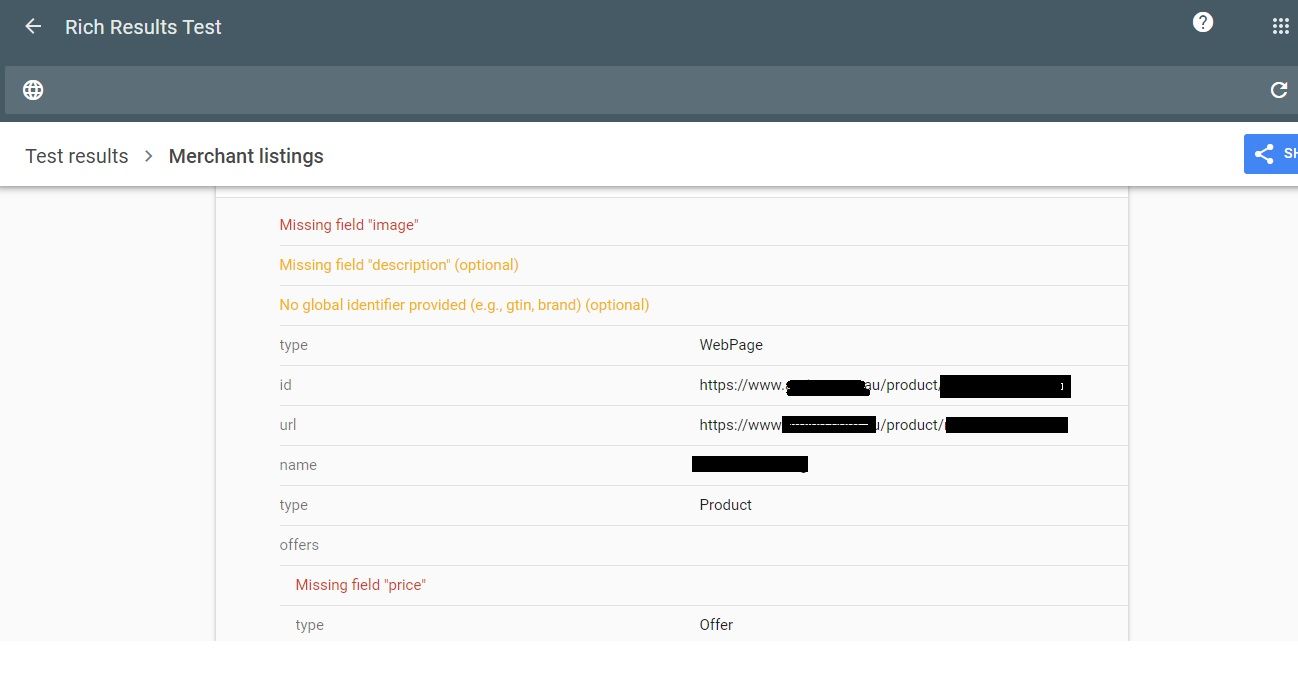
-
The "Missing field 'image' and 'price'" errors in WordPress WooCommerce product pages typically indicate that some product listings are incomplete or lacking essential information. To resolve this, ensure that you have properly configured product images and prices for all your items in the WooCommerce backend. This will help provide a better shopping experience for your customers. If you need more guidance on how to fix these issues, please let me know.
-
Hey, it sounds like there might be a configuration issue with the product pages. Have you checked if the 'image' and 'price' fields are properly Nedbank Branch Code filled for each product in the WooCommerce settings? Double-checking those might solve the problem. Let me know how it goes!
-
I'm sorry to hear about the trouble you're facing. This issue might stem from incomplete product listings in your WooCommerce setup. Ensure that each product has a designated image and price specified. Also, double-check any custom fields or plugins that might affect this. If the problem persists, Nedbank Branch Code reaching out to WooCommerce support or consulting the community forums could provide further assistance. Good luck!
-
I'm sorry to hear about the trouble you're facing. It sounds like you've followed the structured data guidelines correctly. Double-check that there are no typos or discrepancies in your code. Also, ensure your website is properly indexed by Google. If the issue persists, consider reaching out to Google Support for more specific guidance. Good luck getting it sorted!



Got a burning SEO question?
Subscribe to Moz Pro to gain full access to Q&A, answer questions, and ask your own.
Browse Questions
Explore more categories
-
Moz Tools
Chat with the community about the Moz tools.
-
SEO Tactics
Discuss the SEO process with fellow marketers
-
Community
Discuss industry events, jobs, and news!
-
Digital Marketing
Chat about tactics outside of SEO
-
Research & Trends
Dive into research and trends in the search industry.
-
Support
Connect on product support and feature requests.
Related Questions
-

What Tools Should I Use To Investigate Damage to my website
I would like to know what tools I should use and how to investigate damage to my website in2town.co.uk I hired a person to do some work to my website but they damaged it. That person was on a freelance platform and was removed because of all the complaints made about them. They also put in backdoors on websites including mine and added content. I also had a second problem where my content was being stolen. My site always did well and had lots of keywords in the top five and ten, but now they are not even in the top 200. This happened in January and feb. When I write unique articles, they are not showing in Google and need to find what the problem is and how to fix it. Can anyone please help
Technical SEO | | blogwoman10 -

Unsolved Using Weglot on wordpress (errors)
Good day to you all, Does anyone have experience of the errors being pulled up by Moz about the utility of the weglot plugin on Wordpress? Moz is pulling up URLs such as: https://www.ibizacc.com/es/chapparal-2/?wg-choose-original=false These are classified under "redirect issues" and 99% of the pages are with the ?wg-choose parameter in the URL. Is this having an actual negative impact on my search or is it something more Moz related being highlighted. Any advice be appreciated and a resolution .. Im thinking I could exclude this parameter.
Moz Pro | | alwaysbeseen0 -

Unsolved Question about a Screaming Frog crawling issue
Hello, I have a very peculiar question about an issue I'm having when working on a website. It's a WordPress site and I'm using a generic plug in for title and meta updates. When I go to crawl the site through screaming frog, however, there seems to be a hard coded title tag that I can't find anywhere and the plug in updates don't get crawled. If anyone has any suggestions, thatd be great. Thanks!
Technical SEO | | KyleSennikoff0 -

Unsolved Capturing Source Dynamically for UTM Parameters
Does anyone have a tutorial on how to dynamically capture the referring source to be populated in UTM parameters for Google Analytics? We want to syndicate content and be able to see all of the websites that provided referral traffic for this specific objective. We want to set a specific utm_medium and utm_campaign but have the utm_source be dynamic and capture the referring website. If we set a permanent utm_source, it would appear the same for all incoming traffic. Thanks in advance!
Technical SEO | | peteboyd0 -

Unsolved SEO And Digital Marketing Training
Hi Everyone, I have a basic SEO and Digital Marketing knowledge and looking for a course /training which will teach me step by step SEO and tools need to use with hand on training. I have a website (https://gemslearninginstitute.com/) which I need bring in Google Packs and on the first page of Google. I have attended a few courses but none of them offered in depth knowledge with hands on training so whatever I do it is not producing results. Thanks
SEO Tactics | | fslpso0 -

Collections or blog posts for Shopify ecommerce seo?
Hi, hope you guys can help as I am going down a rabbit hole with this one! We have a solid-ranking sports nutrition site and are building a new SEO keyword strategy on our Shopify built store. We are using collections (categories) for much of the key product-based seo. This is because, as we understand it, Google prioritises collection/category pages over product pages. Should we then build additional collection pages to rank for secondary product search terms that could fit a collection page structure (eg 'vegan sports nutrition'), or should we use blog posts to do this? We have a quality blog with good unique content and reasonable domain authority so both options are open to us. But while the collection/category option may be best for SEO, too many collections/categories could upset our UX. We have a very small product range (10 products) so want to keep navigation fast and easy. Our 7 lead keyword collection pages do this already. More run the risk of upsetting ease/speed of site navigation. On the other hand, conversion rate from collection pages is historically much better than blog pages. We have made major technical upgrades to the blog to improve this but these are yet to be tested in anger. So at the heart of it all - do you guys recommend favouring blog posts or collection/category pages for secondary high sales intent keywords? All help gratefully received - thanks!
SEO Tactics | | WP332 -

How can I Style Long "List Posts" in Wordpress?
Hi All, I have been working on a list-post which spans over 100 items. Each item on the list has a quick blurb to explain it, an image and a few resource links. I am trying to find an attractive way to present this long list post in Wordpress. I have seen several sites with long list posts however; they place their items one on top of the other which yields a VERY long page and the end user has to do a lot of scrolling. Others turn their lists into slideshows, but I have no data on how slides perform against 10-mile-long-lists which load in 1 page. I would like to do something similar to what List25.com does as they present about 5-10 items per page and they seem to have pagination. The pagination part I understand however; is there a shortcode plugin to format lists in an attractive way just like list25?
Technical SEO | | IvanC0 -

What is best practice for redirecting "secondary" domain names?
For sites with multiple top-level domains that have been secured for a business or organization, I'm curious as to what is considered best practice for setting up 301 redirects for secondary domains. Is it best to do the 301 redirects at the registrar level, or the hosting level? So that .net, .biz, or other secondary domains funnel visitors to the correct primary/main domain name. I'm looking for the "best practice" answer and want to avoid duplicate content problems, or penalties from the search engines. I'm not trying to game the system with dozens of domain names, simply the handful of domains that are important to the client. I've seen some registrars recommend hosting secondary domains, and doing redirects from the hosting level (and they use meta refresh for "domain forwarding," which I want to avoid). It seems rather wasteful to set up hosting for a secondary domain and then 301 each URL.
Technical SEO | | Scott-Thomas0