Moz Q&A is closed.
After more than 13 years, and tens of thousands of questions, Moz Q&A closed on 12th December 2024. Whilst we’re not completely removing the content - many posts will still be possible to view - we have locked both new posts and new replies. More details here.
How to index e-commerce marketplace product pages
-
Hello!
We are an online marketplace that submitted our sitemap through Google Search Console 2 weeks ago. Although the sitemap has been submitted successfully, out of ~10000 links (we have ~10000 product pages), we only have 25 that have been indexed.
I've attached images of the reasons given for not indexing the platform.
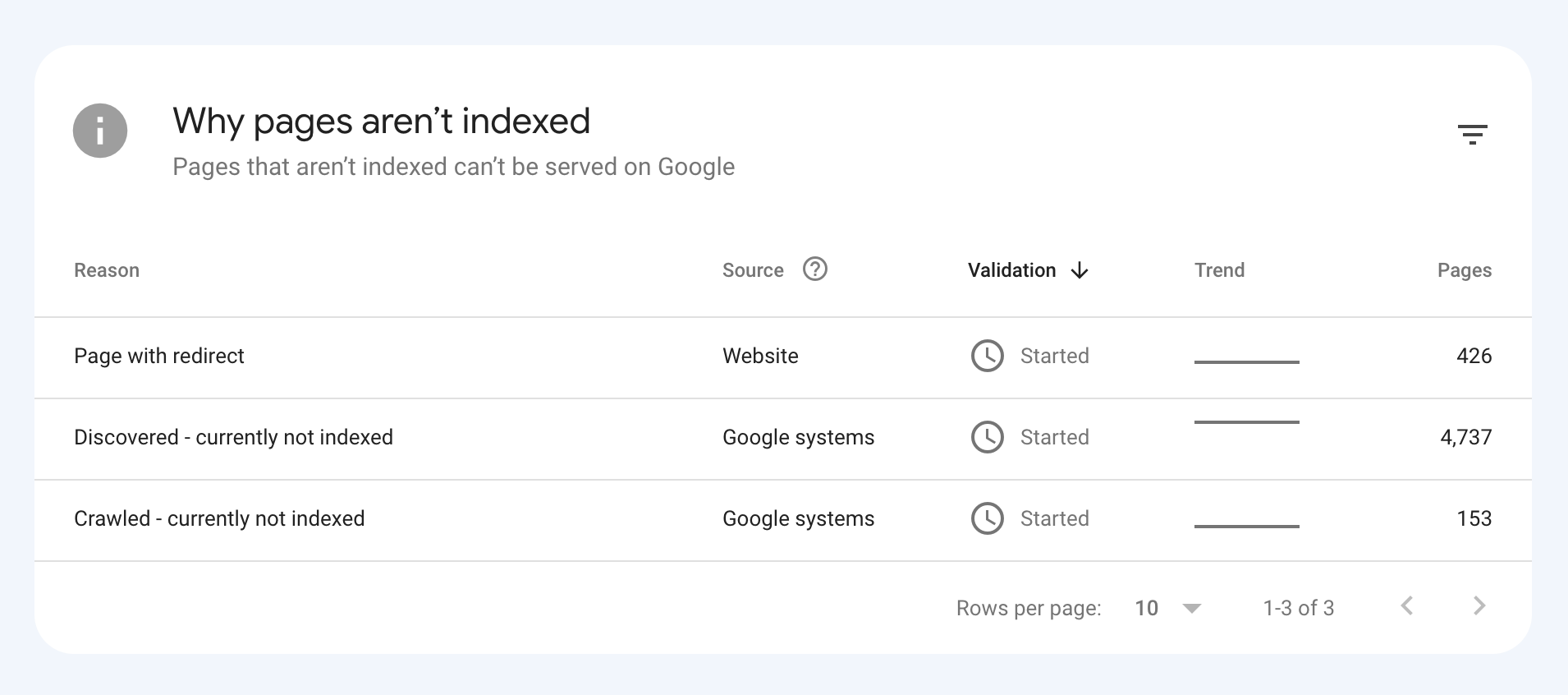
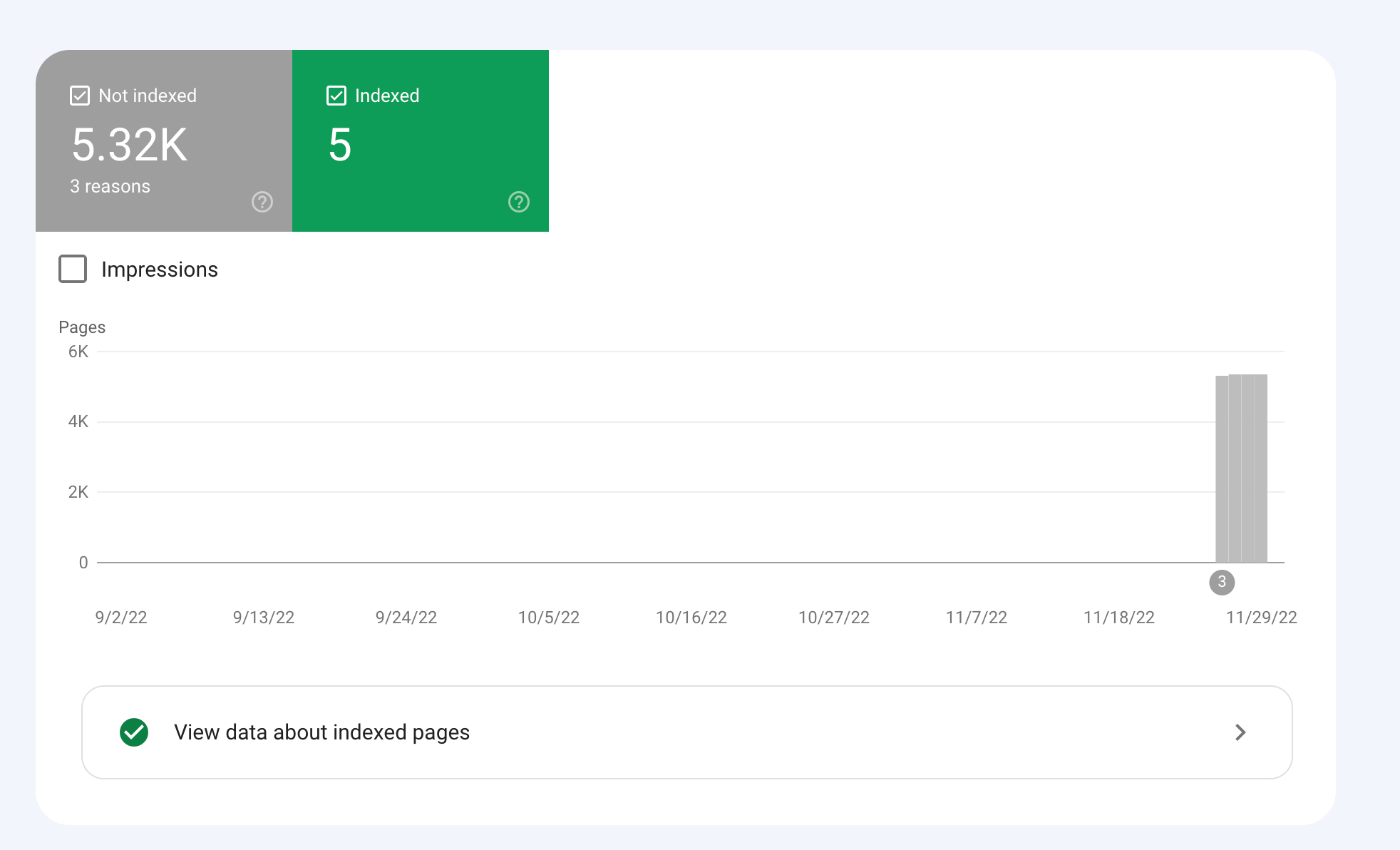
How would we go about fixing this?
-
To get your e-commerce marketplace product pages indexed, make sure your pages include unique and descriptive titles, meta descriptions, relevant keywords, and high-quality images. Additionally, optimize your URLs, leverage schema markup, and prioritize user experience for increased search engine visibility.
-
@fbcosta i hve this problem but its so less in my site
پوشاک پاپیون -
I'd appreciate if someone who faced the same indexing issue comes forward and share the case study with fellow members. Pin points steps a sufferer should do to overcome indexing dilemma. What actionable steps to do to enable quick product indexing? How we can get Google's attention so it can start indexing pages at a quick pace? Actionable advice please.
-
There could be several reasons why only 25 out of approximately 10,000 links have been indexed by Google, despite successfully submitting your sitemap through Google Search Console:
Timing: It is not uncommon for indexing to take some time, especially for larger sites with many pages. Although your sitemap has been submitted, it may take several days or even weeks for Google to crawl and index all of your pages. It's worth noting that not all pages on a site may be considered important or relevant enough to be indexed by Google.
Quality of Content: Google may not index pages that it considers low-quality, thin or duplicate content. If a significant number of your product pages have similar or duplicate content, they may not be indexed. To avoid this issue, make sure your product pages have unique, high-quality content that provides value to users.
Technical issues: Your site may have technical issues that are preventing Google from crawling and indexing your pages. These issues could include problems with your site's architecture, duplicate content, or other issues that may impact crawling and indexing.
Inaccurate Sitemap: There is also a possibility that there are errors in the sitemap you submitted to Google. Check the sitemap to ensure that all the URLs are valid, the sitemap is up to date and correctly formatted.
To troubleshoot this issue, you can check your site's coverage report on Google Search Console, which will show you which pages have been indexed and which ones haven't. You can also check your site's crawl report to see if there are any technical issues that may be preventing Google from crawling your pages. Finally, you can also run a site audit to identify and fix any technical issues that may be impacting indexing.
-
@fbcosta As per my experience, if your site is new it will take some time to index all of the URLs, and the second thing is, if you have Hundreds of URLs, it doesn't mean Google will index all of them.
You can try these steps which will help in fast indexing:
- Sharing on Social Media
- Interlinking from already indexed Pages
- Sitemap
- Share the link on the verified Google My Business Profile (Best way to index fast). You can add by-products or create a post and link it to the website.
- Guest post
I am writing here for the first time, I hope it will help



Got a burning SEO question?
Subscribe to Moz Pro to gain full access to Q&A, answer questions, and ask your own.
Browse Questions
Explore more categories
-
Moz Tools
Chat with the community about the Moz tools.
-
SEO Tactics
Discuss the SEO process with fellow marketers
-
Community
Discuss industry events, jobs, and news!
-
Digital Marketing
Chat about tactics outside of SEO
-
Research & Trends
Dive into research and trends in the search industry.
-
Support
Connect on product support and feature requests.
Related Questions
-

How best to wrap anchor tags around a product tile
Hi Say I am on a Product Listing page on ecommerce website and I have product tiles which contain images and name/price underneath them. Is it better to wrap the whole product tile (image and name/price) in an anchor tag (linking to their product page) or to wrap the image and the name/price underneath in anchor tags separately (linking to the product page) ? thanks
On-Page Optimization | | jtiernanibm0 -

Good to use disallow or noindex for these?
Hello everyone, I am reaching out to seek your expert advice on a few technical SEO aspects related to my website. I highly value your expertise in this field and would greatly appreciate your insights.
Technical SEO | | williamhuynh
Below are the specific areas I would like to discuss: a. Double and Triple filter pages: I have identified certain URLs on my website that have a canonical tag pointing to the main /quick-ship page. These URLs are as follows: https://www.interiorsecrets.com.au/collections/lounge-chairs/quick-ship+black
https://www.interiorsecrets.com.au/collections/lounge-chairs/quick-ship+black+fabric Considering the need to optimize my crawl budget, I would like to seek your advice on whether it would be advisable to disallow or noindex these pages. My understanding is that by disallowing or noindexing these URLs, search engines can avoid wasting resources on crawling and indexing duplicate or filtered content. I would greatly appreciate your guidance on this matter. b. Page URLs with parameters: I have noticed that some of my page URLs include parameters such as ?variant and ?limit. Although these URLs already have canonical tags in place, I would like to understand whether it is still recommended to disallow or noindex them to further conserve crawl budget. My understanding is that by doing so, search engines can prevent the unnecessary expenditure of resources on indexing redundant variations of the same content. I would be grateful for your expert opinion on this matter. Additionally, I would be delighted if you could provide any suggestions regarding internal linking strategies tailored to my website's structure and content. Any insights or recommendations you can offer would be highly valuable to me. Thank you in advance for your time and expertise in addressing these concerns. I genuinely appreciate your assistance. If you require any further information or clarification, please let me know. I look forward to hearing from you. Cheers!0 -

Unsolved Question about a Screaming Frog crawling issue
Hello, I have a very peculiar question about an issue I'm having when working on a website. It's a WordPress site and I'm using a generic plug in for title and meta updates. When I go to crawl the site through screaming frog, however, there seems to be a hard coded title tag that I can't find anywhere and the plug in updates don't get crawled. If anyone has any suggestions, thatd be great. Thanks!
Technical SEO | | KyleSennikoff0 -

Unsolved how to add my known backlinks manually to moz
hello
Moz Local | | icogems
i have cryptocurrency website and i found backlinks listed in my google webmasters dashboard, but those backlinks dont show in my moz dashboard even after 45 days. so my question is can i add those backlinks to moz, just to check my website real da score thanks,0 -

Dynamic Canonical Tag for Search Results Filtering Page
Hi everyone, I run a website in the travel industry where most users land on a location page (e.g. domain.com/product/location, before performing a search by selecting dates and times. This then takes them to a pre filtered dynamic search results page with options for their selected location on a separate URL (e.g. /book/results). The /book/results page can only be accessed on our website by performing a search, and URL's with search parameters from this page have never been indexed in the past. We work with some large partners who use our booking engine who have recently started linking to these pre filtered search results pages. This is not being done on a large scale and at present we only have a couple of hundred of these search results pages indexed. I could easily add a noindex or self-referencing canonical tag to the /book/results page to remove them, however it’s been suggested that adding a dynamic canonical tag to our pre filtered results pages pointing to the location page (based on the location information in the query string) could be beneficial for the SEO of our location pages. This makes sense as the partner websites that link to our /book/results page are very high authority and any way that this could be passed to our location pages (which are our most important in terms of rankings) sounds good, however I have a couple of concerns. • Is using a dynamic canonical tag in this way considered spammy / manipulative? • Whilst all the content that appears on the pre filtered /book/results page is present on the static location page where the search initiates and which the canonical tag would point to, it is presented differently and there is a lot more content on the static location page that isn’t present on the /book/results page. Is this likely to see the canonical tag being ignored / link equity not being passed as hoped, and are there greater risks to this that I should be worried about? I can’t find many examples of other sites where this has been implemented but the closest would probably be booking.com. https://www.booking.com/searchresults.it.html?label=gen173nr-1FCAEoggI46AdIM1gEaFCIAQGYARS4ARfIAQzYAQHoAQH4AQuIAgGoAgO4ArajrpcGwAIB0gIkYmUxYjNlZWMtYWQzMi00NWJmLTk5NTItNzY1MzljZTVhOTk02AIG4AIB&sid=d4030ebf4f04bb7ddcb2b04d1bade521&dest_id=-2601889&dest_type=city& Canonical points to https://www.booking.com/city/gb/london.it.html In our scenario however there is a greater difference between the content on both pages (and booking.com have a load of search results pages indexed which is not what we’re looking for) Would be great to get any feedback on this before I rule it out. Thanks!
Technical SEO | | GAnalytics1 -

Google Not Indexing Pages (Wordpress)
Hello, recently I started noticing that google is not indexing our new pages or our new blog posts. We are simply getting a "Discovered - Currently Not Indexed" message on all new pages. When I click "Request Indexing" is takes a few days, but eventually it does get indexed and is on Google. This is very strange, as our website has been around since the late 90's and the quality of the new content is neither duplicate nor "low quality". We started noticing this happening around February. We also do not have many pages - maybe 500 maximum? I have looked at all the obvious answers (allowing for indexing, etc.), but just can't seem to pinpoint a reason why. Has anyone had this happen recently? It is getting very annoying having to manually go in and request indexing for every page and makes me think there may be some underlying issues with the website that should be fixed.
Technical SEO | | Hasanovic1 -

Pages are Indexed but not Cached by Google. Why?
Hello, We have magento 2 extensions website mageants.com since 1 years google every 15 days cached my all pages but suddenly last 15 days my websites pages not cached by google showing me 404 error so go search console check error but din't find any error so I have cached manually fetch and render but still most of pages have same 404 error example page : - https://www.mageants.com/free-gift-for-magento-2.html error :- http://webcache.googleusercontent.com/search?q=cache%3Ahttps%3A%2F%2Fwww.mageants.com%2Ffree-gift-for-magento-2.html&rlz=1C1CHBD_enIN803IN804&oq=cache%3Ahttps%3A%2F%2Fwww.mageants.com%2Ffree-gift-for-magento-2.html&aqs=chrome..69i57j69i58.1569j0j4&sourceid=chrome&ie=UTF-8 so have any one solutions for this issues
Technical SEO | | vikrantrathore0 -

How to structure rel=canonical for a e commerce site
Hello, So I have searched the Q & A , Google, the zen cart forum and at this point I am looking for some one to give a concrete answer on what I should do. There is a lot of different opinions on " rel=canonical" and how to apply it , since there are many other variable in place. I have a zen cart site. I am using the latest 1.3.9 version. The default setting ( seem to me) uses the rel=canonical to point back to the specific link product or category respectively. Most of the time I have two scenarios. 1. Main category ---> Sub category----> Product 2. Main Category----> Product I'll give an example http://www.perfectindesign.com/awards ---main category http://www.perfectindesign.com/awards/acrylic-awards sub category http://www.perfectindesign.com/awards/acrylic-awards/slanted-award product (this example has three sub categories with maybe 12 products in one 4 in the second and 5 in the third) From looking at the source code for each url it the rel=canonical just points back to its own url. I want to avoid competing against my self, for the example above keyword "acrylic awards" so should the use of the re=canonical be changes site wide to have products point back to sub categories when they exist and have products point back to main categories when no sub categories exist? I am very new to seo, specifically eCommerce seo. If you have experience and have done this to a site you manage for a client or your own please advise how to proceed. Also if I'm missing some thing that will give me a better understanding of the bigger seo picture that would be great. Thanks, Yevgeny
Technical SEO | | Yevgeny0