Moz Q&A is closed.
After more than 13 years, and tens of thousands of questions, Moz Q&A closed on 12th December 2024. Whilst we’re not completely removing the content - many posts will still be possible to view - we have locked both new posts and new replies. More details here.
How to index e-commerce marketplace product pages
-
Hello!
We are an online marketplace that submitted our sitemap through Google Search Console 2 weeks ago. Although the sitemap has been submitted successfully, out of ~10000 links (we have ~10000 product pages), we only have 25 that have been indexed.
I've attached images of the reasons given for not indexing the platform.
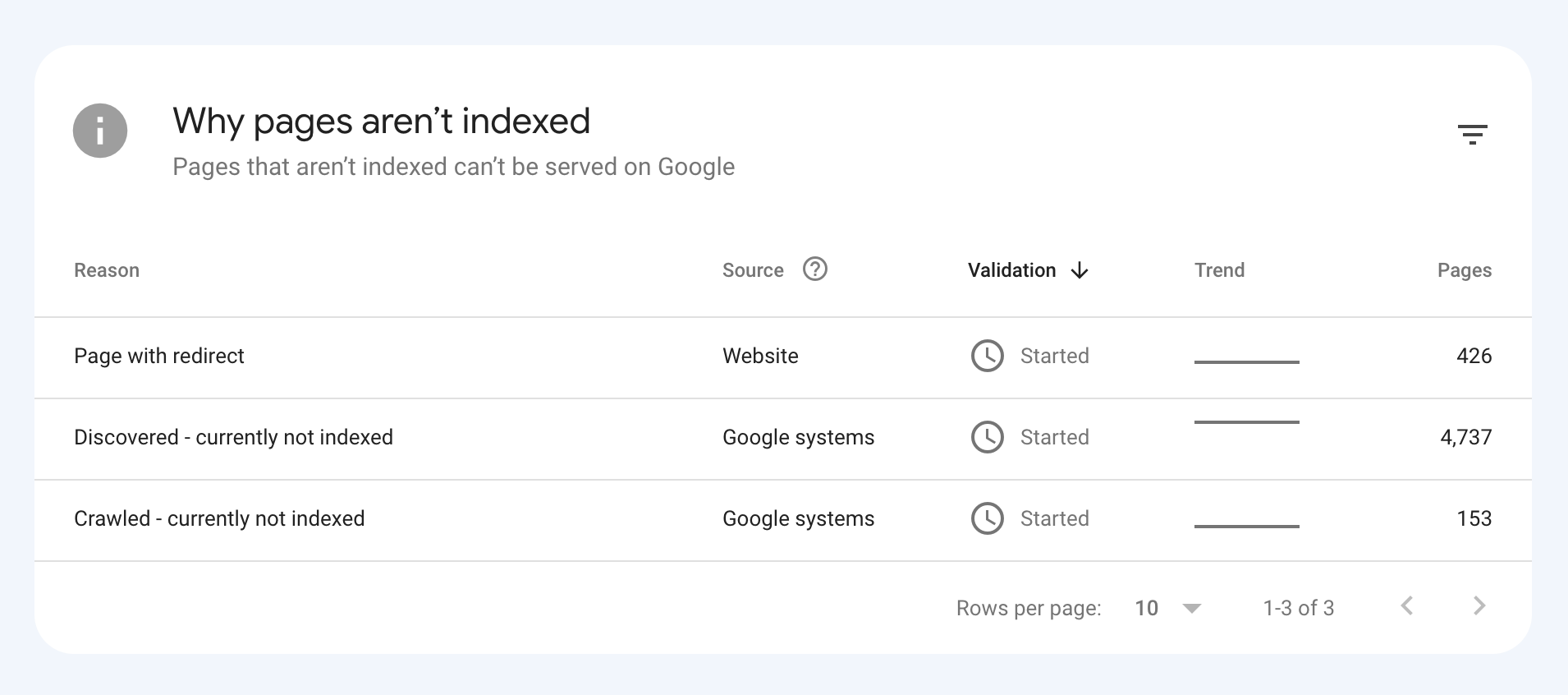
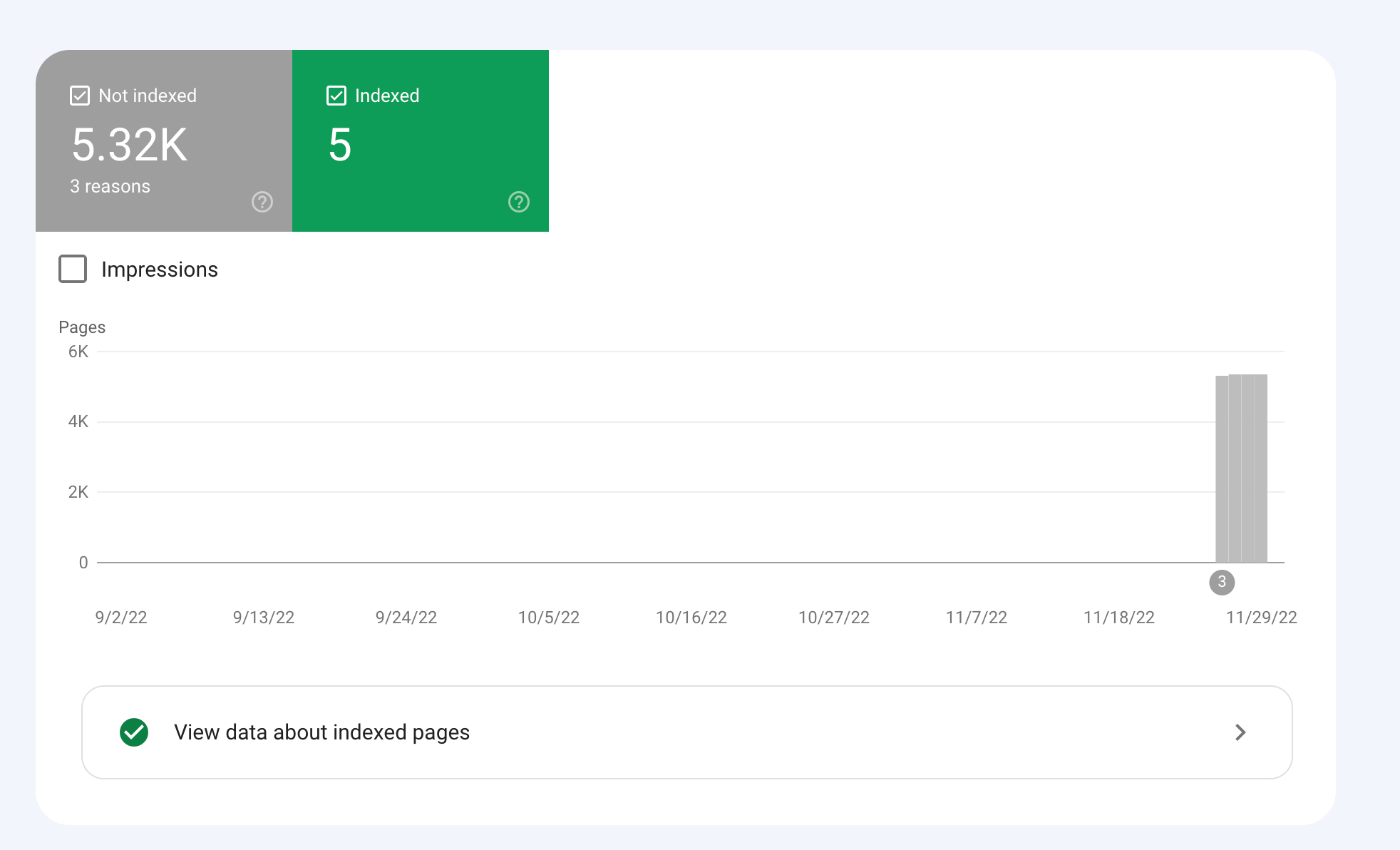
How would we go about fixing this?
-
To get your e-commerce marketplace product pages indexed, make sure your pages include unique and descriptive titles, meta descriptions, relevant keywords, and high-quality images. Additionally, optimize your URLs, leverage schema markup, and prioritize user experience for increased search engine visibility.
-
@fbcosta i hve this problem but its so less in my site
پوشاک پاپیون -
I'd appreciate if someone who faced the same indexing issue comes forward and share the case study with fellow members. Pin points steps a sufferer should do to overcome indexing dilemma. What actionable steps to do to enable quick product indexing? How we can get Google's attention so it can start indexing pages at a quick pace? Actionable advice please.
-
There could be several reasons why only 25 out of approximately 10,000 links have been indexed by Google, despite successfully submitting your sitemap through Google Search Console:
Timing: It is not uncommon for indexing to take some time, especially for larger sites with many pages. Although your sitemap has been submitted, it may take several days or even weeks for Google to crawl and index all of your pages. It's worth noting that not all pages on a site may be considered important or relevant enough to be indexed by Google.
Quality of Content: Google may not index pages that it considers low-quality, thin or duplicate content. If a significant number of your product pages have similar or duplicate content, they may not be indexed. To avoid this issue, make sure your product pages have unique, high-quality content that provides value to users.
Technical issues: Your site may have technical issues that are preventing Google from crawling and indexing your pages. These issues could include problems with your site's architecture, duplicate content, or other issues that may impact crawling and indexing.
Inaccurate Sitemap: There is also a possibility that there are errors in the sitemap you submitted to Google. Check the sitemap to ensure that all the URLs are valid, the sitemap is up to date and correctly formatted.
To troubleshoot this issue, you can check your site's coverage report on Google Search Console, which will show you which pages have been indexed and which ones haven't. You can also check your site's crawl report to see if there are any technical issues that may be preventing Google from crawling your pages. Finally, you can also run a site audit to identify and fix any technical issues that may be impacting indexing.
-
@fbcosta As per my experience, if your site is new it will take some time to index all of the URLs, and the second thing is, if you have Hundreds of URLs, it doesn't mean Google will index all of them.
You can try these steps which will help in fast indexing:
- Sharing on Social Media
- Interlinking from already indexed Pages
- Sitemap
- Share the link on the verified Google My Business Profile (Best way to index fast). You can add by-products or create a post and link it to the website.
- Guest post
I am writing here for the first time, I hope it will help




Got a burning SEO question?
Subscribe to Moz Pro to gain full access to Q&A, answer questions, and ask your own.
Browse Questions
Explore more categories
-
Moz Tools
Chat with the community about the Moz tools.
-
SEO Tactics
Discuss the SEO process with fellow marketers
-
Community
Discuss industry events, jobs, and news!
-
Digital Marketing
Chat about tactics outside of SEO
-
Research & Trends
Dive into research and trends in the search industry.
-
Support
Connect on product support and feature requests.
Related Questions
-

Google Index Issue
2 months ago, I registered a domain named www.nextheadphone.com I had a plan to learn SEO and create a affiliate blog site. In my website I had 3 types of content. Informative Articles Headphone Review articles Product Comparision Review articles Problem is, Google does not index my informative articles. I dont know the reasons. https://www.nextheadphone.com/benefits-of-noise-cancelling-headphones/
Content Development | | NextHeadphone
https://www.nextheadphone.com/noise-cancelling-headphones-protect-hearing/ Is there anyone who can take a look and find the issues why google is not indexing my articles? I will be waiting for your reply0 -

Dynamic Canonical Tag for Search Results Filtering Page
Hi everyone, I run a website in the travel industry where most users land on a location page (e.g. domain.com/product/location, before performing a search by selecting dates and times. This then takes them to a pre filtered dynamic search results page with options for their selected location on a separate URL (e.g. /book/results). The /book/results page can only be accessed on our website by performing a search, and URL's with search parameters from this page have never been indexed in the past. We work with some large partners who use our booking engine who have recently started linking to these pre filtered search results pages. This is not being done on a large scale and at present we only have a couple of hundred of these search results pages indexed. I could easily add a noindex or self-referencing canonical tag to the /book/results page to remove them, however it’s been suggested that adding a dynamic canonical tag to our pre filtered results pages pointing to the location page (based on the location information in the query string) could be beneficial for the SEO of our location pages. This makes sense as the partner websites that link to our /book/results page are very high authority and any way that this could be passed to our location pages (which are our most important in terms of rankings) sounds good, however I have a couple of concerns. • Is using a dynamic canonical tag in this way considered spammy / manipulative? • Whilst all the content that appears on the pre filtered /book/results page is present on the static location page where the search initiates and which the canonical tag would point to, it is presented differently and there is a lot more content on the static location page that isn’t present on the /book/results page. Is this likely to see the canonical tag being ignored / link equity not being passed as hoped, and are there greater risks to this that I should be worried about? I can’t find many examples of other sites where this has been implemented but the closest would probably be booking.com. https://www.booking.com/searchresults.it.html?label=gen173nr-1FCAEoggI46AdIM1gEaFCIAQGYARS4ARfIAQzYAQHoAQH4AQuIAgGoAgO4ArajrpcGwAIB0gIkYmUxYjNlZWMtYWQzMi00NWJmLTk5NTItNzY1MzljZTVhOTk02AIG4AIB&sid=d4030ebf4f04bb7ddcb2b04d1bade521&dest_id=-2601889&dest_type=city& Canonical points to https://www.booking.com/city/gb/london.it.html In our scenario however there is a greater difference between the content on both pages (and booking.com have a load of search results pages indexed which is not what we’re looking for) Would be great to get any feedback on this before I rule it out. Thanks!
Technical SEO | | GAnalytics1 -

Collections or blog posts for Shopify ecommerce seo?
Hi, hope you guys can help as I am going down a rabbit hole with this one! We have a solid-ranking sports nutrition site and are building a new SEO keyword strategy on our Shopify built store. We are using collections (categories) for much of the key product-based seo. This is because, as we understand it, Google prioritises collection/category pages over product pages. Should we then build additional collection pages to rank for secondary product search terms that could fit a collection page structure (eg 'vegan sports nutrition'), or should we use blog posts to do this? We have a quality blog with good unique content and reasonable domain authority so both options are open to us. But while the collection/category option may be best for SEO, too many collections/categories could upset our UX. We have a very small product range (10 products) so want to keep navigation fast and easy. Our 7 lead keyword collection pages do this already. More run the risk of upsetting ease/speed of site navigation. On the other hand, conversion rate from collection pages is historically much better than blog pages. We have made major technical upgrades to the blog to improve this but these are yet to be tested in anger. So at the heart of it all - do you guys recommend favouring blog posts or collection/category pages for secondary high sales intent keywords? All help gratefully received - thanks!
SEO Tactics | | WP332 -

Is there a way to get a list of all pages of your website that are indexed in Google?
I am trying to put together a comprehensive list of all pages that are indexed in Google and have differing opinions on how to do this.
Technical SEO | | SpodekandCo0 -

Should I put meta descriptions on pages that are not indexed?
I have multiple pages that I do not want to be indexed (and they are currently not indexed, so that's great). They don't have meta descriptions on them and I'm wondering if it's worth my time to go in and insert them, since they should hypothetically never be shown. Does anyone have any experience with this? Thanks! The reason this is a question is because one member of our team was linking to this page through Facebook to send people to it and noticed random text on the page being pulled in as the description.
Technical SEO | | Viewpoints0 -

Best way to handle pages with iframes that I don't want indexed? Noindex in the header?
I am doing a bit of SEO work for a friend, and the situation is the following: The site is a place to discuss articles on the web. When clicking on a link that has been posted, it sends the user to a URL on the main site that is URL.com/article/view. This page has a large iframe that contains the article itself, and a small bar at the top containing the article with various links to get back to the original site. I'd like to make sure that the comment pages (URL.com/article) are indexed instead of all of the URL.com/article/view pages, which won't really do much for SEO. However, all of these pages are indexed. What would be the best approach to make sure the iframe pages aren't indexed? My intuition is to just have a "noindex" in the header of those pages, and just make sure that the conversation pages themselves are properly linked throughout the site, so that they get indexed properly. Does this seem right? Thanks for the help...
Technical SEO | | jim_shook0 -

How Does Google's "index" find the location of pages in the "page directory" to return?
This is my understanding of how Google's search works, and I am unsure about one thing in specific: Google continuously crawls websites and stores each page it finds (let's call it "page directory") Google's "page directory" is a cache so it isn't the "live" version of the page Google has separate storage called "the index" which contains all the keywords searched. These keywords in "the index" point to the pages in the "page directory" that contain the same keywords. When someone searches a keyword, that keyword is accessed in the "index" and returns all relevant pages in the "page directory" These returned pages are given ranks based on the algorithm The one part I'm unsure of is how Google's "index" knows the location of relevant pages in the "page directory". The keyword entries in the "index" point to the "page directory" somehow. I'm thinking each page has a url in the "page directory", and the entries in the "index" contain these urls. Since Google's "page directory" is a cache, would the urls be the same as the live website (and would the keywords in the "index" point to these urls)? For example if webpage is found at wwww.website.com/page1, would the "page directory" store this page under that url in Google's cache? The reason I want to discuss this is to know the effects of changing a pages url by understanding how the search process works better.
Technical SEO | | reidsteven750 -

Can you 301 redirect a page to an already existing/old page ?
If you delete a page (say a sub department/category page on an ecommerce store) should you 301 redirect its url to the nearest equivalent page still on the site or just delete and forget about it ? Generally should you try and 301 redirect any old pages your deleting if you can find suitable page with similar content to redirect to. Wont G consider it weird if you say a page has moved permenantly to such and such an address if that page/address existed before ? I presume its fine since say in the scenario of consolidating departments on your store you want to redirect the department page your going to delete to the existing pages/department you are consolidating old departments products into ?
Technical SEO | | Dan-Lawrence0