Moz Q&A is closed.
After more than 13 years, and tens of thousands of questions, Moz Q&A closed on 12th December 2024. Whilst we’re not completely removing the content - many posts will still be possible to view - we have locked both new posts and new replies. More details here.
How to index e-commerce marketplace product pages
-
Hello!
We are an online marketplace that submitted our sitemap through Google Search Console 2 weeks ago. Although the sitemap has been submitted successfully, out of ~10000 links (we have ~10000 product pages), we only have 25 that have been indexed.
I've attached images of the reasons given for not indexing the platform.
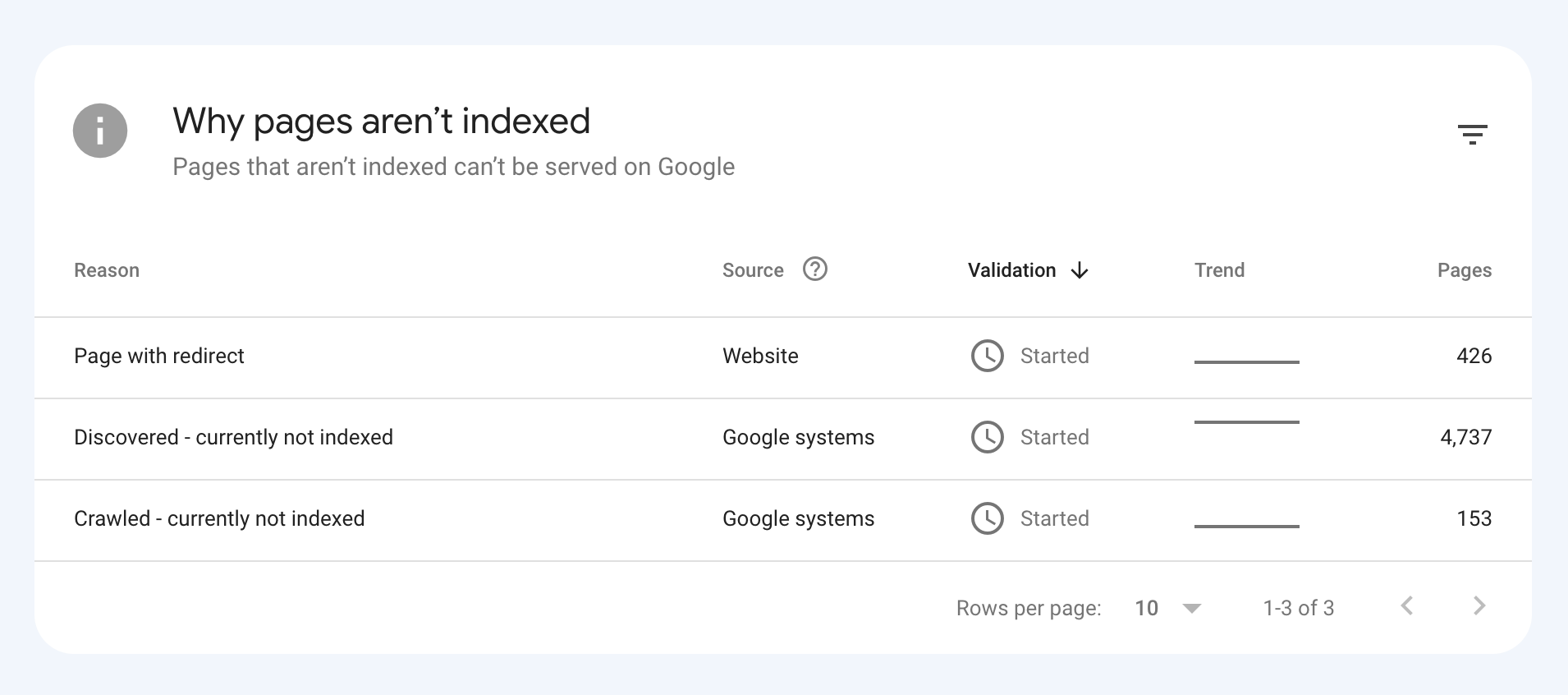
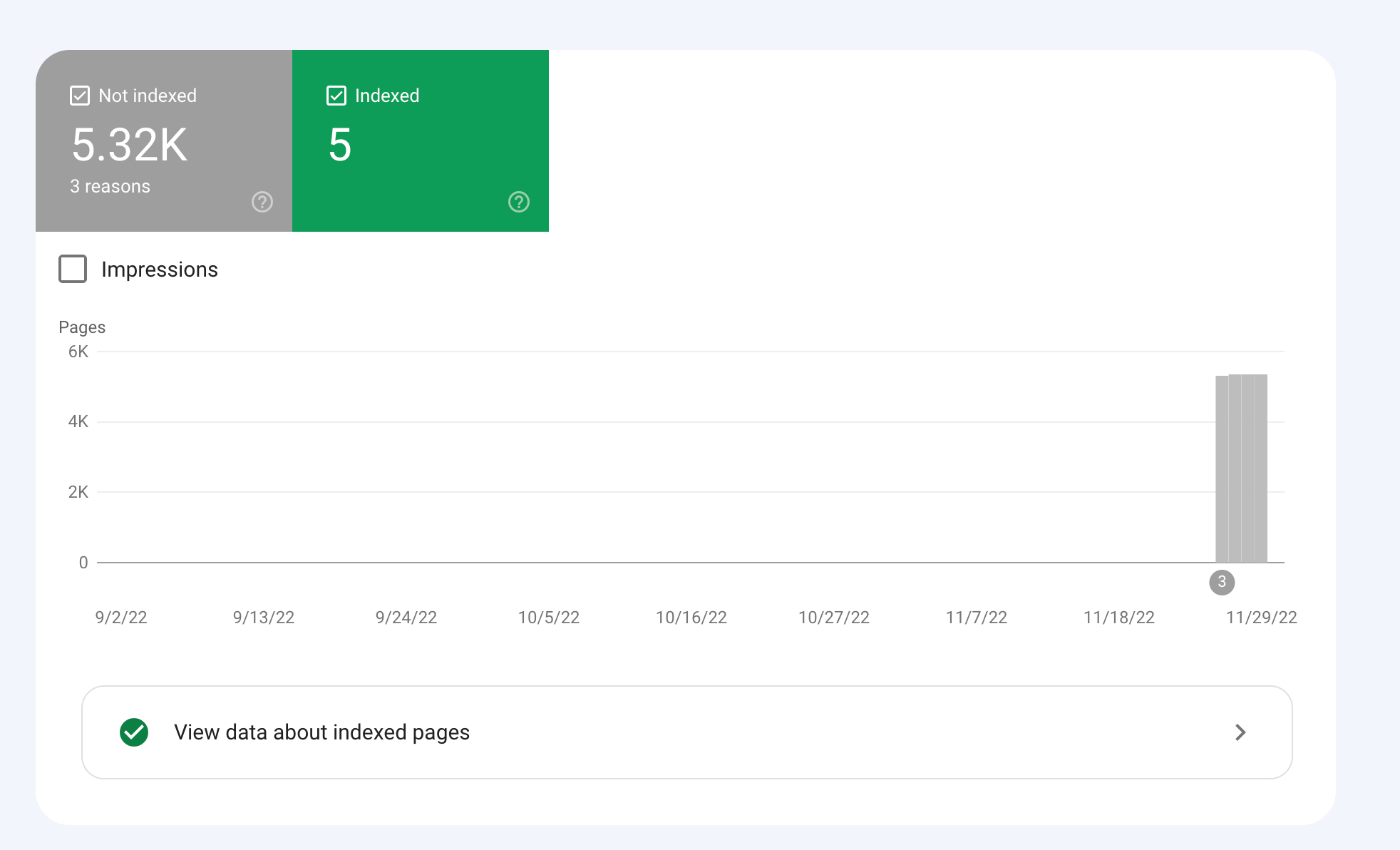
How would we go about fixing this?
-
To get your e-commerce marketplace product pages indexed, make sure your pages include unique and descriptive titles, meta descriptions, relevant keywords, and high-quality images. Additionally, optimize your URLs, leverage schema markup, and prioritize user experience for increased search engine visibility.
-
@fbcosta i hve this problem but its so less in my site
پوشاک پاپیون -
I'd appreciate if someone who faced the same indexing issue comes forward and share the case study with fellow members. Pin points steps a sufferer should do to overcome indexing dilemma. What actionable steps to do to enable quick product indexing? How we can get Google's attention so it can start indexing pages at a quick pace? Actionable advice please.
-
There could be several reasons why only 25 out of approximately 10,000 links have been indexed by Google, despite successfully submitting your sitemap through Google Search Console:
Timing: It is not uncommon for indexing to take some time, especially for larger sites with many pages. Although your sitemap has been submitted, it may take several days or even weeks for Google to crawl and index all of your pages. It's worth noting that not all pages on a site may be considered important or relevant enough to be indexed by Google.
Quality of Content: Google may not index pages that it considers low-quality, thin or duplicate content. If a significant number of your product pages have similar or duplicate content, they may not be indexed. To avoid this issue, make sure your product pages have unique, high-quality content that provides value to users.
Technical issues: Your site may have technical issues that are preventing Google from crawling and indexing your pages. These issues could include problems with your site's architecture, duplicate content, or other issues that may impact crawling and indexing.
Inaccurate Sitemap: There is also a possibility that there are errors in the sitemap you submitted to Google. Check the sitemap to ensure that all the URLs are valid, the sitemap is up to date and correctly formatted.
To troubleshoot this issue, you can check your site's coverage report on Google Search Console, which will show you which pages have been indexed and which ones haven't. You can also check your site's crawl report to see if there are any technical issues that may be preventing Google from crawling your pages. Finally, you can also run a site audit to identify and fix any technical issues that may be impacting indexing.
-
@fbcosta As per my experience, if your site is new it will take some time to index all of the URLs, and the second thing is, if you have Hundreds of URLs, it doesn't mean Google will index all of them.
You can try these steps which will help in fast indexing:
- Sharing on Social Media
- Interlinking from already indexed Pages
- Sitemap
- Share the link on the verified Google My Business Profile (Best way to index fast). You can add by-products or create a post and link it to the website.
- Guest post
I am writing here for the first time, I hope it will help




Got a burning SEO question?
Subscribe to Moz Pro to gain full access to Q&A, answer questions, and ask your own.
Browse Questions
Explore more categories
-
Moz Tools
Chat with the community about the Moz tools.
-
SEO Tactics
Discuss the SEO process with fellow marketers
-
Community
Discuss industry events, jobs, and news!
-
Digital Marketing
Chat about tactics outside of SEO
-
Research & Trends
Dive into research and trends in the search industry.
-
Support
Connect on product support and feature requests.
Related Questions
-

Best redirect destination for 18k highly-linked pages
Technical SEO question regarding redirects; I appreciate any insights on best way to handle. Situation: We're decommissioning several major content sections on a website, comprising ~18k webpages. This is a well established site (10+ years) and many of the pages within these sections have high-quality inbound links from .orgs and .edus. Challenge: We're trying to determine the best place to redirect these 18k pages. For user experience, we believe best option is the homepage, which has a statement about the changes to the site and links to the most important remaining sections of the site. It's also the most important page on site, so the bolster of 301 redirected links doesn't seem bad. However, someone on our team is concerned that that many new redirected pages and links going to our homepage will trigger a negative SEO flag for the homepage, and recommends instead that they all go to our custom 404 page (which also includes links to important remaining sections). What's the right approach here to preserve remaining SEO value of these soon-to-be-redirected pages without triggering Google penalties?
Technical SEO | | davidvogel1 -

Page Indexing without content
Hello. I have a problem of page indexing without content. I have website in 3 different languages and 2 of the pages are indexing just fine, but one language page (the most important one) is indexing without content. When searching using site: page comes up, but when searching unique keywords for which I should rank 100% nothing comes up. This page was indexing just fine and the problem arose couple of days ago after google update finished. Looking further, the problem is language related and every page in the given language that is newly indexed has this problem, while pages that were last crawled around one week ago are just fine. Has anyone ran into this type of problem?
Technical SEO | | AtuliSulava1 -

Unsolved Capturing Source Dynamically for UTM Parameters
Does anyone have a tutorial on how to dynamically capture the referring source to be populated in UTM parameters for Google Analytics? We want to syndicate content and be able to see all of the websites that provided referral traffic for this specific objective. We want to set a specific utm_medium and utm_campaign but have the utm_source be dynamic and capture the referring website. If we set a permanent utm_source, it would appear the same for all incoming traffic. Thanks in advance!
Technical SEO | | peteboyd0 -

Sudden Drop in Mobile Core Web Vitals
Web Vitals Screengrab.PNG For some reason, after all URLs being previously classified as Good, our Mobile Web Vitals report suddenly shifted to the above, and it doesn't correspond with any site changes on our end. Has anyone else experience something similar or have any idea what might have caused such a shift? Curiously I'm not seeing a drop in session duration, conversion rate etc. for mobile traffic despite the seemingly sudden change.
Technical SEO | | rwat0 -

Product Variations (rel=canonical or 301) & Duplicate Product Descriptions
Hi All, Hoping for a bit of advice here please, I’ve been tasked with building an e-commerce store and all is going well so far. We decided to use Wordpress with Woocommerce as our shop plugin. I’ve been testing the CSV import option for uploading all our products and I’m a little concerned on two fronts: - Product Variations Duplicate content within the product descriptions **Product Variations: - ** We are selling furniture that has multiple variations (see list below) and as a result it creates c.50 product variations all with their own URL’s. Facing = Left, Right Leg style = Round, Straight, Queen Ann Leg colour = Black, White, Brown, Wood Matching cushion = Yes, No So my question is should I 301 re-direct the variation URL’s to the main product URL as from a user perspective they aren't used (we don't have images for each variation that would trigger the URL change, simply drop down options for the user to select the variation options) or should I add the rel canonical tag to each variation pointing back to the main product URL. **Duplicate Content: - ** We will be selling similar products e.g. A chair which comes in different fabrics and finishes, but is basically the same product. Most, if not all of the ‘long’ product descriptions are identical with only the ‘short’ product descriptions being unique. The ‘long’ product descriptions contain all the manufacturing information, leg option/colour information, graphics, dimensions, weight etc etc. I’m concerned that by having 300+ products all with identical ‘long’ descriptions its going to be seen negatively by google and effect the sites SEO. My question is will this be viewed as duplicate content? If so, are there any best practices I should be following for handling this, other than writing completely unique descriptions for each product, which would be extremely difficult given its basically the same products re-hashed. Many thanks in advance for any advice.
Technical SEO | | Jon-S0 -

How Does Google's "index" find the location of pages in the "page directory" to return?
This is my understanding of how Google's search works, and I am unsure about one thing in specific: Google continuously crawls websites and stores each page it finds (let's call it "page directory") Google's "page directory" is a cache so it isn't the "live" version of the page Google has separate storage called "the index" which contains all the keywords searched. These keywords in "the index" point to the pages in the "page directory" that contain the same keywords. When someone searches a keyword, that keyword is accessed in the "index" and returns all relevant pages in the "page directory" These returned pages are given ranks based on the algorithm The one part I'm unsure of is how Google's "index" knows the location of relevant pages in the "page directory". The keyword entries in the "index" point to the "page directory" somehow. I'm thinking each page has a url in the "page directory", and the entries in the "index" contain these urls. Since Google's "page directory" is a cache, would the urls be the same as the live website (and would the keywords in the "index" point to these urls)? For example if webpage is found at wwww.website.com/page1, would the "page directory" store this page under that url in Google's cache? The reason I want to discuss this is to know the effects of changing a pages url by understanding how the search process works better.
Technical SEO | | reidsteven750 -

ECommerce: Best Practice for expired product pages
I'm optimizing a pet supplies site (http://www.qualipet.ch/) and have a question about the best practice for expired product pages. We have thousands of products and hundreds of our offers just exist for a few months. Currently, when a product is no longer available, the site just returns a 404. Now I'm wondering what a better solution could be: 1. When a product disappears, a 301 redirect is established to the category page it in (i.e. leash would redirect to dog accessories). 2. After a product disappers, a customized 404 page appears, listing similar products (but the server returns a 404) I prefer solution 1, but am afraid that having hundreds of new redirects each month might look strange. But then again, returning lots of 404s to search engines is also not the best option. Do you know the best practice for large ecommerce sites where they have hundreds or even thousands of products that appear/disappear on a frequent basis? What should be done with those obsolete URLs?
Technical SEO | | zeepartner1 -

How to structure rel=canonical for a e commerce site
Hello, So I have searched the Q & A , Google, the zen cart forum and at this point I am looking for some one to give a concrete answer on what I should do. There is a lot of different opinions on " rel=canonical" and how to apply it , since there are many other variable in place. I have a zen cart site. I am using the latest 1.3.9 version. The default setting ( seem to me) uses the rel=canonical to point back to the specific link product or category respectively. Most of the time I have two scenarios. 1. Main category ---> Sub category----> Product 2. Main Category----> Product I'll give an example http://www.perfectindesign.com/awards ---main category http://www.perfectindesign.com/awards/acrylic-awards sub category http://www.perfectindesign.com/awards/acrylic-awards/slanted-award product (this example has three sub categories with maybe 12 products in one 4 in the second and 5 in the third) From looking at the source code for each url it the rel=canonical just points back to its own url. I want to avoid competing against my self, for the example above keyword "acrylic awards" so should the use of the re=canonical be changes site wide to have products point back to sub categories when they exist and have products point back to main categories when no sub categories exist? I am very new to seo, specifically eCommerce seo. If you have experience and have done this to a site you manage for a client or your own please advise how to proceed. Also if I'm missing some thing that will give me a better understanding of the bigger seo picture that would be great. Thanks, Yevgeny
Technical SEO | | Yevgeny0