Moz Q&A is closed.
After more than 13 years, and tens of thousands of questions, Moz Q&A closed on 12th December 2024. Whilst we’re not completely removing the content - many posts will still be possible to view - we have locked both new posts and new replies. More details here.
Should I "no-index" two exact pages on Google results?
-
Hello everyone,
I recently started a new wordpress website and created a static homepage.
I noticed that on Google search results, there are two different URLs landing on same content page.
I've attached an image to explain what I saw.
Should I "no-index" the page url?
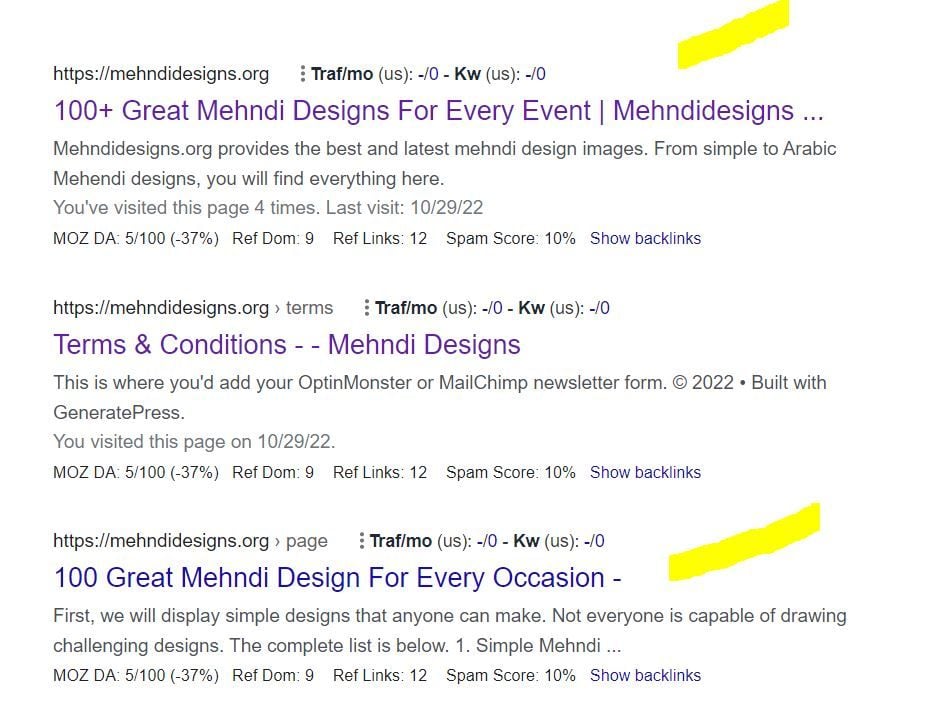
In this picture, the first result is the homepage and I try to rank for that page. The last result is landing on same content with different URL.
So, should I no-index last result as shown in image?
-
In any SEO plugin, you can go to edit the secondary article and in canonical URL you put the link to the home page.
-
@amanda5964 You can use canonical meta tag to tell google that those are the exact same pages. Google will index one of them which google choose best for the SERP.
-
Hi @amanda5964 actually could I ask if there is a reason for having these identical pages? You might want to consider simply combining the pages - i.e. deleting your sub page and redirecting to home if the content is identical.
-
I would not no-index. Typically it is more effective to use a canonical link from the secondary content to the main page you want the traffic directed to.




Got a burning SEO question?
Subscribe to Moz Pro to gain full access to Q&A, answer questions, and ask your own.
Browse Questions
Explore more categories
-
Moz Tools
Chat with the community about the Moz tools.
-
SEO Tactics
Discuss the SEO process with fellow marketers
-
Community
Discuss industry events, jobs, and news!
-
Digital Marketing
Chat about tactics outside of SEO
-
Research & Trends
Dive into research and trends in the search industry.
-
Support
Connect on product support and feature requests.
Related Questions
-

Unsolved Can Dollarpesa Website Achieve a High Google or Bing Ranking with a Domain Authority of DA 50+ on Moz?
Can Dollarpesa Website Achieve a High Google or Bing Ranking with a Domain Authority of DA 50+ on Moz? How to Attain Domain Authority of DA 50+ on Moz? everyone please help me
Moz Pro | | dollarpesa0 -

Unsolved Using NoIndex Tag instead of 410 Gone Code on Discontinued products?
Hello everyone, I am very new to SEO and I wanted to get some input & second opinions on a workaround I am planning to implement on our Shopify store. Any suggestions, thoughts, or insight you have are welcome & appreciated! For those who aren't aware, Shopify as a platform doesn't allow us to send a 410 Gone Code/Error under any circumstance. When you delete or archive a product/page, it becomes unavailable on the storefront. Unfortunately, the only thing Shopify natively allows me to do is set up a 301 redirect. So when we are forced to discontinue a product, customers currently get a 404 error when trying to go to that old URL. My planned workaround is to automatically detect when a product has been discontinued and add the NoIndex meta tag to the product page. The product page will stay up but be unavailable for purchase. I am also adjusting the LD+JSON to list the products availability as Discontinued instead of InStock/OutOfStock.
Technical SEO | | BakeryTech
Then I let the page sit for a few months so that crawlers have a chance to recrawl and remove the page from their indexes. I think that is how that works?
Once 3 or 6 months have passed, I plan on archiving the product followed by setting up a 301 redirect pointing to our internal search results page. The redirect will send the to search with a query aimed towards similar products. That should prevent people with open tabs, bookmarks and direct links to that page from receiving a 404 error. I do have Google Search Console setup and integrated with our site, but manually telling google to remove a page obviously only impacts their index. Will this work the way I think it will?
Will search engines remove the page from their indexes if I add the NoIndex meta tag after they have already been index?
Is there a better way I should implement this? P.S. For those wondering why I am not disallowing the page URL to the Robots.txt, Shopify won't allow me to call collection or product data from within the template that assembles the Robots.txt. So I can't automatically add product URLs to the list.0 -

Looking for an SEO expert.
We have been struggling with SEO for a while now. We are looking for an expert who can help us on the journey? Any leads?
Jobs and Opportunities | | Matthew.wainaina1 -

Google Search Console "Text too small to read" Errors
What are the guidelines / best practices for clearing these errors? Google has some pretty vague documentation on how to handle this sort of error. User behavior metrics in GA are pretty much in line with desktop usage and don't show anything concerning Any input is appreciated! Thanks m3F3uOI
Technical SEO | | Digital_Reach2 -

Sitemap indexed pages dropping
About a month ago I noticed my pages indexed from my sitemap are dropping.There are 134 pages in my sitemap and only 11 are indexed. It used to be 117 pages and just died off quickly. I still seem to be getting consistant search traffic but I'm just not sure whats causing this. There are no warnings or manual actions required in GWT that I can find.
Technical SEO | | zenstorageunits0 -

Google is indexing my directories
I'm sure this has been asked before, but I was looking at all of Google's results for my site and I found dozens of results for directories such as: Index of /scouting/blog/wp-includes/js/swfupload/plugins Obviously I don't want those indexed. How do I prevent Google from indexing those? Also, it only seems to be doing it with Wordpress, not any of the directories on my main site. (We have a wordpress blog, which is only a portion of the site)
Technical SEO | | UnderRugSwept0 -
Google Cache is not showing in my page
Hello Everyone, I have issue in my Page, My category page (http://www.bannerbuzz.com/custom-vinyl-banners.html) is regular cached in past, but before sometime it can't show the cached result in SERP and not show in cached result , I have also fetch this link in google web master, but can't get the result, it is showing following message. 404. That’s an error. The requested URL /search?q=cache%3A http%3A//www.bannerbuzz.com/custom-vinyl-banners.html was not found on this server. That’s all we know. My category page rank is 2 and its keyword is on first in google.com, so i am little bit worried about this page cache issue, Can someone please tell me why is this happening? Is this a temporary issue? Help me to solve out this cache issue and once again my page will regularly cache in future. Thanks
Technical SEO | | CommercePundit0 -

Dynamically-generated .PDF files, instead of normal pages, indexed by and ranking in Google
Hi, I come across a tough problem. I am working on an online-store website which contains the functionlaity of viewing products details in .PDF format (by the way, the website is built on Joomla CMS), now when I search my site's name in Google, the SERP simply displays my .PDF files in the first couple positions (shown in normal .PDF files format: [PDF]...)and I cannot find the normal pages there on SERP #1 unless I search the full site domain in Google. I really don't want this! Would you please tell me how to figure the problem out and solve it. I can actually remove the corresponding component (Virtuemart) that are in charge of generating the .PDF files. Now I am trying to redirect all the .PDF pages ranking in Google to a 404 page and remove the functionality, I plan to regenerate a sitemap of my site and submit it to Google, will it be working for me? I really appreciate that if you could help solve this problem. Thanks very much. Sincerely SEOmoz Pro Member
Technical SEO | | fugu0
