Moz Q&A is closed.
After more than 13 years, and tens of thousands of questions, Moz Q&A closed on 12th December 2024. Whilst we’re not completely removing the content - many posts will still be possible to view - we have locked both new posts and new replies. More details here.
Should I "no-index" two exact pages on Google results?
-
Hello everyone,
I recently started a new wordpress website and created a static homepage.
I noticed that on Google search results, there are two different URLs landing on same content page.
I've attached an image to explain what I saw.
Should I "no-index" the page url?
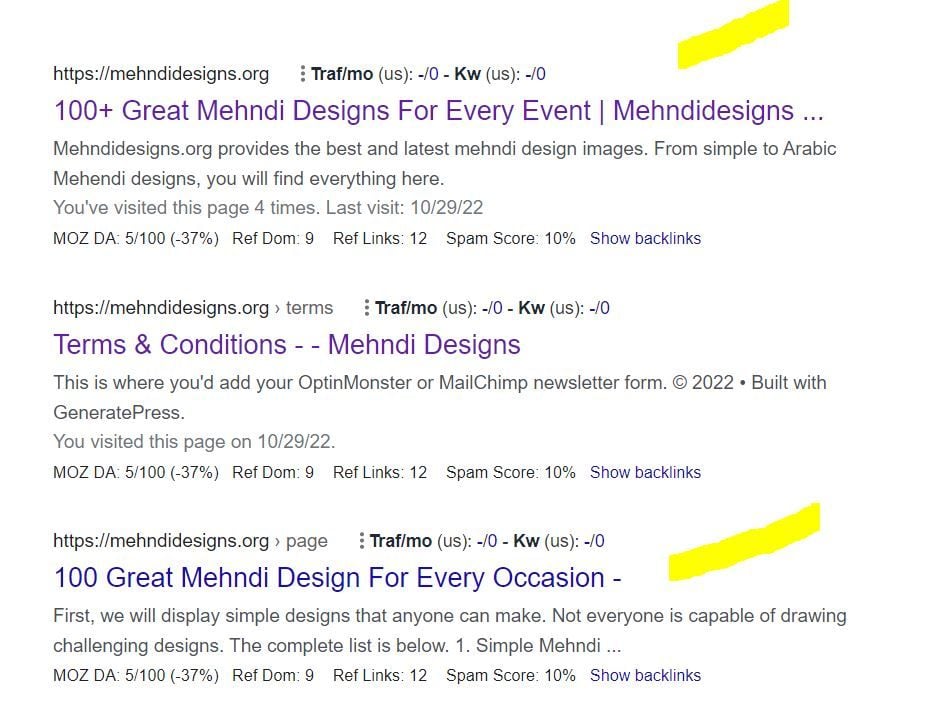
In this picture, the first result is the homepage and I try to rank for that page. The last result is landing on same content with different URL.
So, should I no-index last result as shown in image?
-
In any SEO plugin, you can go to edit the secondary article and in canonical URL you put the link to the home page.
-
@amanda5964 You can use canonical meta tag to tell google that those are the exact same pages. Google will index one of them which google choose best for the SERP.
-
Hi @amanda5964 actually could I ask if there is a reason for having these identical pages? You might want to consider simply combining the pages - i.e. deleting your sub page and redirecting to home if the content is identical.
-
I would not no-index. Typically it is more effective to use a canonical link from the secondary content to the main page you want the traffic directed to.




Got a burning SEO question?
Subscribe to Moz Pro to gain full access to Q&A, answer questions, and ask your own.
Browse Questions
Explore more categories
-
Moz Tools
Chat with the community about the Moz tools.
-
SEO Tactics
Discuss the SEO process with fellow marketers
-
Community
Discuss industry events, jobs, and news!
-
Digital Marketing
Chat about tactics outside of SEO
-
Research & Trends
Dive into research and trends in the search industry.
-
Support
Connect on product support and feature requests.
Related Questions
-

Page Indexing without content
Hello. I have a problem of page indexing without content. I have website in 3 different languages and 2 of the pages are indexing just fine, but one language page (the most important one) is indexing without content. When searching using site: page comes up, but when searching unique keywords for which I should rank 100% nothing comes up. This page was indexing just fine and the problem arose couple of days ago after google update finished. Looking further, the problem is language related and every page in the given language that is newly indexed has this problem, while pages that were last crawled around one week ago are just fine. Has anyone ran into this type of problem?
Technical SEO | | AtuliSulava1 -

Staging website got indexed by google
Our staging website got indexed by google and now MOZ is showing all inbound links from staging site, how should i remove those links and make it no index. Note- we already added Meta NOINDEX in head tag
Intermediate & Advanced SEO | | Asmi-Ta0 -

Ranking going south
Hi - I have a site Simply Stairlifts and I don't understand it but I've followed all the SEO processes of cleaning the site and building links, but ranking just keeps falling - any advise would be very gratefully received 👍 .
SEO Tactics | | Naju2310 -

How to rank a website in different countries
I have a website which I want to rank in UK, NZ and AU and I want to keep my domain as .com in all the countries. I have specified the lang=en now what needs to be done to rank one website in 3 different English countries without changing the domain extension i.e. .com.au or .com.nz
SEO Tactics | | Ravi_Rana0 -

Looking for an SEO expert.
We have been struggling with SEO for a while now. We are looking for an expert who can help us on the journey? Any leads?
Jobs and Opportunities | | Matthew.wainaina1 -

Blog Page Titles - Page 1, Page 2 etc.
Hi All, I have a couple of crawl errors coming up in MOZ that I am trying to fix. They are duplicate page title issues with my blog area. For example we have a URL of www.ourwebsite.com/blog/page/1 and as we have quite a few blog posts they get put onto another page, example www.ourwebsite.com/blog/page/2 both of these urls have the same heading, title, meta description etc. I was just wondering if this was an actual SEO problem or not and if there is a way to fix it. I am using Wordpress for reference but I can't see anywhere to access the settings of these pages. Thanks
Technical SEO | | O2C0 -

"nofollow pages" or "duplicate content"?
We have a huge site with lots of geographical-pages in this structure: domain.com/country/resort/hotel domain.com/country/resort/hotel/facts domain.com/country/resort/hotel/images domain.com/country/resort/hotel/excursions domain.com/country/resort/hotel/maps domain.com/country/resort/hotel/car-rental Problem is that the text on ie. /excursions is often exactly the same on .../alcudia/hotel-sea-club/excursion and .../alcudia/hotel-beach-club/excursion The two hotels offer the same excursions, and the intro text on the pages are the exact same throughout the entire site. This is also a problem on the /images and /car-rental pages. I think in most cases the only difference on these pages is the Title, description and H1. These pages do not attract a lot of visits through search-engines. But to avoid them being flagged as duplicate content (we have more than 4000 of these pages - /excursions, /maps, /car-rental, /images), do i add a nofollow-tag to these, do i block them in robots.txt or should i just leave them and live with them being flagged as duplicate content? Im waiting for our web-team to add a function to insert a geographical-name in the text, so i could add ie #HOTELNAME# in the text and thereby avoiding the duplicate text. Right now we have intros like: When you visit the hotel ... instead of: When you visit Alcudia Sea Club But untill the web-team has fixed these GEO-tags, what should i do? What would you do and why?
Technical SEO | | alsvik0 -

301 for "index.php" in Web.config?
Hi there, I'm trying to create a 301 redirect for the file "index.php" but I keep getting a "fail to redirect" message in Firefox whenever I insert it into the Web.config file. <location path="index.php"></location> Is there anyway around this? Thanks for any help According to Open Site Explorer, there are about 500 links to my index file but it only has a 302 status so will not be passing link juice.
Technical SEO | | tdsnet0