Moz Q&A is closed.
After more than 13 years, and tens of thousands of questions, Moz Q&A closed on 12th December 2024. Whilst we’re not completely removing the content - many posts will still be possible to view - we have locked both new posts and new replies. More details here.
Sudden Drop in Mobile Core Web Vitals
-
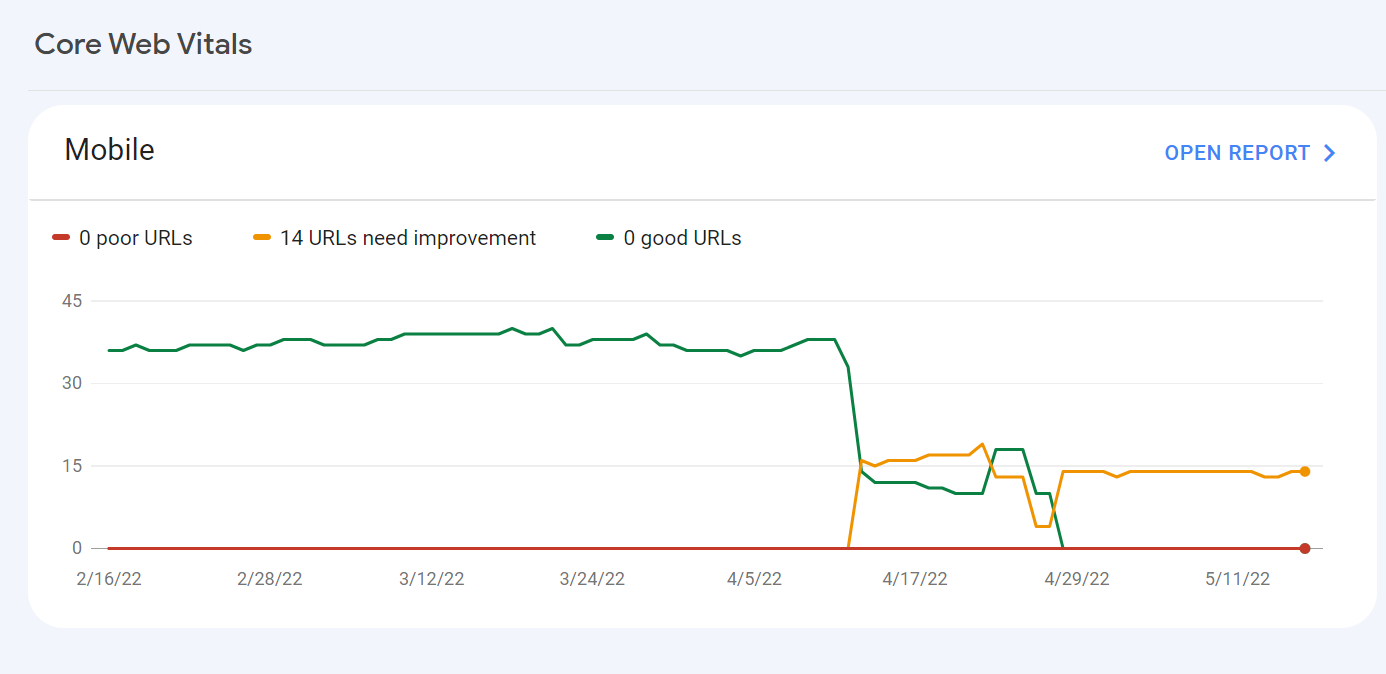
For some reason, after all URLs being previously classified as Good, our Mobile Web Vitals report suddenly shifted to the above, and it doesn't correspond with any site changes on our end.
Has anyone else experience something similar or have any idea what might have caused such a shift?
Curiously I'm not seeing a drop in session duration, conversion rate etc. for mobile traffic despite the seemingly sudden change.
-
I can’t understand their algorithm for core web vitals. I have made some technical updates to our website for speed optimization, but the thing that happened in the search console is very confusing for my site.
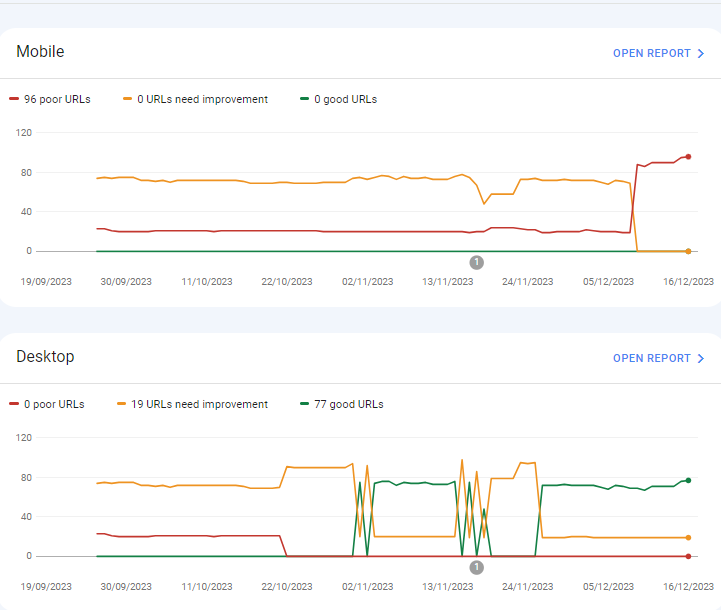
For desktops, pages are indexed as good URLs
while mobile-indexed URLs are displayed as poor URLs.
Our website is the collective material for people looking for Canada immigration (PAIC), and 70% of the portion is filled with text only. We are using webp images for optimization, still it is not passing Core Web Vitals.I am looking forward to the expert’s suggestion to overcome this problem.
-
I can’t understand their algorithm for core web vitals. I have made some technical updates to our website for speed optimization, but the thing that happened in the search console is very confusing for my site.
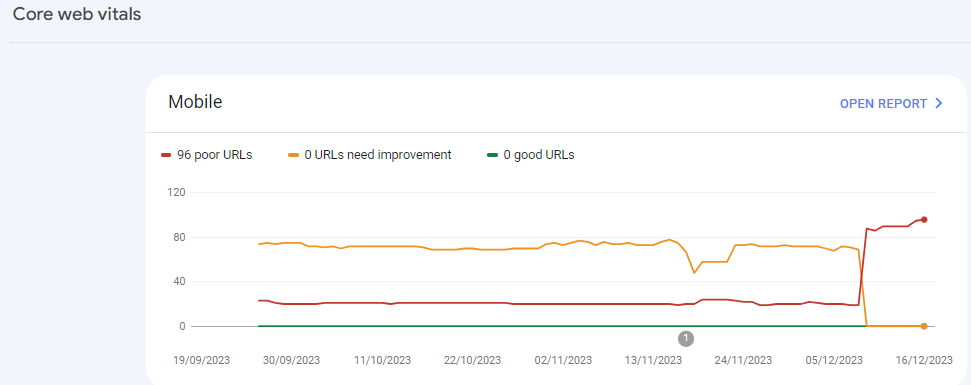
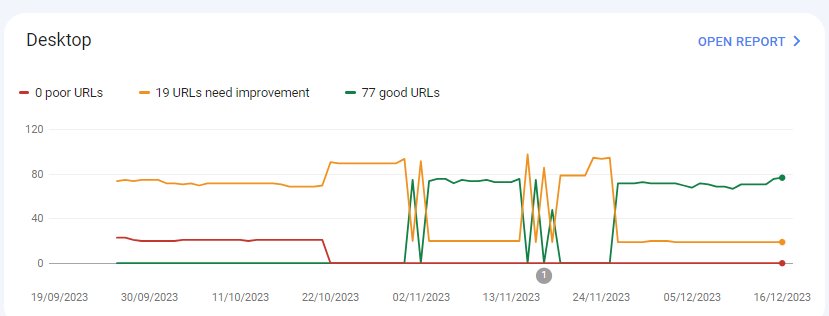
For desktops, pages are indexed as good URLs
while mobile-indexed URLs are displayed as poor URLs.
Our website is the collective material for people looking for Canadian immigration (PAIC), and 70% of the portion is filled with text only. We are using webp images for optimization, still it is not passing Core Web Vitals.I am looking forward to the expert’s suggestion to overcome this problem.
-
@rwat Hi, did you find a solution?
-
Yes, I am also experiencing the same for one of my websites, but most of them are blog posts and I am using a lot of images without proper optimization, so that could be the reason. but not sure.
It is also quite possible that Google maybe adding some more parameters to their main web critical score.



Got a burning SEO question?
Subscribe to Moz Pro to gain full access to Q&A, answer questions, and ask your own.
Browse Questions
Explore more categories
-
Moz Tools
Chat with the community about the Moz tools.
-
SEO Tactics
Discuss the SEO process with fellow marketers
-
Community
Discuss industry events, jobs, and news!
-
Digital Marketing
Chat about tactics outside of SEO
-
Research & Trends
Dive into research and trends in the search industry.
-
Support
Connect on product support and feature requests.
Related Questions
-

Good to use disallow or noindex for these?
Hello everyone, I am reaching out to seek your expert advice on a few technical SEO aspects related to my website. I highly value your expertise in this field and would greatly appreciate your insights.
Technical SEO | | williamhuynh
Below are the specific areas I would like to discuss: a. Double and Triple filter pages: I have identified certain URLs on my website that have a canonical tag pointing to the main /quick-ship page. These URLs are as follows: https://www.interiorsecrets.com.au/collections/lounge-chairs/quick-ship+black
https://www.interiorsecrets.com.au/collections/lounge-chairs/quick-ship+black+fabric Considering the need to optimize my crawl budget, I would like to seek your advice on whether it would be advisable to disallow or noindex these pages. My understanding is that by disallowing or noindexing these URLs, search engines can avoid wasting resources on crawling and indexing duplicate or filtered content. I would greatly appreciate your guidance on this matter. b. Page URLs with parameters: I have noticed that some of my page URLs include parameters such as ?variant and ?limit. Although these URLs already have canonical tags in place, I would like to understand whether it is still recommended to disallow or noindex them to further conserve crawl budget. My understanding is that by doing so, search engines can prevent the unnecessary expenditure of resources on indexing redundant variations of the same content. I would be grateful for your expert opinion on this matter. Additionally, I would be delighted if you could provide any suggestions regarding internal linking strategies tailored to my website's structure and content. Any insights or recommendations you can offer would be highly valuable to me. Thank you in advance for your time and expertise in addressing these concerns. I genuinely appreciate your assistance. If you require any further information or clarification, please let me know. I look forward to hearing from you. Cheers!0 -

Google News and Discover down by a lot
Hi,
Technical SEO | | SolenneGINX
Could you help me understand why my website's Google News and Discover Performance dropped suddenly and drastically all of a sudden in November? numbers seem to pick up a little bit again but nowhere close what we used to see before then0 -

Solved How to solve orphan pages on a job board
Working on a website that has a job board, and over 4000 active job ads. All of these ads are listed on a single "job board" page, and don’t obviously all load at the same time. They are not linked to from anywhere else, so all tools are listing all of these job ad pages as orphans. How much of a red flag are these orphan pages? Do sites like Indeed have this same issue? Their job ads are completely dynamic, how are these pages then indexed? We use Google’s Search API to handle any expired jobs, so they are not the issue. It’s the active, but orphaned pages we are looking to solve. The site is hosted on WordPress. What is the best way to solve this issue? Just create a job category page and link to each individual job ad from there? Any simpler and perhaps more obvious solutions? What does the website structure need to be like for the problem to be solved? Would appreciate any advice you can share!
Reporting & Analytics | | Michael_M2 -

Sudden Indexation of "Index of /wp-content/uploads/"
Hi all, I have suddenly noticed a massive jump in indexed pages. After performing a "site:" search, it was revealed that the sudden jump was due to the indexation of many pages beginning with the serp title "Index of /wp-content/uploads/" for many uploaded pieces of content & plugins. This has appeared approximately one month after switching to https. I have also noticed a decline in Bing rankings. Does anyone know what is causing/how to fix this? To be clear, these pages are **not **normal /wp-content/uploads/ but rather "index of" pages, being included in Google. Thank you.
Technical SEO | | Tom3_150 -

How can I block incoming links from a bad web site ?
Hello all, We got a new client recently who had a warning from Google Webmasters tools for manual soft penalty. I did a lot of search and I found out one particular site that sounds roughly 100k links to one page and has been potentialy a high risk site. I wish to block those links from coming in to my site but their webmaster is nowhere to be seen and I do not want to use the disavow tool. Is there a way I can use code to our htaccess file or any other method? Would appreciate anyone's immediate response. Kind Regards
Technical SEO | | artdivision0 -

Do web pages have to be linked to a menu?
I have a situation where people search for terms like, say 1978 one dollar bill. Even though there never was a 1978 one dollar bill. I want to make a page to capture these searches but since there wasn't such a thing as a one dollar bill I don't want it connected to the rest of my content which is reality based. Does that make sense? Anyway, my question is, can I publish pages that aren't linked to my menu structure but that will be searchable or, am I going to have to figure out a way to make these oddball pages accessible through my menu?
Technical SEO | | Banknotes0 -

Web config redirects not working where a trailing slash is involved
I'm having real trouble with getting working redirects in place to use on a site we're re-launching with a modified url structure. Old URL: http://www.example.com/example_folder/ New URL: http://www.example.com/example-of-new-folder/ Now, where the old URL's have a trailing slash the web.config simply will not accept it. It says the URL can start with a slash, but not end with a slash. However, many of my URL's do end with a slash so I need a workaround. These are the rules I'm putting in place: <location path="example_folder/"></location> Thanks
Technical SEO | | AndrewAkesson0 -

Sudden ranking drop, no manual action
Sort of a strange situation I'm having and I wanted to see if I could get some thoughts. Here's what has happened... Monday morning, I realized that my website, which had been showing up at the bottom of page 2 for a specific result, had now been demoted to the bottom of page 6 (roughly a 40 spot demotion). No other keyword searches were affected. I immediately figured that this was some sort of keyword-specific penalty that I had incurred. I had done a bit of link building over the weekend (two or three directory type sites and a bio link from a site I contribute to). I also changed some anchor text on another site to match my homepage's title tag (which just so happened to be the exact phrase match I had dropped in) - I assumed this was what got me. I was slowly beginning to climb up the rankings and just got a bit impatient/overzealous. Changed the anchor text back to what it originally was and submitted a reconsideration request on Tuesday. This morning, I get the automated response in Webmaster Tools that no manual action had been taken. So my question is, would this drop have been an automated deal? If that's the case, then it's going to be mighty hard to pinpoint what I did wrong, since there's no way to know when I did whatever it was to cause the drop. Any ideas/thoughts/suggestions to regain my modest original placement?
Technical SEO | | sandlappercreative0