Moz Q&A is closed.
After more than 13 years, and tens of thousands of questions, Moz Q&A closed on 12th December 2024. Whilst we’re not completely removing the content - many posts will still be possible to view - we have locked both new posts and new replies. More details here.
Sudden Drop in Mobile Core Web Vitals
-
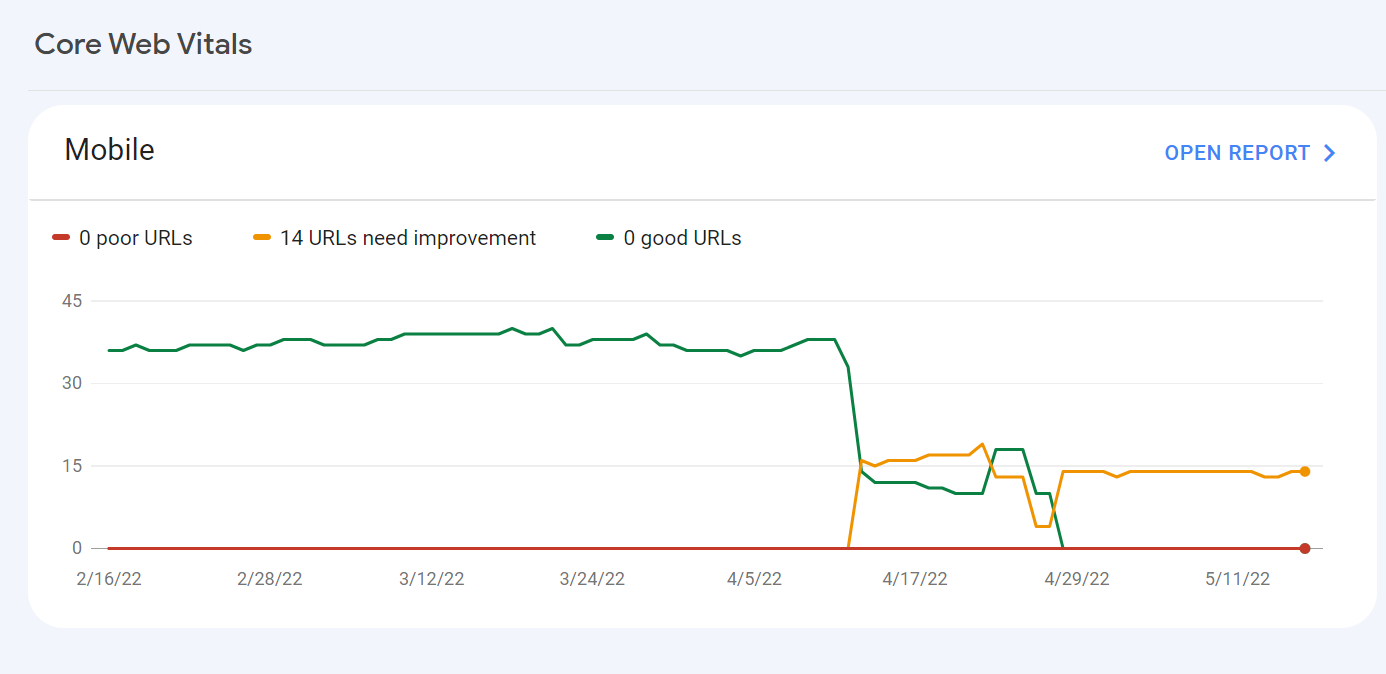
For some reason, after all URLs being previously classified as Good, our Mobile Web Vitals report suddenly shifted to the above, and it doesn't correspond with any site changes on our end.
Has anyone else experience something similar or have any idea what might have caused such a shift?
Curiously I'm not seeing a drop in session duration, conversion rate etc. for mobile traffic despite the seemingly sudden change.
-
I can’t understand their algorithm for core web vitals. I have made some technical updates to our website for speed optimization, but the thing that happened in the search console is very confusing for my site.
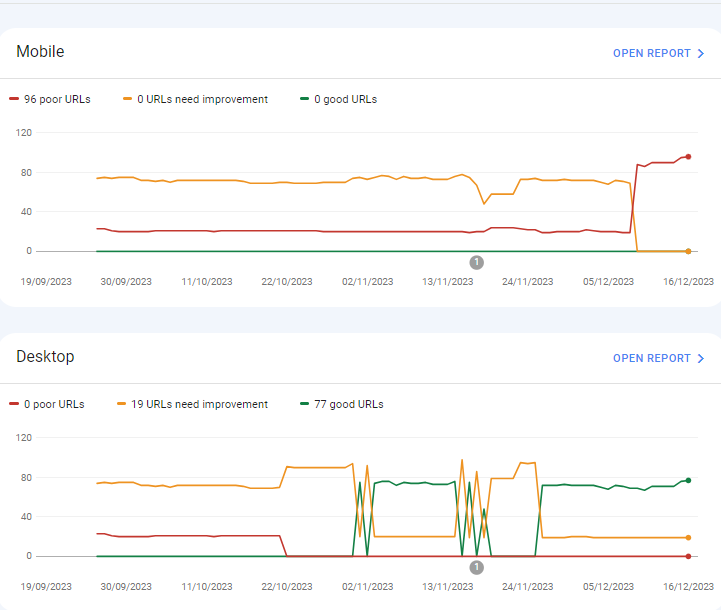
For desktops, pages are indexed as good URLs
while mobile-indexed URLs are displayed as poor URLs.
Our website is the collective material for people looking for Canada immigration (PAIC), and 70% of the portion is filled with text only. We are using webp images for optimization, still it is not passing Core Web Vitals.I am looking forward to the expert’s suggestion to overcome this problem.
-
I can’t understand their algorithm for core web vitals. I have made some technical updates to our website for speed optimization, but the thing that happened in the search console is very confusing for my site.
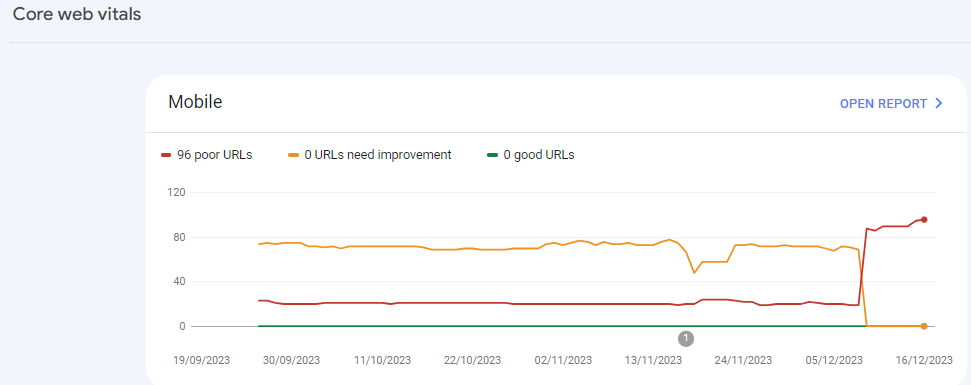
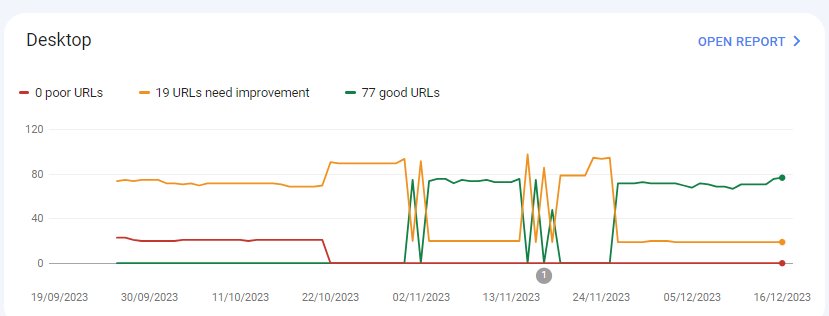
For desktops, pages are indexed as good URLs
while mobile-indexed URLs are displayed as poor URLs.
Our website is the collective material for people looking for Canadian immigration (PAIC), and 70% of the portion is filled with text only. We are using webp images for optimization, still it is not passing Core Web Vitals.I am looking forward to the expert’s suggestion to overcome this problem.
-
@rwat Hi, did you find a solution?
-
Yes, I am also experiencing the same for one of my websites, but most of them are blog posts and I am using a lot of images without proper optimization, so that could be the reason. but not sure.
It is also quite possible that Google maybe adding some more parameters to their main web critical score.



Got a burning SEO question?
Subscribe to Moz Pro to gain full access to Q&A, answer questions, and ask your own.
Browse Questions
Explore more categories
-
Moz Tools
Chat with the community about the Moz tools.
-
SEO Tactics
Discuss the SEO process with fellow marketers
-
Community
Discuss industry events, jobs, and news!
-
Digital Marketing
Chat about tactics outside of SEO
-
Research & Trends
Dive into research and trends in the search industry.
-
Support
Connect on product support and feature requests.
Related Questions
-

Unsolved Why My site pages getting video index viewport issue?
Hello, I have been publishing a good number of blogs on my site Flooring Flow. Though, there's been an error of the video viewport on some of my articles. I have tried fixing it but the error is still showing in Google Search Console. Can anyone help me fix it out?
Technical SEO | | mitty270 -

Backlinks on Moz not on Google Search Console
Moz is showing thousands of backlinks to my site that are not showing up on Google Search Console - which is good because those links were created by some spammer in Pakistan somewhere. I haven't yet submitted a disavow report to Google of well over 10K links because the list keeps growing every day with new backlinks that have been rerouted to a 404 page. I have asked Google to clarify and they put my question on their forum for an answer, which I'm still waiting for - so I thought I'd try my luck here. My question... If Moz does not match Google Search Console, and backlinks are important to results, how valid is the ranking that Moz creates to let me know how I'm doing in this competition and if I'm improving or not. If the goal is to get Google to pay attention and I use Moz to help me figure out how to do this, how can I do that if the backlink information isn't the same - by literally over 10 000 backlinks created by some spammer doing odd things... They've included the url from their deleted profile on my site with 100s of other urls, including moz.rainyclouds.online and are posting them everywhere with their preferred anchor text. Moz ranking considers the thousands of spam backlinks I can't get rid of and Google ignores them or disavows them. So isn't the rankings, data, and graphs apples and bananas? How can I know what my site's strength really is and if I'm improving or not if the data doesn't match? Complete SEO Novice Shannon Peel
Link Building | | MarketAPeel
Brand Storyteller
MarketAPeel0 -

Sudden Indexation of "Index of /wp-content/uploads/"
Hi all, I have suddenly noticed a massive jump in indexed pages. After performing a "site:" search, it was revealed that the sudden jump was due to the indexation of many pages beginning with the serp title "Index of /wp-content/uploads/" for many uploaded pieces of content & plugins. This has appeared approximately one month after switching to https. I have also noticed a decline in Bing rankings. Does anyone know what is causing/how to fix this? To be clear, these pages are **not **normal /wp-content/uploads/ but rather "index of" pages, being included in Google. Thank you.
Technical SEO | | Tom3_150 -

Is it good practice to still pay for Best of the Web Directory (BOTW) and other similar one's you have to pay for?
I know that paid for links are hit by Google, but in the past these directories were okay. What about now? Thank you.
Technical SEO | | RoxBrock0 -

Too Many On-Page Links - caused by a drop down menu
Many of our e-com sites we build for customers have drop down menus to help the user easily find products without having to click - Example: http://www.customandcommercial.com/ But this then causes the report to trigger too many on page links We do have a site map and a google site map So should I put code in place not to follow the drop down menu link items or leave in place?
Technical SEO | | spiralsites0 -

Google Impressions Drop Due to Expired SSL
Recently I noticed a huge drop in our clients Google Impressions via GWMT from 900 impressions to 70 overnight on October 30, 2012 and has remained this way for the entire month of November 2012. The SSL Cert had expired in mid October due to the notification message for renewal going to the SPAM folder and being missed. Is it possible for an SSL expiry to be related to this massive drop in daily impressions which in-turn has also effected traffic? I also can't see any evidence of duplicate pages (ie. https and http) being indexed but to be honest I'm not the one doing the SEO therefore haven't been tracking this. Thanks for your help! Chris
Technical SEO | | MeMediaSEO0 -

Google rankings dropped dramatically after 24 hrs of hosting suspension
Hi, One of my websites ( http://www.traveldestinationsearch.com/ ) dropped most of its Google rankings after 24 hours of hosting suspension (from April 26 until April 27, 2012). The hosting company suspended my website after exceeding the bandwidth limit: there was no unusual activity on my website, it just exceeded its bandwidth limit by 20-30MB for the previous month. Anyway, the website is back online since April 27 but the problem is that, following these 24 hrs of no service, I see a dramatic decrease of my website's Google rankings for its main keywords. Even today, April 29, I can't find my website anywhere in the first 100 results for most of its targeted keywords. Before the suspension, the website ranked #1 for its main keyword and somewhere in the first 2-3 pages of Google search results for other two main keywords. My question is: is it the hosting suspension the reason for the Google ranking drop, and (assuming this is a temporary problem) when do you think I should expect my website to regain the rankings it had before the hosting suspension? Thanks for your support. Regards, Adrian
Technical SEO | | AdrianBanu0 -

Web config redirects not working where a trailing slash is involved
I'm having real trouble with getting working redirects in place to use on a site we're re-launching with a modified url structure. Old URL: http://www.example.com/example_folder/ New URL: http://www.example.com/example-of-new-folder/ Now, where the old URL's have a trailing slash the web.config simply will not accept it. It says the URL can start with a slash, but not end with a slash. However, many of my URL's do end with a slash so I need a workaround. These are the rules I'm putting in place: <location path="example_folder/"></location> Thanks
Technical SEO | | AndrewAkesson0