Moz Q&A is closed.
After more than 13 years, and tens of thousands of questions, Moz Q&A closed on 12th December 2024. Whilst we’re not completely removing the content - many posts will still be possible to view - we have locked both new posts and new replies. More details here.
Sudden Drop in Mobile Core Web Vitals
-
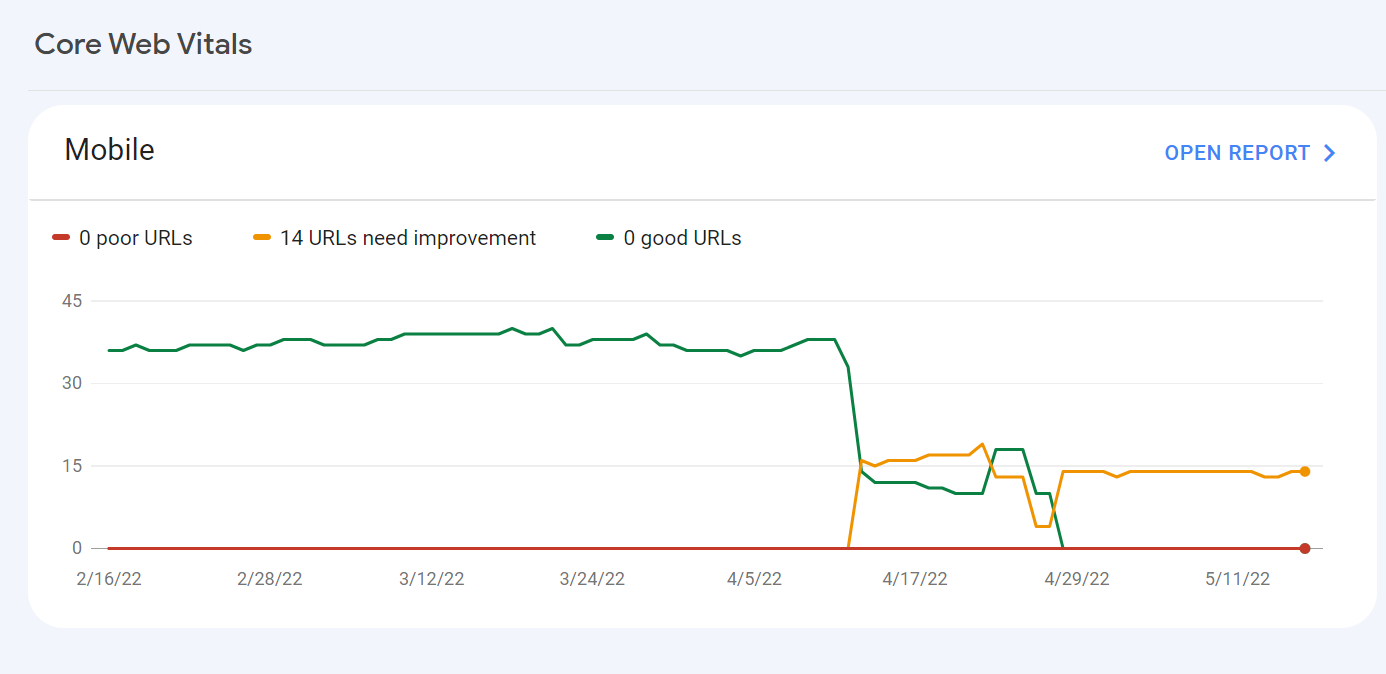
For some reason, after all URLs being previously classified as Good, our Mobile Web Vitals report suddenly shifted to the above, and it doesn't correspond with any site changes on our end.
Has anyone else experience something similar or have any idea what might have caused such a shift?
Curiously I'm not seeing a drop in session duration, conversion rate etc. for mobile traffic despite the seemingly sudden change.
-
I can’t understand their algorithm for core web vitals. I have made some technical updates to our website for speed optimization, but the thing that happened in the search console is very confusing for my site.
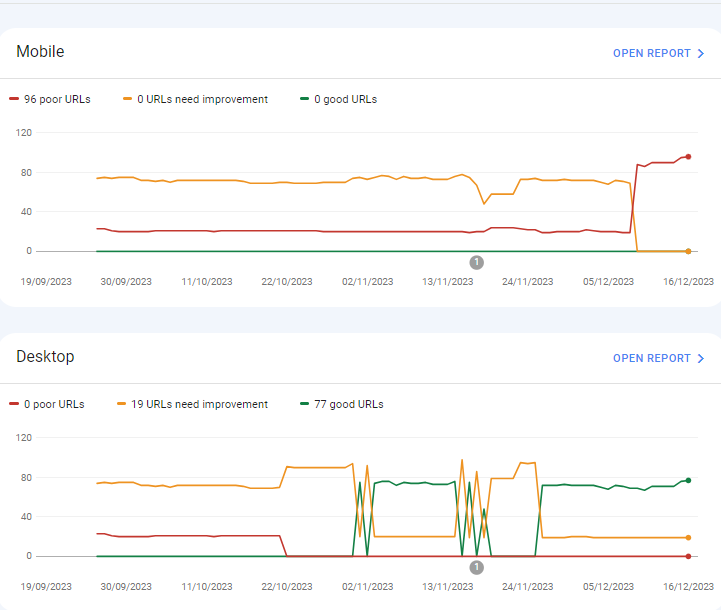
For desktops, pages are indexed as good URLs
while mobile-indexed URLs are displayed as poor URLs.
Our website is the collective material for people looking for Canada immigration (PAIC), and 70% of the portion is filled with text only. We are using webp images for optimization, still it is not passing Core Web Vitals.I am looking forward to the expert’s suggestion to overcome this problem.
-
I can’t understand their algorithm for core web vitals. I have made some technical updates to our website for speed optimization, but the thing that happened in the search console is very confusing for my site.
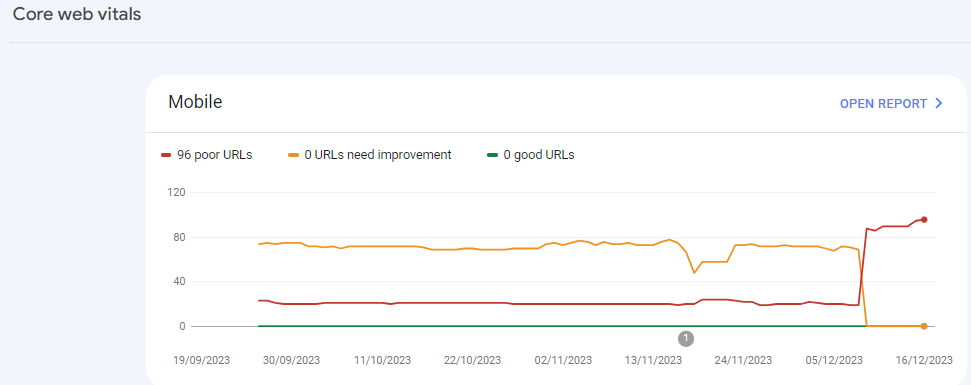
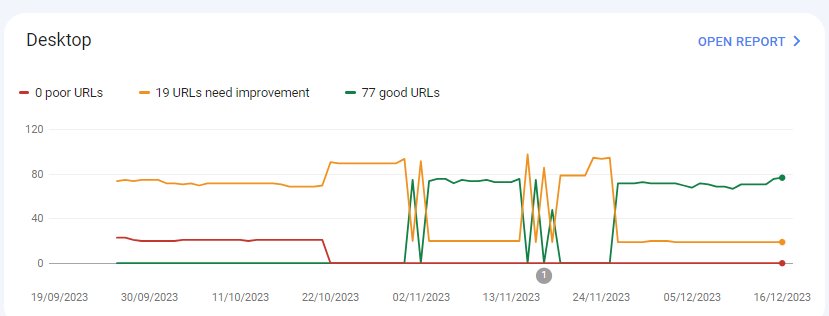
For desktops, pages are indexed as good URLs
while mobile-indexed URLs are displayed as poor URLs.
Our website is the collective material for people looking for Canadian immigration (PAIC), and 70% of the portion is filled with text only. We are using webp images for optimization, still it is not passing Core Web Vitals.I am looking forward to the expert’s suggestion to overcome this problem.
-
@rwat Hi, did you find a solution?
-
Yes, I am also experiencing the same for one of my websites, but most of them are blog posts and I am using a lot of images without proper optimization, so that could be the reason. but not sure.
It is also quite possible that Google maybe adding some more parameters to their main web critical score.



Got a burning SEO question?
Subscribe to Moz Pro to gain full access to Q&A, answer questions, and ask your own.
Browse Questions
Explore more categories
-
Moz Tools
Chat with the community about the Moz tools.
-
SEO Tactics
Discuss the SEO process with fellow marketers
-
Community
Discuss industry events, jobs, and news!
-
Digital Marketing
Chat about tactics outside of SEO
-
Research & Trends
Dive into research and trends in the search industry.
-
Support
Connect on product support and feature requests.
Related Questions
-

Unsolved Question about a Screaming Frog crawling issue
Hello, I have a very peculiar question about an issue I'm having when working on a website. It's a WordPress site and I'm using a generic plug in for title and meta updates. When I go to crawl the site through screaming frog, however, there seems to be a hard coded title tag that I can't find anywhere and the plug in updates don't get crawled. If anyone has any suggestions, thatd be great. Thanks!
Technical SEO | | KyleSennikoff0 -

URL structure for same product in multiple categories?
Hello everyone ! I am building an ecom store using wordpress. I have assigned multiple categories to the same product. What should be the URL structure when users are navigating with different product categories? Categories Assigned: tshirt, blue, striped
Technical SEO | | Dingos
Product Name: blue-striped-tshirt Option 01: Matching site navigation breadcrumb to product url URL - ecomstore.com/tshirt/blue-striped-tshirt
Breadcrumb - home/tshirt/blue-striped-tshirt URL - ecomstore.com/blue/blue-striped-tshirt (canonical to 1 product page)
Breadcrumb - home/color/blue/blue-striped-tshirt URL - ecomstore.com/striped/blue-striped-tshirt (canonical to 1 product page)
Breadcrumb - home/type/striped/blue-striped-tshirt Option 02: Same product urls and different breadcrumbs based on user site navigation URL - ecomstore.com/tshirt/blue-striped-tshirt
Breadcrumb - home/tshirt/blue-striped-tshirt URL - ecomstore.com/tshirt/blue-striped-tshirt (url same as 1 product page)
Breadcrumb - home/color/blue/blue-striped-tshirt URL - ecomstore.com/tshirt/blue-striped-tshirt (url same as 1 product page)
Breadcrumb - home/type/striped/blue-striped-tshirt I have decided to got with Option 01 so that the product in each category can be ranked according to each category keyword. Which option is the best according to your experience or is there any other best practice?0 -

Domain Authority dropped 10 points and I don't know why
In my latest site crawl, the domain authority dropped 10 points for no apparent reason. There have been no changes to the site. The only change I have made this month is to block referral spam to the site. My competitors' DAs have stayed the same too. website name: https://knowledgefront.co.uk/ Any ideas?
Technical SEO | | LisaBabblebird0 -

Unsolved Google URL inspection live test rendering issue.
Hi Everyone, This is my first post on Moz. I have been trying to get this thing sorted and have read everywhere and everyone just says don't worry about it. I would really like some advice/suggestions on this it will be really helpful. When I use the Google URL inspection tool from the Google search console the page rendering is completely broken. The tool refuses to load resources each time. At end of the day that's how the website is rendered in Google cache. I have already tried disabling cache plugins and Cloudflare but nothing works. site - nationalcarparts.co.nz
Support | | caitlinrolex789
This is how it renders when using URL inspection tool -
https://prnt.sc/7XKHtEU01gEl and if you check cache:https://nationalcarparts.co.nz this is how Google is caching it. Plugins I am using - Elementor Version 3.6.1, Elementor Pro Version 3.6.4, Exclusive Addons Elementor Version 2.5.4, Exclusive Addons Elementor Pro Version 1.4.6, WP- rocket, Cloudflare Pro plan with the plugin. Please if someone has fixed this issue and has a possible solution for it. Thanks cacheissue1.PNG1 -

Why can't google mobile friendly test access my website?
getting the following error when trying to use google mobile friendly tool: "page cannot be reached. This could be because the page is unavailable or blocked by robots.txt" I don't have anything blocked by robots.txt or robots tag. i also manage to render my pages on google search console's fetch and render....so what can be the reason that the tool can't access my website? Also...the mobile usability report on the search console works but reports very little, and the google speed test also doesnt work... Any ideas to what is the reason and how to fix this? LEARN MOREDetailsUser agentGooglebot smartphone
Technical SEO | | Nadav_W0 -

What are best options for website built with navigation drop-down menus in JavaScript, to get those menus indexed by Google?
This concerns f5.com, a large website with navigation menus that drop down when hovered over. The sub nav items (example: “DDoS Protection”) are not cached by Google and therefore do not distribute internal links properly to help those sub-pages rank well. Best option naturally is to change the nav menus from JS to CSS but barring that, is there another option? Will Schema SiteNavigationElement work as an alternate?
Technical SEO | | CarlLarson0 -

Why has my search traffic suddenly tanked?
On 6 June, Google search traffic to my Wordpress travel blog http://www.travelnasia.com tanked completely. There are no warnings or indicators in Webmaster Tools that suggest why this happened. Traffic from search has remained at zero since 6 June and shows no sign of recovering. Two things happened on or around 6 June. (1) I dropped my premium theme which was proving to be not mobile friendly and replaced it with the ColorMag theme which is responsive. (2) I relocated off my previous hosting service which was showing long server lag times to a faster host. Both of these should have improved my search performance, not tanked it. There were some problems with the relocation to the new web host which resulted in a lot of "out of memory" errors on the website for 3-4 days. The allowed memory was simply not enough for the complexity of the site and the volume of traffic. After a few days of trying to resolve these problems, I moved the site to another web host which allows more PHP memory and the site now appears reliably accessible for both desktop and mobile. But my search traffic has not recovered. I am wondering if in all of this I've done something that Google considers to be a cardinal sin and I can't see it. The clues I'm seeing include: Moz Pro was unable to crawl my site last Friday. It seems like every URL it tried to crawl was of the form http://www.travelnasia.com/wp-login.php?action=jetpack-sso&redirect_to=http://www.travelnasia.com/blog/bangkok-skytrain-bts-mrt-lines which resulted in a 500 status error. I don't know why this happened but I have disabled the Jetpack login function completely, just in case it's the problem. GWT tells me that some of my resource files are not accessible by GoogleBot due to my robots.txt file denying access to /wp-content/plugins/. I have removed this restriction after reading the latest advice from Yoast but I still can't get GWT to fetch and render my posts without some resource errors. On 6 June I see in Structured Data of GWT that "items" went from 319 to 1478 and "items with errors" went from 5 to 214. There seems to be a problem with both hatom and hcard microformats but when I look at the source code they seem to be OK. What I can see in GWT is that each hcard has a node called "n [n]" which is empty and Google is generating a warning about this. I see that this is because the author vcard URL class now says "url fn n" but I don't see why it says this or how to fix it. I also don't see that this would cause my search traffic to tank completely. I wonder if anyone can see something I'm missing on the site. Why would Google completely deny search traffic to my site all of a sudden without notifying any kind of penalty? Note that I have NOT changed the content of the site in any significant way. And even if I did, it's unlikely to result in a complete denial of traffic without some kind of warning.
Technical SEO | | Gavin.Atkinson1 -

Why is Google Webmaster Tools showing 404 Page Not Found Errors for web pages that don't have anything to do with my site?
I am currently working on a small site with approx 50 web pages. In the crawl error section in WMT Google has highlighted over 10,000 page not found errors for pages that have nothing to do with my site. Anyone come across this before?
Technical SEO | | Pete40