Moz Q&A is closed.
After more than 13 years, and tens of thousands of questions, Moz Q&A closed on 12th December 2024. Whilst we’re not completely removing the content - many posts will still be possible to view - we have locked both new posts and new replies. More details here.
How to change noindex to index?
-
Hey,
I've recently upgraded to a pro SEOmoz account and have realised i have 14574 issues to do with 'blocked by meta-robot' and that 'This page is being kept out of the search engine indexes by the meta tag , which may have a value of "noindex", keeping this page out of the index.'
How can i change this so my pages get indexed?
I read somewhere that i need to change my privacy settings but that thread was 3 years old and now the WP Dashboard has updated..
Please let me know
Many thanks, Jamie
P.s Im using WordPress 3.5
And i have the XML sitemap plugin
And i have no idea where to look for this robots.txt file..
-
Answered below as well, but wanted to drop this here in case anyone else is looking. WP has changed the location of what used to be "Privacy" under settings. The functionality (which blocks search engines from your wordpress installation) is now under Settings->Reading
[Screenshot](Hi Mark Did you find it? I struggled too for a bit, but it's moved to Settings->Reading See this screenshot -Dan)
-Dan
-
Hi Mark
Did you find it? I struggled too for a bit, but it's moved to Settings->Reading
-Dan
-
Just updated it to this: http://gyazo.com/4a8a008055abbd563f96bf29b6b259a6.png?1357651763
And then checked my page sources and they're still 'noindex' - why can't i correct this?!
-
Just installed it and now its added this field into my settings>Reading
http://gyazo.com/0be601793fc1cb866d918ea61e7d8ec1.png?1357649141
What do i need to change to allow it to index all my pages?
(Don't want to type something in that will block all my pages
 )
) -
Just asked the WordPress Forums and one of their reply was to install this plugin: http://wordpress.org/extend/plugins/wp-robots-txt/
Just seems to add the privacy tab again so i can set the settings to: I would like my blog to be visible to everyone, including search engines (like Google, Bing, Technorati) and archivers
Like you first stated

Will install it now and see how it goes
-
It could be that the older wordpress had a setting that this new version has decided to ignore. This is typical of programmers!
The next possibility is to look in the database, but the options part of the database is hard to read.
Another idea is to look in the code of the the theme and hack it, so it is permanently index, follow or just remove that altogether.
Maybe someone else has a better idea?
Alan
-
If i remember correctly my pages were still not being indexed before i installed the all in one SEO pack.
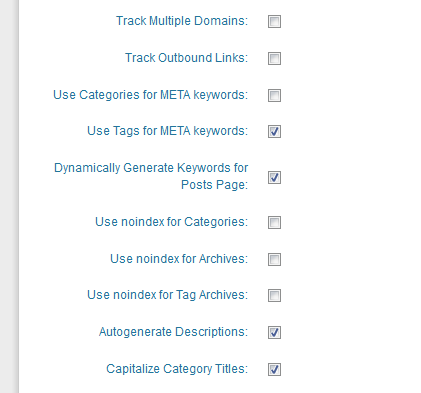
Here is my settings for the SEO pack: http://gyazo.com/6b4dddacb307bdacfdd7741894e0356b.png?1357647136
As you can see they are as you explained.
Any other ideas?
-
Yes, I would have them indexed in that case too.
I think it is the categories that are noindex.
I think this is an 'All in one SEO pack' adjustable feature.
In the setup for that, look for a checkbox:
"use noindex for categories"
uncheck that if it is checked.
If that isn't it, I don't know the answer
-
Thanks again for your reply Alan.
Currently the site is still in its final stages of development and once my automated system is finally built and implemented then I won't need to be changing any of the index pages except posting a few blogs once in a week or so.
So i think it would benefit me more to have each of my index pages getting indexed but then again I'm not sure on how to go about allowing them to be indexed due to WordPress' update.
My plugins are all highly downloaded and i use the 'All in one SEO pack' - if that may be the problem? I've gone through all the settings and the noindex buttons are all anticked.
Perhaps it could be the initial theme i used?
-
Thank you Mark
Nice looking site!
Your front page is index, follow.
Index pages are noindex, follow
Final pages are index, follow
I do something very close to this on my site.
Often, index pages are useless to searchers, because the index page changes so quickly that by the time the info gets into a search result, the information is no longer on that page, and the searcher will either just click away, cursing you and your site, or they will go looking through a few index pages and then curse you when they can't find what they wanted.
So I agree with the way you're doing that - if it is the case that the content changes quickly. If the index pages are just collectors of groups of items, then index, follow would be better, provided that you have enough text on the page to make it worthwhile.
As to how to make that happen, it isn't obvious.
I need to upgrade some of my sites to 3.5.
It could be that you have a plugin or a "custom field" that sets the index follow.
I suggest you edit a post and a page and scroll down to see if you have a field that handles it, such as "robotsmeta" that is set to "noindex,follow" for those pages
-
Hi Alan, thanks for your quick response.
My website is: www.FifaCoinStore.com
Here is a printscreen of my settings: http://gyazo.com/0cd3d21c5ec1797873a5c7cacc85a588.png?1357600674
I believe since the WordPress 3.5 update they have removed this privacy option which is why i can't seem to find it. I read this page from WordPress on it: http://codex.wordpress.org/Settings_Reading_Screen
Or am i just looking in the wrong place?
Thanks again
-
Hello Mark.
Please send me a bitly shortened link to your website so I can see what you are seeing
It probably isn't your robots file.
First try this.
In the Admin section, you should see "Settings" on the left navigation
Click that and you should see "Privacy"
Click that and you should see two radio buttons
<label for="blog-public">I would like my blog to be visible to everyone, including search engines (like Google, Bing, Technorati) and archivers</label>
<label for="blog-norobots">I would like to block search engines, but allow normal visitors</label>
Obviously, choose the top one and save it.
Then, refresh your front page or inner pages and look in the code to see if it still says noindex
If you have a cache, you will need to flush it.






Got a burning SEO question?
Subscribe to Moz Pro to gain full access to Q&A, answer questions, and ask your own.
Browse Questions
Explore more categories
-
Moz Tools
Chat with the community about the Moz tools.
-
SEO Tactics
Discuss the SEO process with fellow marketers
-
Community
Discuss industry events, jobs, and news!
-
Digital Marketing
Chat about tactics outside of SEO
-
Research & Trends
Dive into research and trends in the search industry.
-
Support
Connect on product support and feature requests.
Related Questions
-

Duplicate content, although page has "noindex"
Hello, I had an issue with some pages being listed as duplicate content in my weekly Moz report. I've since discussed it with my web dev team and we decided to stop the pages from being crawled. The web dev team added this coding to the pages <meta name='robots' content='max-image-preview:large, noindex dofollow' />, but the Moz report is still reporting the pages as duplicate content. Note from the developer "So as far as I can see we've added robots to prevent the issue but maybe there is some subtle change that's needed here. You could check in Google Search Console to see how its seeing this content or you could ask Moz why they are still reporting this and see if we've missed something?" Any help much appreciated!
Technical SEO | | rj_dale0 -

Dynamically Inserting Noindex With Javascript
Hello, I have a broken plugin creating hundreds of WP-Content directory pages being indexed by Google. I can not access the source code of these pages to add a noindex to them. The page URL's all have the plugin name within them. In order to resolve the issue, I wrote a solution with javascript to dynamically add in a noindex tag to any URL containing the plugin name. Would this noindex be respected by Google and is there a way to immediately check that it is respected? Currently, I can not delete the plugin due to issues with it's php. If you would like to view the code: https://codepen.io/trodrick/pen/Gwwaej?editors=0010 Thanks!
Technical SEO | | Tom3_150 -

Pages are Indexed but not Cached by Google. Why?
Hello, We have magento 2 extensions website mageants.com since 1 years google every 15 days cached my all pages but suddenly last 15 days my websites pages not cached by google showing me 404 error so go search console check error but din't find any error so I have cached manually fetch and render but still most of pages have same 404 error example page : - https://www.mageants.com/free-gift-for-magento-2.html error :- http://webcache.googleusercontent.com/search?q=cache%3Ahttps%3A%2F%2Fwww.mageants.com%2Ffree-gift-for-magento-2.html&rlz=1C1CHBD_enIN803IN804&oq=cache%3Ahttps%3A%2F%2Fwww.mageants.com%2Ffree-gift-for-magento-2.html&aqs=chrome..69i57j69i58.1569j0j4&sourceid=chrome&ie=UTF-8 so have any one solutions for this issues
Technical SEO | | vikrantrathore0 -

Fake Links indexing in google
Hello everyone, I have an interesting situation occurring here, and hoping maybe someone here has seen something of this nature or be able to offer some sort of advice. So, we recently installed a wordpress to a subdomain for our business and have been blogging through it. We added the google webmaster tools meta tag and I've noticed an increase in 404 links. I brought this up to or server admin, and he verified that there were a lot of ip's pinging our server looking for these links that don't exist. We've combed through our server files and nothing seems to be compromised. Today, we noticed that when you do site:ourdomain.com into google the subdomain with wordpress shows hundreds of these fake links, that when you visit them, return a 404 page. Just curious if anyone has seen anything like this, what it may be, how we can stop it, could it negatively impact us in anyway? Should we even worry about it? Here's the link to the google results. https://www.google.com/search?q=site%3Amshowells.com&oq=site%3A&aqs=chrome.0.69i59j69i57j69i58.1905j0j1&sourceid=chrome&es_sm=91&ie=UTF-8 (odd links show up on pages 2-3+)
Technical SEO | | mshowells0 -

Staging & Development areas should be not indexable (i.e. no followed/no index in meta robots etc)
Hi I take it if theres a staging or development area on a subdomain for a site, who's content is hence usually duplicate then this should not be indexable i.e. (no-indexed & nofollowed in metarobots) ? In order to prevent dupe content probs as well as non project related people seeing work in progress or finding accidentally in search engine listings ? Also if theres no such info in meta robots is there any other way it may have been made non-indexable, or at least dupe content prob removed by canonicalising the page to the equivalent page on the live site ? In the case in question i am finding it listed in serps when i search for the staging/dev area url, so i presume this needs urgent attention ? Cheers Dan
Technical SEO | | Dan-Lawrence0 -

301 Redirect with index.asp
I am very new to all of this so forgive the newbie questions I will get better. Ok so after starting a campaign I see that I have many issues including where some pages are being deemed as duplicate content. 1. The report says the http://lucid8.com has duplicate content on 2 other pages 2. When I look at them it shows that http://lucid8.com/index.asp and http://www.lucid8.com are duplicates. 3. Really these are the exactly the same page because the default page that is opened for www.lucid8.com http://www.lucid8.com etc always opens the index.asp page. 4. Now I read that I should do permanent redirects and how to do this via IIS and I tried to do a redirect from index.asp to www.lucid8.com but that does not work because www.lucid8.com is pointing to index.asp and so we end up in a circle. So the question is how do I get rid of these duplicate page references without causing problems. Thanks
Technical SEO | | TroyW0 -

De-indexing millions of pages - would this work?
Hi all, We run an e-commerce site with a catalogue of around 5 million products. Unfortunately, we have let Googlebot crawl and index tens of millions of search URLs, the majority of which are very thin of content or duplicates of other URLs. In short: we are in deep. Our bloated Google-index is hampering our real content to rank; Googlebot does not bother crawling our real content (product pages specifically) and hammers the life out of our servers. Since having Googlebot crawl and de-index tens of millions of old URLs would probably take years (?), my plan is this: 301 redirect all old SERP URLs to a new SERP URL. If new URL should not be indexed, add meta robots noindex tag on new URL. When it is evident that Google has indexed most "high quality" new URLs, robots.txt disallow crawling of old SERP URLs. Then directory style remove all old SERP URLs in GWT URL Removal Tool This would be an example of an old URL:
Technical SEO | | TalkInThePark
www.site.com/cgi-bin/weirdapplicationname.cgi?word=bmw&what=1.2&how=2 This would be an example of a new URL:
www.site.com/search?q=bmw&category=cars&color=blue I have to specific questions: Would Google both de-index the old URL and not index the new URL after 301 redirecting the old URL to the new URL (which is noindexed) as described in point 2 above? What risks are associated with removing tens of millions of URLs directory style in GWT URL Removal Tool? I have done this before but then I removed "only" some useless 50 000 "add to cart"-URLs.Google says themselves that you should not remove duplicate/thin content this way and that using this tool tools this way "may cause problems for your site". And yes, these tens of millions of SERP URLs is a result of a faceted navigation/search function let loose all to long.
And no, we cannot wait for Googlebot to crawl all these millions of URLs in order to discover the 301. By then we would be out of business. Best regards,
TalkInThePark0 -

How to tell if PDF content is being indexed?
I've searched extensively for this, but could not find a definitive answer. We recently updated our website and it contains links to about 30 PDF data sheets. I want to determine if the text from these PDFs is being archived by search engines. When I do this search http://bit.ly/rRYJPe (google - site:www.gamma-sci.com and filetype:pdf) I can see that the PDF urls are getting indexed, but does that mean that their content is getting indexed? I have read in other posts/places that if you can copy text from a PDF and paste it that means Google can index the content. When I try this with PDFs from our site I cannot copy text, but I was told that these PDFs were all created from Word docs, so they should be indexable, correct? Since WordPress has you upload PDFs like they are an image could this be causing the problem? Would it make sense to take the time and extract all of the PDF content to html? Thanks for any assistance, this has been driving me crazy.
Technical SEO | | zazo0