Moz Q&A is closed.
After more than 13 years, and tens of thousands of questions, Moz Q&A closed on 12th December 2024. Whilst we’re not completely removing the content - many posts will still be possible to view - we have locked both new posts and new replies. More details here.
How to change noindex to index?
-
Hey,
I've recently upgraded to a pro SEOmoz account and have realised i have 14574 issues to do with 'blocked by meta-robot' and that 'This page is being kept out of the search engine indexes by the meta tag , which may have a value of "noindex", keeping this page out of the index.'
How can i change this so my pages get indexed?
I read somewhere that i need to change my privacy settings but that thread was 3 years old and now the WP Dashboard has updated..
Please let me know
Many thanks, Jamie
P.s Im using WordPress 3.5
And i have the XML sitemap plugin
And i have no idea where to look for this robots.txt file..
-
Answered below as well, but wanted to drop this here in case anyone else is looking. WP has changed the location of what used to be "Privacy" under settings. The functionality (which blocks search engines from your wordpress installation) is now under Settings->Reading
[Screenshot](Hi Mark Did you find it? I struggled too for a bit, but it's moved to Settings->Reading See this screenshot -Dan)
-Dan
-
Hi Mark
Did you find it? I struggled too for a bit, but it's moved to Settings->Reading
-Dan
-
Just updated it to this: http://gyazo.com/4a8a008055abbd563f96bf29b6b259a6.png?1357651763
And then checked my page sources and they're still 'noindex' - why can't i correct this?!
-
Just installed it and now its added this field into my settings>Reading
http://gyazo.com/0be601793fc1cb866d918ea61e7d8ec1.png?1357649141
What do i need to change to allow it to index all my pages?
(Don't want to type something in that will block all my pages
 )
) -
Just asked the WordPress Forums and one of their reply was to install this plugin: http://wordpress.org/extend/plugins/wp-robots-txt/
Just seems to add the privacy tab again so i can set the settings to: I would like my blog to be visible to everyone, including search engines (like Google, Bing, Technorati) and archivers
Like you first stated

Will install it now and see how it goes
-
It could be that the older wordpress had a setting that this new version has decided to ignore. This is typical of programmers!
The next possibility is to look in the database, but the options part of the database is hard to read.
Another idea is to look in the code of the the theme and hack it, so it is permanently index, follow or just remove that altogether.
Maybe someone else has a better idea?
Alan
-
If i remember correctly my pages were still not being indexed before i installed the all in one SEO pack.
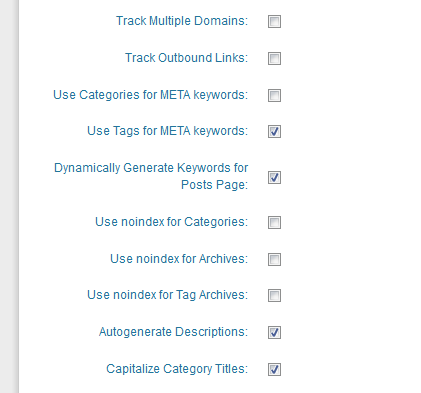
Here is my settings for the SEO pack: http://gyazo.com/6b4dddacb307bdacfdd7741894e0356b.png?1357647136
As you can see they are as you explained.
Any other ideas?
-
Yes, I would have them indexed in that case too.
I think it is the categories that are noindex.
I think this is an 'All in one SEO pack' adjustable feature.
In the setup for that, look for a checkbox:
"use noindex for categories"
uncheck that if it is checked.
If that isn't it, I don't know the answer
-
Thanks again for your reply Alan.
Currently the site is still in its final stages of development and once my automated system is finally built and implemented then I won't need to be changing any of the index pages except posting a few blogs once in a week or so.
So i think it would benefit me more to have each of my index pages getting indexed but then again I'm not sure on how to go about allowing them to be indexed due to WordPress' update.
My plugins are all highly downloaded and i use the 'All in one SEO pack' - if that may be the problem? I've gone through all the settings and the noindex buttons are all anticked.
Perhaps it could be the initial theme i used?
-
Thank you Mark
Nice looking site!
Your front page is index, follow.
Index pages are noindex, follow
Final pages are index, follow
I do something very close to this on my site.
Often, index pages are useless to searchers, because the index page changes so quickly that by the time the info gets into a search result, the information is no longer on that page, and the searcher will either just click away, cursing you and your site, or they will go looking through a few index pages and then curse you when they can't find what they wanted.
So I agree with the way you're doing that - if it is the case that the content changes quickly. If the index pages are just collectors of groups of items, then index, follow would be better, provided that you have enough text on the page to make it worthwhile.
As to how to make that happen, it isn't obvious.
I need to upgrade some of my sites to 3.5.
It could be that you have a plugin or a "custom field" that sets the index follow.
I suggest you edit a post and a page and scroll down to see if you have a field that handles it, such as "robotsmeta" that is set to "noindex,follow" for those pages
-
Hi Alan, thanks for your quick response.
My website is: www.FifaCoinStore.com
Here is a printscreen of my settings: http://gyazo.com/0cd3d21c5ec1797873a5c7cacc85a588.png?1357600674
I believe since the WordPress 3.5 update they have removed this privacy option which is why i can't seem to find it. I read this page from WordPress on it: http://codex.wordpress.org/Settings_Reading_Screen
Or am i just looking in the wrong place?
Thanks again
-
Hello Mark.
Please send me a bitly shortened link to your website so I can see what you are seeing
It probably isn't your robots file.
First try this.
In the Admin section, you should see "Settings" on the left navigation
Click that and you should see "Privacy"
Click that and you should see two radio buttons
<label for="blog-public">I would like my blog to be visible to everyone, including search engines (like Google, Bing, Technorati) and archivers</label>
<label for="blog-norobots">I would like to block search engines, but allow normal visitors</label>
Obviously, choose the top one and save it.
Then, refresh your front page or inner pages and look in the code to see if it still says noindex
If you have a cache, you will need to flush it.






Got a burning SEO question?
Subscribe to Moz Pro to gain full access to Q&A, answer questions, and ask your own.
Browse Questions
Explore more categories
-
Moz Tools
Chat with the community about the Moz tools.
-
SEO Tactics
Discuss the SEO process with fellow marketers
-
Community
Discuss industry events, jobs, and news!
-
Digital Marketing
Chat about tactics outside of SEO
-
Research & Trends
Dive into research and trends in the search industry.
-
Support
Connect on product support and feature requests.
Related Questions
-

Google Not Indexing Pages (Wordpress)
Hello, recently I started noticing that google is not indexing our new pages or our new blog posts. We are simply getting a "Discovered - Currently Not Indexed" message on all new pages. When I click "Request Indexing" is takes a few days, but eventually it does get indexed and is on Google. This is very strange, as our website has been around since the late 90's and the quality of the new content is neither duplicate nor "low quality". We started noticing this happening around February. We also do not have many pages - maybe 500 maximum? I have looked at all the obvious answers (allowing for indexing, etc.), but just can't seem to pinpoint a reason why. Has anyone had this happen recently? It is getting very annoying having to manually go in and request indexing for every page and makes me think there may be some underlying issues with the website that should be fixed.
Technical SEO | | Hasanovic1 -

URLs dropping from index (Crawled, currently not indexed)
I've noticed that some of our URLs have recently dropped completely out of Google's index. When carrying out a URL inspection in GSC, it comes up with 'Crawled, currently not indexed'. Strangely, I've also noticed that under referring page it says 'None detected', which is definitely not the case. I wonder if it could be something to do with the following? https://www.seroundtable.com/google-ranking-index-drop-30192.html - It seems to be a bug affecting quite a few people. Here are a few examples of the URLs that have gone missing: https://www.ihasco.co.uk/courses/detail/sexual-harassment-awareness-training https://www.ihasco.co.uk/courses/detail/conflict-resolution-training https://www.ihasco.co.uk/courses/detail/prevent-duty-training Any help here would be massively appreciated!
Technical SEO | | iHasco0 -

Discovered - currently not indexed issue
Hello all, We have a sitemap with URLs that have mostly user generated content. Profile Overview section. Where users write about their services and some other things. Out of 46K URLs, only 14K are valid according to search console and 32K URLs are excluded. Out of these 32K, 28K are "Discovered - currently not indexed". We can't really update these pages as they have user generated content. However we do want to leverage all these pages to help us in our SEO. So the question is how do we make all of these pages indexable? If anyone can help in the regard, please let me know. Thanks!
Technical SEO | | akashkandari0 -

How to change 302 redirect from http to https
Hi gang. Our site currently has a 302 redirect from the HTTP version of the homepage to the HTTPS version of the homepage. I understand this really should be changed to a 301 redirect but I'm having a little trouble figuring out exactly how this should be done. Some places on the internet are telling me I can edit our htaccess file to specify the type of redirect, however our htaccess file seems to be missing some of the information in theirs. Can anyone tell me what needs to be changed in the htaccess file - or if there's a simpler way to change the 302 to a 301? Many thanks 🙂 htaccess: BEGIN WordPress RewriteEngine On RewriteBase / RewriteRule ^index.php$ - [L] RewriteCond %{REQUEST_FILENAME} !-f RewriteCond %{REQUEST_FILENAME} !-d RewriteRule . /index.php [L] END WordPress EXPIRES CACHING ExpiresActive On ExpiresByType image/jpg "access plus 6 months" ExpiresByType image/jpeg "access plus 6 months" ExpiresByType image/gif "access plus 6 months" ExpiresByType image/png "access plus 6 months" ExpiresByType text/css "access plus 10 days" ExpiresByType application/pdf "access plus 10 days" ExpiresByType application/x-shockwave-flash "access plus 10 days" ExpiresByType image/x-icon "access plus 6 months" ExpiresDefault "access plus 2 days" EXPIRES CACHING
Technical SEO | | davedon0 -

Sitemap_index.xml = noindex,follow
I was running a rapport with Sreaming Frog SEO Spider and i saw: (Tab) Directives > NOindex : https://compleetverkleed.nl/sitemap_index.xml/ is set on X-Robots-Tag 1 > noindex,follow Does this mean my sitemap isn't indexed? If anyone has some more tips for our website, feel free to give some suggestions 🙂 (Website is far from complete)
Technical SEO | | Happy-SEO2 -

Investigating a huge spike in indexed pages
I've noticed an enormous spike in pages indexed through WMT in the last week. Now I know WMT can be a bit (OK, a lot) off base in its reporting but this was pretty hard to explain. See, we're in the middle of a huge campaign against dupe content and we've put a number of measures in place to fight it. For example: Implemented a strong canonicalization effort NOINDEX'd content we know to be duplicate programatically Are currently fixing true duplicate content issues through rewriting titles, desc etc. So I was pretty surprised to see the blow-up. Any ideas as to what else might cause such a counter intuitive trend? Has anyone else see Google do something that suddenly gloms onto a bunch of phantom pages?
Technical SEO | | farbeseo0 -

Should i index or noindex a contact page
Im wondering if i should noindex the contact page im doing SEO for a website just wondering if by noindexing the contact page would it help SEO or hurt SEO for that website
Technical SEO | | aronwp0 -

Google is indexing my directories
I'm sure this has been asked before, but I was looking at all of Google's results for my site and I found dozens of results for directories such as: Index of /scouting/blog/wp-includes/js/swfupload/plugins Obviously I don't want those indexed. How do I prevent Google from indexing those? Also, it only seems to be doing it with Wordpress, not any of the directories on my main site. (We have a wordpress blog, which is only a portion of the site)
Technical SEO | | UnderRugSwept0