Moz Q&A is closed.
After more than 13 years, and tens of thousands of questions, Moz Q&A closed on 12th December 2024. Whilst we’re not completely removing the content - many posts will still be possible to view - we have locked both new posts and new replies. More details here.
How to stop Google crawling after 301 redirect?
-
I have removed all pages from my old website and set 301 redirect to new website. But, I have verified old website with Google webmaster tools' HTML verification file which enable me to track all data and existence of pages in Google search for my old website. I was assumed that, Google will stop crawling and DE-indexed all pages after 301 redirect. Because, I have set 301 redirect before 3 months.
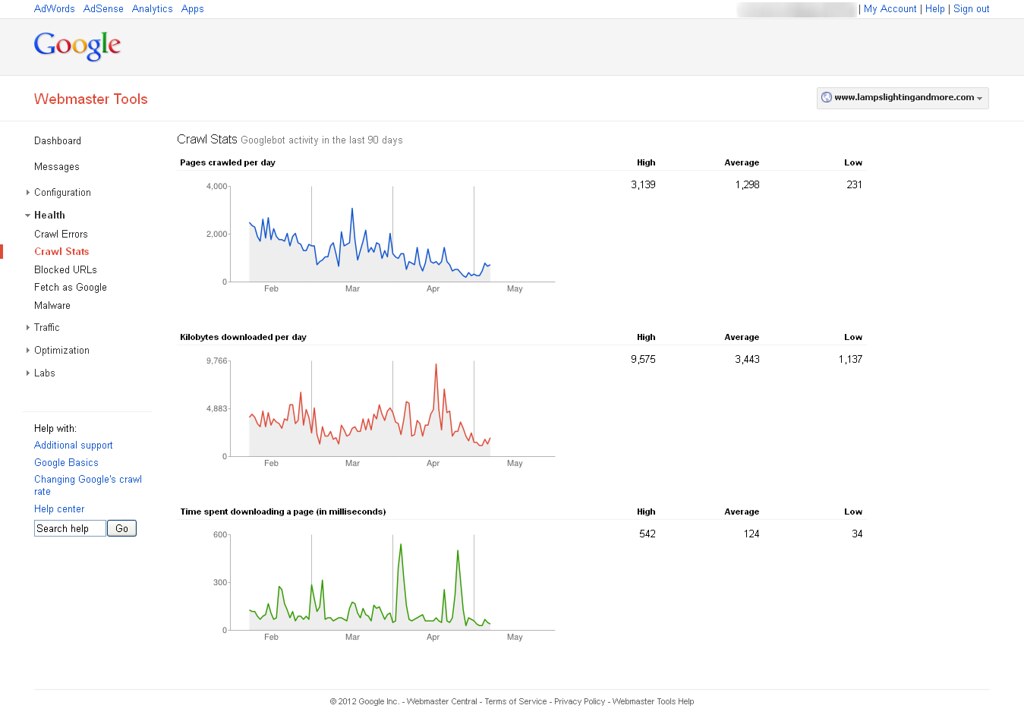
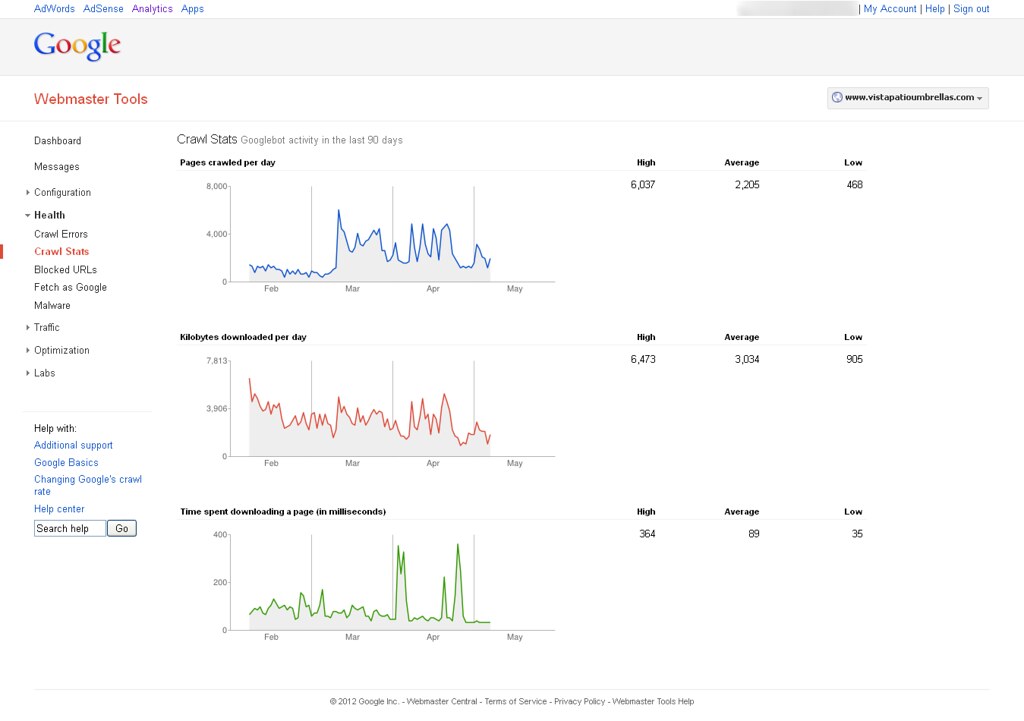
Now, I'm able to see Google bot activity on my website with help of Google webmaster tools. You can find out attachment to know more about it. How can it possible & How Google can crawl removed pages?
You can see following image to know more about it.
&
-
Google is most likely following links on other sites pointing to your old site and then 301'ing to the new site so you're seeing activity in WMT
looking here is still see two pages in the index:
you can go in and remove the site in WMT using the remove URL tool and see if that stops activity in that old WMT account. Crawling or not crawling, reporting or not reporting, there is not an issue here though - the 301's appear to be properly set up.


Got a burning SEO question?
Subscribe to Moz Pro to gain full access to Q&A, answer questions, and ask your own.
Browse Questions
Explore more categories
-
Moz Tools
Chat with the community about the Moz tools.
-
SEO Tactics
Discuss the SEO process with fellow marketers
-
Community
Discuss industry events, jobs, and news!
-
Digital Marketing
Chat about tactics outside of SEO
-
Research & Trends
Dive into research and trends in the search industry.
-
Support
Connect on product support and feature requests.
Related Questions
-

Using a Reverse Proxy and 301 redirect to appear Sub Domain as Sub Directory - what are the SEO Risks?
We’re in process to move WordPress blog URLs from subdomains to sub-directory. We aren’t moving blog physically, but using reverse proxy and 301 redirection to do this. Blog subdomain URL is https://blog.example.com/ and destination sub-directory URL is https://www.example.com/blog/ Our main website is e-commerce marketplace which is YMYL site. This is on Windows server. Due to technical reasons, we can’t physically move our WordPress blog to the main website. Following is our Technical Setup Setup a reverse proxy at https://www.example.com/blog/ pointing to https://blog.example.com/ Use a 301 redirection from https://blog.example.com/ to https://www.example.com/blog/ with an exception if a traffic is coming from main WWW domain then it won’t redirect. Thus, we can eliminate infinite loop. Change all absolute URLs to relative URLs on blog Change the sitemap URL from https://blog.example.com/sitemap.xml to https://www.example.com/blog/sitemap.xml and update all URLs mentioned within the sitemap. SEO Risk Evaluation We have individual GA Tracking ID and individual Google Search Console Properties for main website and blog. We will not merge them. Keep them separate as they are. Keeping this in mind, I am evaluating SEO Risks factors Right now when we receive traffic from main website to blog (or vice versa) then it is considered as referral traffic and new cookies are set for Google Analytics. What’s going to happen when its on the same domain? Which type of settings change should I do in Blog’s Google Search Console? (A). Do I need to request “Change of Address” in the Blog’s search console property? (B). Should I re-submit the sitemap? Do I need to re-submit the blog sitemap from the https://www.example.com/ Google Search Console Property? Main website is e-commerce marketplace which is YMYL website, and blog is all about content. So does that impact SEO? Will this dilute SEO link juice or impact on the main website ranking because following are the key SEO Metrices. (A). Main website’s Avg Session Duration is about 10 minutes and bounce rate is around 30% (B). Blog’s Avg Session Duration is 33 seconds and bounce rate is over 92%
Intermediate & Advanced SEO | | joshibhargav_200 -

302 > 302 > 301 Redirect Chain Issue & Advice
Hi everyone, I recently relaunched our website and everything went well. However, while checking site health, I found a new redirect chain issue (302 > 302 > 301 > 200) when the user requests the HTTP and non-www version of our URL. Here's what's happening: • 302 #1 -- http://domain.com/example/ 302 redirects to http://domain.com/PnVKV/example/ (the 5 characters in the appended "subfolder" are dynamic and change each time)
Intermediate & Advanced SEO | | Andrew_In_Search_of_Answers
• 302 #2 -- http://domain.com/PnVKV/example/ 302 redirects BACK to http://domain.com/example/
• 301 #1 -- http://domain.com/example/ 301 redirects to https://www.domain.com/example/ (as it should have done originally)
• 200 -- https://www.domain.com/example/ resolves properly We're hosted on AWS, and one of my cloud architects investigated and reported GoDaddy was causing the two 302s. That's backed up online by posts like https://stackoverflow.com/questions/46307518/random-5-alpha-character-path-appended-to-requests and https://www.godaddy.com/community/Managing-Domains/My-domain-name-not-resolving-correctly-6-random-characters-are/td-p/60782. I reached out to GoDaddy today, expecting them to say it wasn't a problem on their end, but they actually confirmed this was a known bug (as of September 2017) but there is no timeline for a fix. I asked the first rep I spoke with on the phone to send a summary, and here's what he provided in his own words: From the information gathered on my end and I was able to get from our advanced tech support team, the redirect issue is in a bug report and many examples have been logged with the help of customers, but no log will be made in this case due to the destination URL being met. Most issues being logged are site not resolving properly or resolving errors. I realize the redirect can cause SEO issues with the additional redirects occurring. Also no ETA has been logged for the issue being reported. I do feel for you since I now understand more the SEO issues it can cause. I myself will keep an eye out for the bug report and see if any progress is being made any info outside of this I will email you directly. Thanks. Issue being Experienced: Domains that are set to Go Daddy forwarding IPs may sometimes resolve to a url that has extra characters appended to the end of them. Example: domain1.com forwards to http://www.domain2.com/TLYEZ. However it should just forward to http://www.domain2.com. I think this answers what some Moz users may have been experiencing sporadically, especially this previous thread: https://moz.rainyclouds.online/community/q/forwarded-vanity-domains-suddenly-resolving-to-404-with-appended-url-s-ending-in-random-5-characters. My question: Given everything stated above and what we know about the impact of redirect chains on SEO, how severe should I rate this? I told my Director that I would recommend we move away from GoDaddy (something I don't want to do, but feel we _**have **_to do), but she viewed it as just another technical SEO issue and one that didn't necessarily need to be prioritized over others related to the relaunch. How would you respond in my shoes? On a scale of 1 to 10 (10 being the biggest), how big of a technical SEO is this? Would you make it a priority? At the very least, I thought the Moz community would benefit from the GoDaddy confirmation of this issue and knowing about the lack of an ETA on a fix. Thanks!0 -

Does removal of internal redirects(301) help in SEO
I am planning to completely remove 301 redirects manually by replacing such links with actual live pages/links. So there will be no redirects internally in the website. Will this boost our SEO efforts? Auto redirects will be there for incoming links to non-existing pages. Thanks, Satish
Intermediate & Advanced SEO | | vtmoz0 -

For URLs that require login, should our redirect be 301 or 302?
We have a login required section of our website that is being crawled and reporting as potential issues in Webmaster Tools. I'm not sure what the best solution to this is - is it to make URLs requiring a login noindex/nocrawl? Right now, we have them 302 redirecting to the login page, since it's a temporary redirect, it seems like it isn't the right solution. Is a 301 better?
Intermediate & Advanced SEO | | alecfwilson0 -

How do you 301 redirect URLs with a hashbang (#!) format? We just lost a ton of pagerank because we thought javascript redirect was the only way! But other sites have been able to do this – examples and details inside
Hi Moz, Here's more info on our problem, and thanks for reading! We’re trying to Create 301 redirects for 44 pages on site.com. We’re having trouble 301 redirecting these pages, possibly because they are AJAX and have hashbangs in the URLs. These are locations pages. The old locations URLs are in the following format: www.site.com/locations/#!new-york and the new URLs that we want to redirect to are in this format: www.site.com/locations/new-york We have not been able to create these redirects using Yoast WordPress SEO plugin v.1.5.3.2. The CMS is WordPress version 3.9.1 The reason we want to 301 redirect these pages is because we have created new pages to replace them, and we want to pass pagerank from the old pages to the new. A 301 redirect is the ideal way to pass pagerank. Examples of pages that are able to 301 redirect hashbang URLs include http://www.sherrilltree.com/Saddles#!Saddles and https://twitter.com/#!RobOusbey.
Intermediate & Advanced SEO | | DA20130 -

Can an incorrect 301 redirect or .htaccess code cause 500 errors?
Google Webmaster Tools is showing the following message: _Googlebot couldn't access the contents of this URL because the server had an internal error when trying to process the request. These errors tend to be with the server itself, not with the request. _ Before I contact the person who manages the server and hosting (essentially asking if the error is on his end) is there a chance I could have created an issue with an incorrect 301 redirect or other code added to .htaccess incorrectly? Here is the 301 redirect code I am using in .htaccess: RewriteEngine On RewriteCond %{THE_REQUEST} ^[A-Z]{3,9}\ /([^/.]+/)*(index.html|default.asp)\ HTTP/ RewriteRule ^(([^/.]+/)*)(index|default) http://www.example.com/$1 [R=301,L] RewriteCond %{HTTP_HOST} !^(www.example.com)?$ [NC] RewriteRule (.*) http://www.example.com/$1 [R=301,L] Could adding the following code after that in the .htaccess potentially cause any issues? BEGIN EXPIRES <ifmodule mod_expires.c="">ExpiresActive On
Intermediate & Advanced SEO | | kimmiedawn
ExpiresDefault "access plus 10 days"
ExpiresByType text/css "access plus 1 week"
ExpiresByType text/plain "access plus 1 month"
ExpiresByType image/gif "access plus 1 month"
ExpiresByType image/png "access plus 1 month"
ExpiresByType image/jpeg "access plus 1 month"
ExpiresByType application/x-javascript "access plus 1 month"
ExpiresByType application/javascript "access plus 1 week"
ExpiresByType application/x-icon "access plus 1 year"</ifmodule> END EXPIRES (Edit) I'd like to add that there is a Wordpress blog on the site too at www.example.com/blog with the following code in it's .htaccess: BEGIN WordPress <ifmodule mod_rewrite.c="">RewriteEngine On
RewriteBase /blog/
RewriteRule ^index.php$ - [L]
RewriteCond %{REQUEST_FILENAME} !-f
RewriteCond %{REQUEST_FILENAME} !-d
RewriteRule . /blog/index.php [L]</ifmodule> END WordPress Thanks0 -

301 vs 410 redirect: What to use when removing a URL from the website
We are in the process of detemining how to handle URLs that are completely removed from our website? Think of these as listings that have an expiration date (i.e. http://www.noodle.org/test-prep/tphU3/sat-group-course). What is the best practice for removing these listings (assuming not many people are linking to them externally). 301 to a general page (i.e. http://www.noodle.org/search/test-prep) Do nothing and leave them up but remove from the site map (as they are no longer useful from a user perspective) return a 404 or 410?
Intermediate & Advanced SEO | | abargmann0 -

How to 301 redirect old wordpress category?
Hi All, In order to avoid duplication errors we've decided to redirect old categories (merge some categories).
Intermediate & Advanced SEO | | BeytzNet
In the past we have been very generous with the number of categories we assigned each post. One category needs to be redirected back to blog home (removed completely) while a couple others should be merged. Afterwords we will re-categorize some of the old posts. What is the proper way to do so?
We are not technical, Is there a plugin that can assist? Thanks0