Moz Q&A is closed.
After more than 13 years, and tens of thousands of questions, Moz Q&A closed on 12th December 2024. Whilst we’re not completely removing the content - many posts will still be possible to view - we have locked both new posts and new replies. More details here.
How to stop Google crawling after 301 redirect?
-
I have removed all pages from my old website and set 301 redirect to new website. But, I have verified old website with Google webmaster tools' HTML verification file which enable me to track all data and existence of pages in Google search for my old website. I was assumed that, Google will stop crawling and DE-indexed all pages after 301 redirect. Because, I have set 301 redirect before 3 months.
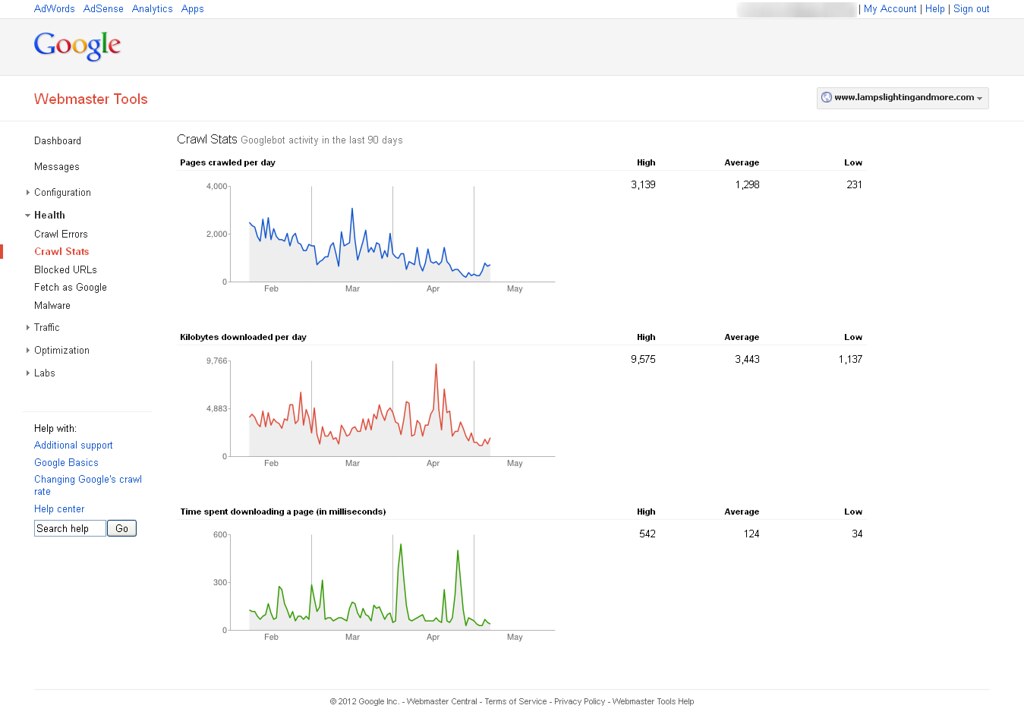
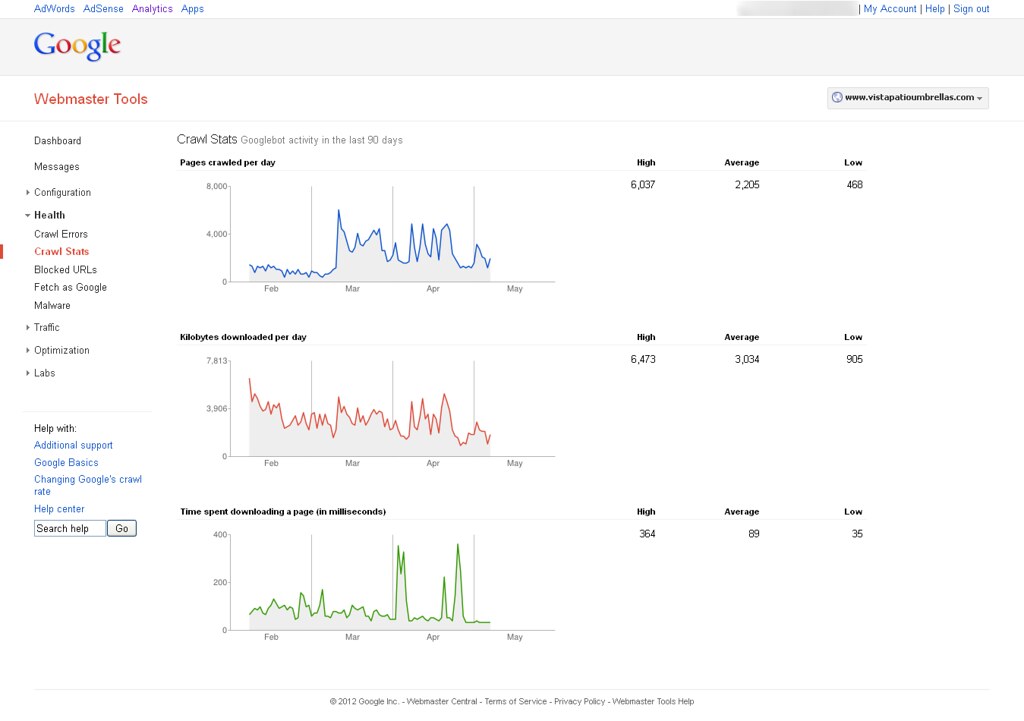
Now, I'm able to see Google bot activity on my website with help of Google webmaster tools. You can find out attachment to know more about it. How can it possible & How Google can crawl removed pages?
You can see following image to know more about it.
&
-
Google is most likely following links on other sites pointing to your old site and then 301'ing to the new site so you're seeing activity in WMT
looking here is still see two pages in the index:
you can go in and remove the site in WMT using the remove URL tool and see if that stops activity in that old WMT account. Crawling or not crawling, reporting or not reporting, there is not an issue here though - the 301's appear to be properly set up.


Got a burning SEO question?
Subscribe to Moz Pro to gain full access to Q&A, answer questions, and ask your own.
Browse Questions
Explore more categories
-
Moz Tools
Chat with the community about the Moz tools.
-
SEO Tactics
Discuss the SEO process with fellow marketers
-
Community
Discuss industry events, jobs, and news!
-
Digital Marketing
Chat about tactics outside of SEO
-
Research & Trends
Dive into research and trends in the search industry.
-
Support
Connect on product support and feature requests.
Related Questions
-

How to handle potentially thousands (50k+) of 301 redirects following a major site replacement
We are looking for the very best way of handling potentially thousands (50k+) of 301 redirects following
Intermediate & Advanced SEO | | GeezerG
a major site replacement and I mean total replacement. Things you should know
Existing domain has 17 years history with Google but rankings have suffered over the past year and yes we know why. (and the bitch is we paid a good sized SEO company for that ineffective and destructive work)
The URL structure of the new site is completely different and SEO friendly URL's rule. This means that there will be many thousands of historical URL's (mainly dynamic ones) that will attract 404 errors as they will not exist anymore. Most are product profile pages and the God Google has indexed them all. There are also many links to them out there.
The new site is fully SEO optimised and is passing all tests so far - however there is a way to go yet. So here are my thoughts on the possible ways of meeting our need,
1: Create 301 redirects for each an every page in the .htaccess file that would be one huge .htaccess file 50,000 lines plus - I am worried about effect on site speed.
2: Create 301 redirects for each and every unused folder, and wildcard the file names, this would be a single redirect for each file in each folder to a single redirect page
so the 404 issue is overcome but the user doesn't open the precise page they are after.
3: Write some code to create a hard copy 301 index.php file for each and every folder that is to be replaced.
4: Write code to create a hard copy 301 .php file for each and every page that is to be replaced.
5: We could just let the pages all die and list them with Google to advise of their death.
6: We could have the redirect managed by a database rather than .htaccess or single redirect files. Probably the most challenging thing will be to load the data in the first place, but I assume this could be done programatically - especially if the new URL can be inferred from the old. Many be I am missing another, simpler approach - please discuss0 -

Does content revealed by a 'show more' button get crawled by Google?
I have a div on my website with around 500 words of unique content in, automatically when the page is first visited the div has a fixed height of 100px, showing a couple of hundred words and fading out to white, with a show more button, which when clicked, increases the height to show the full content. My question is, does Google crawl the content in that div when it renders the page? Or disregard it? Its all in the source code. Or worse, do they consider this cloaking or hidden content? It is only there to make the site more useable for customers, so i don't want to get penalised for it. Cheers
Intermediate & Advanced SEO | | SEOhmygod0 -

Prevent Google from crawling Ajax
With Google figuring out how to make Ajax and JS more searchable/indexable, I am curious on thoughts or techniques to prevent this. Here's my Situation, we have a page that we do not ever want to be indexed/crawled or other. Currently we have the nofollow/noindex command, but due to technical changes for our site the method in which this information is being implemented if it is ever displayed it will not have the ability to block the content from search. It is also the decision of the business to not list the file in robots.txt due to the sensitivity of the content. Basically, this content doesn't exist unless something super important happens, and even if something super important happens, we do not want Google to know of its existence. Since the Dev team is planning on using Ajax/JS to pull in this content if the business turns it on, the concern is that it will be on the homepage and Google could index it. So the questions that I was asked; if Google can/does index, how long would that piece of content potentially appear in the SERPs? Can we block Google from caring about and indexing this section of content on the homepage? Sorry for the vagueness of this question, it's very sensitive in nature and I am trying to avoid too many specifics. I am able to discuss this in a more private way if necessary. Thanks!
Intermediate & Advanced SEO | | Shawn_Huber0 -

Is a 301 Redirect and a Canonical Tag on Uppercase to Lowercase Pages Correct?
We have a medium size site that lost more than 50% of its traffic in July 2013 just before the Panda rollout. After working with a SEO agency, we were advised to clean up various items, one of them being that the 10k+ urls were all mixed case (i.e. www.example.com/Blue-Widget). A 301 redirect was set up thereafter forcing all these urls to go to a lowercase version (i.e. www.example.com/blue-widget). In addition, there was a canonical tag placed on all of these pages in case any parameters or other characters were incorporated into a url. I thought this was a good set up, but when running a SEO audit through a third party tool, it shows me the massive amount of 301 redirects. And, now I wonder if there should only be a canonical without the redirect or if its okay to have tens of thousands 301 redirects on the site. We have not recovered yet from the traffic loss yet and we are wondering if its really more of a technical problem than a Google penalty. Guidance and advise from those experienced in the industry is appreciated.
Intermediate & Advanced SEO | | ABK7170 -

301 v/s 302 Redirection on Homepage (Multilingual)
Hello, Our website: http://www.luxresorts.com currently has a default 302 redirection to http://www.luxresorts.com/en. We would like to do a 301 redirection instead of a 302 to http://www.luxresorts.com. Our concern is that the site is multilingual and we wonder what effect would the 301 redirection have on search engine crawlers and how would this appear on SERP. When a search is done on Google.com, the English version of our website appears and when on Google.FR, the French version appears. Would the 301 redirection change the way our website appear on Google? Grateful if you could help us out in understanding the pros and cons/best practices for our concern. Thanks in advance. Tej Luchmun.
Intermediate & Advanced SEO | | luxresorts0 -

.htaccess 301 Redirect Help! Specific Redirects and Blanket Rule
Hi there, I have the following domains: OLD DOMAIN: domain1.co.uk NEW DOMAIN: domain2.co.uk I need to create a .htaccess file that 301 redirects specific, individual pages on domain1.co.uk to domain2.co.uk I've searched for hours to try and find a solution, but I can't find anything that will do what I need. The pages on domain1.co.uk are all kinds of filenames and extensions, but they will be redirected to a Wordpress website that has a clean folder structure. Some example URL's to be redirected from the old website: http://www.domain1.co.uk/charitypage.php?charity=357 http://www.domain1.co.uk/adopt.php http://www.domain1.co.uk/register/?type=2 These will need to be redirected to the following URL types on the new domain: http://www.domain2.co.uk/charities/ http://www.domain2.co.uk/adopt/ http://www.domain2.co.uk/register/ I would also like a blanket/catch-all redirect from anything else on www.domain1.co.uk to the homepage of www.domain2.co.uk if there isn't a specific individual redirect in place. I'm literally tearing my hair out with this, so any help would be greatly appreciated! Thanks
Intermediate & Advanced SEO | | Townpages0 -

Reverse Proxy better than 301 redirect?
Are reverse proxies that much better than 301 redirects? Should I invest the time in doing this? I found out about reverse proxies here: http://www.seomoz.org/blog/what-is-a-reverse-proxy-and-how-can-it-help-my-seo
Intermediate & Advanced SEO | | brianmcc0 -

301 - should I redirect entire domain or page for page?
Hi, We recently enabled a 301 on our domain from our old website to our new website. On the advice of fellow mozzer's we copied the old site exactly to the new domain, then did the 301 so that the sites are identical. Question is, should we be doing the 301 as a whole domain redirect, i.e. www.oldsite.com is now > www.newsite.com, or individually setting each page, i.e. www.oldsite.com/page1 is now www.newsite.com/page1 etc for each page in our site? Remembering that both old and new sites (for now) are identical copies. Also we set the 301 about 5 days ago and have verified its working but haven't seen a single change in rank either from the old site or new - is this because Google hasn't likely re-indexed yet? Thanks, Anthony
Intermediate & Advanced SEO | | Grenadi0