Moz Q&A is closed.
After more than 13 years, and tens of thousands of questions, Moz Q&A closed on 12th December 2024. Whilst we’re not completely removing the content - many posts will still be possible to view - we have locked both new posts and new replies. More details here.
MBG Tracker...how to use it?
-
So I am a new blogger that has been submitting guest blog posts to a number of different blogs. It was recommended that I use the MBG Tracker so I can track the back links. The problem is that I am totally lost on how to use this tool. As I said before I am new to this whole thing and I am not really sure what constitutes a "base link" and a "back link." In the author bylines we are linking to different pages within a larger website. If anyone can help me I would really appreciate it!
-
Thanks for the reply Ann! David, SEOmoz and MyBlogGuest are different products, you'll probably find the best help for MBG talking with Ann or using her support forums.
-
Let me try to be very clear. Please email if you have more questions (I got both of your emails, so feel free to use the email)
When guest blogging, are you promoting ONE site in your byline in each of the guest posts? There can be different pages from one site, but one and the same domain.
For example:
- Project name: SEOmoz
- Base domain: seomoz.org
Then when you decide to upload this page, for example: http://www.geekwire.com/2012/seomoz-secret-startup-success-rand-fishkins-tips/ - the tracker will automatically identify the backlink to track - http://www.seomoz.org/dp/seattle-startup-marketing - because it has seomoz.org base domain.
By providing the base domain, you make your own job easier because you don't have to manually provide the tool with the backlink to track!
-
So the base link would be the link to the blog post and the back link is the link that goes back to my site? Is this correct? I had seen the site that you suggested but like I said I was confused by the base link and the back link.
-
Base link is a normal submission with a link. Back link has more value with guest blogging.
HOW DOES THE BACKLINK MONITORING TOOL WORK?
This is the cheapest and simplest alternative I am aware of:
- Receive instant emails if any of your links were removed or nofollowed;
- Track your guest post social popularity (Likes and Tweets)
- Measure traffic from each of your guest posts (for that you’ll need to install a tracking code)
- Identify most efficient backlink sources (for example, to find places where you canguest post again).
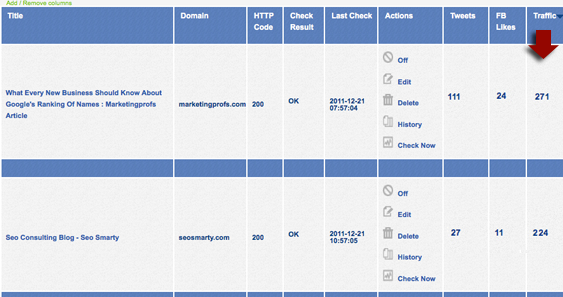
To start tracking your guest posts or links, you’ll need to create a new project and specify your base URL. For all pages you add within one project, this very base URL will be monitored automatically (even if you don’t specify which link within a given page you want to track).
You can add / remove columns from the table (to adjust a clearer view) and sort by each column. You will also receive weekly summaries of your missing links and most popular link sources.
Handy url for more info..... http://www.seosmarty.com/meet-mbg-tracker-the-simplest-and-cheapest-way-to-monitor-your-backlinks/




Got a burning SEO question?
Subscribe to Moz Pro to gain full access to Q&A, answer questions, and ask your own.
Browse Questions
Explore more categories
-
Moz Tools
Chat with the community about the Moz tools.
-
SEO Tactics
Discuss the SEO process with fellow marketers
-
Community
Discuss industry events, jobs, and news!
-
Digital Marketing
Chat about tactics outside of SEO
-
Research & Trends
Dive into research and trends in the search industry.
-
Support
Connect on product support and feature requests.
Related Questions
-

Canonical tag use for ecommerce product page detail
Hi, I have a category page I want to rank. This page has 24 different products quite similar but not exactly the same.
Technical SEO | | amastone
I want to use canonical tag in any product to the parent category.
Is this a right use of the canonical?
Category page I'm talking about is : Finger bits If I understand how to use canonical tags I can improve all my category pages. thanks marco0 -

Can you use Screaming Frog to find all instances of relative or absolute linking?
My client wants to pull every instance of an absolute URL on their site so that they can update them for an upcoming migration to HTTPS (the majority of the site uses relative linking). Is there a way to use the extraction tool in Screaming Frog to crawl one page at a time and extract every occurrence of _href="http://" _? I have gone back and forth between using an x-path extractor as well as a regex and have had no luck with either. Ex. X-path: //*[starts-with(@href, “http://”)][1] Ex. Regex: href=\”//
Technical SEO | | Merkle-Impaqt0 -

Canonical issues using Screaming Frog and other tools?
In the Directives tab within Screaming Frog, can anyone tell me what the difference between "canonicalised", "canonical", and "no canonical" means? They're found in the filter box. I see the data but am not sure how to interpret them. Which one of these would I check to find canonical issues within a website? Are there any other easy ways to identify canonical issues?
Technical SEO | | Flock.Media0 -

Is it ok to use H1 tags in breadcrumbs?
A client has an e-commerce site and she doesn't want a page title on the products page. She has breadcrumbs though. Her website developer suggests putting the H1 on the breadcrumbs. So: products> Gifts > picture frame with h1 tags round the word "picture frame". Is this ok to do? Or is it a bad thing for SEO purposes? Thanks
Technical SEO | | AL123al0 -

Trailing Slashes In Url use Canonical Url or 301 Redirect?
I was thinking of using 301 redirects for trailing slahes to no trailing slashes for my urls. EG: www.url.com/page1/ 301 redirect to www.url.com/page1 Already got a redirect for non-www to www already. Just wondering in my case would it be best to continue using htacces for the trailing slash redirect or just go with Canonical URLs?
Technical SEO | | upick-1623910 -

Using Schema.org: Product or Event as the schema type?
Hello, Most of you heard from the launch of the new format for microdata: Schema.org and my question is about the different types of Schema they provide. Our websites provide an overview of courses, visitors can search/filter training courses and most important: read peer reviews. Until now we formatted (the source) of those courses with the schema type "Product" because it allows us to provide search engines with metadata about reviews via the "Aggregrated Rating". Recently we updated the information about courses, to also provide start dates and locations to users, just like the schema type for: "Events". Because we would like to provide search engines also with both types of data I would like to know your opinion. Schema.org looks like not to support the Aggregated Rating for Events and vice versa for Startdates/Locations for the Product type. And combining the two Schema types also does not looks like an option because we can't put them on the same level like it should be. So what would you recommend to use for kind of schema type(s), are we able to use the 'Product' type next to the 'Event' type and so to combine them? Thanks a lot!
Technical SEO | | Martijn_Scheijbeler0 -

Starting a new product, should we use new domain or subdomain
I'm working with a company that has a high page rank on it's main domain and is looking to launch a new business / product offering. They are evaluating either creating a subdomain or launching a brand new domain. In either case, their current site will link contextually to the new site. Is there one method that would be better for SEO than the other? The new business / product is related to the main offering, but may appeal to different / new customers. The new business / product does need it's own homepage and will have a different conversion funnel than the existing business.
Technical SEO | | gallantc0 -

What tool do you use to check for URLs not indexed?
What is your favorite tool for getting a report of URLs that are not cached/indexed in Google & Bing for an entire site? Basically I want a list of URLs not cached in Google and a seperate list for Bing. Thanks, Mark
Technical SEO | | elephantseo3