Moz Q&A is closed.
After more than 13 years, and tens of thousands of questions, Moz Q&A closed on 12th December 2024. Whilst we’re not completely removing the content - many posts will still be possible to view - we have locked both new posts and new replies. More details here.
MBG Tracker...how to use it?
-
So I am a new blogger that has been submitting guest blog posts to a number of different blogs. It was recommended that I use the MBG Tracker so I can track the back links. The problem is that I am totally lost on how to use this tool. As I said before I am new to this whole thing and I am not really sure what constitutes a "base link" and a "back link." In the author bylines we are linking to different pages within a larger website. If anyone can help me I would really appreciate it!
-
Thanks for the reply Ann! David, SEOmoz and MyBlogGuest are different products, you'll probably find the best help for MBG talking with Ann or using her support forums.
-
Let me try to be very clear. Please email if you have more questions (I got both of your emails, so feel free to use the email)
When guest blogging, are you promoting ONE site in your byline in each of the guest posts? There can be different pages from one site, but one and the same domain.
For example:
- Project name: SEOmoz
- Base domain: seomoz.org
Then when you decide to upload this page, for example: http://www.geekwire.com/2012/seomoz-secret-startup-success-rand-fishkins-tips/ - the tracker will automatically identify the backlink to track - http://www.seomoz.org/dp/seattle-startup-marketing - because it has seomoz.org base domain.
By providing the base domain, you make your own job easier because you don't have to manually provide the tool with the backlink to track!
-
So the base link would be the link to the blog post and the back link is the link that goes back to my site? Is this correct? I had seen the site that you suggested but like I said I was confused by the base link and the back link.
-
Base link is a normal submission with a link. Back link has more value with guest blogging.
HOW DOES THE BACKLINK MONITORING TOOL WORK?
This is the cheapest and simplest alternative I am aware of:
- Receive instant emails if any of your links were removed or nofollowed;
- Track your guest post social popularity (Likes and Tweets)
- Measure traffic from each of your guest posts (for that you’ll need to install a tracking code)
- Identify most efficient backlink sources (for example, to find places where you canguest post again).
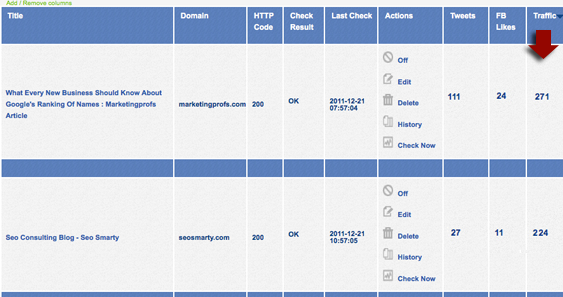
To start tracking your guest posts or links, you’ll need to create a new project and specify your base URL. For all pages you add within one project, this very base URL will be monitored automatically (even if you don’t specify which link within a given page you want to track).
You can add / remove columns from the table (to adjust a clearer view) and sort by each column. You will also receive weekly summaries of your missing links and most popular link sources.
Handy url for more info..... http://www.seosmarty.com/meet-mbg-tracker-the-simplest-and-cheapest-way-to-monitor-your-backlinks/




Got a burning SEO question?
Subscribe to Moz Pro to gain full access to Q&A, answer questions, and ask your own.
Browse Questions
Explore more categories
-
Moz Tools
Chat with the community about the Moz tools.
-
SEO Tactics
Discuss the SEO process with fellow marketers
-
Community
Discuss industry events, jobs, and news!
-
Digital Marketing
Chat about tactics outside of SEO
-
Research & Trends
Dive into research and trends in the search industry.
-
Support
Connect on product support and feature requests.
Related Questions
-

Correct use of schema for online store and physical stores
I have been getting conflicting advice on the best way to implement schema for the following scenario. There is a central e-commerce store that is registered to it's own unique address which is "head office". There are a few physical shops each of which has their own location and address. Each shop has its own landing page within /our-stores/. So each page on the website has the Organisation schema for the central 'organisation', something like: Then on each physical store landing page is something like the following as well as the Organisation schema: Is this correct? If it is should I extend LocalBusiness with store URL and sameAs for GMB listing and maybe Companies House registration? It's also been suggested that we should use LocalBusiness for the head office of the company, then Departmentwith the typeStore. But i'm not sure on that?
Technical SEO | | MickEdwards0 -

Can you force Google to use meta description?
Is it possible to force Google to use only the Meta description put in place for a page and not gather additional text from the page?
Technical SEO | | A_Q0 -

What punctuation can you use in meta tags? Are there any Google does not like?
So I know you can use dashes and | in meta tags, but can anyone tell me what other punctuation you can use? Also, it'd be great to know what punctuation you can't use. Thanks!
Technical SEO | | Trevorneo1 -

When you change your domain, How much time do I have to wait for google to return the traffic used to have?
Hello. 20 days ago, I changed my domain from uclasificados.net to uclasificados.com doing redirect 301 to all urls, and I started to loose rankings since that moment. I was wondering if changing it back could be the solutions, but some experts recommend me not to do that, because it could be worse. Right now I receave almost 50% of traffic I used to receave before, and I have done a lot of linkbuilding strategies to recover but nothing have worked until now. Even though I notified google of this change and I send again my new sitemap, I don't see that have improve my situation in any aspects, and I still see in webmastertools search stats from my last website (the website who used to be uclasificados.com before the change). What should I do to recover faster?
Technical SEO | | capmartin850 -

Custom hreflang tags in WP & using with Yoast
Hi My clients dev has added custom fields for adding hreflang tags to head of pages such as: "Rel Type", "The URL", and "Language Code" Am i right in thinking that until a different language/country version of the site is created these can remain empty or should they still be populated once added say with some sort of global reference or best left blank since will leave the head content global by default ? Also how important is it to add charset to the language code ? since seems optional ? Also this set up is on WP multi-site with Yoast and devs asked me the below: _One thing to note is that Yoast generates its own "canonical" tags - so if _
Technical SEO | | Dan-Lawrence
_you are going to use hreflang tags and canonical tags then you don't need to _
_add a canonical using the custom fields I have set up - Yoast has that _
sorted. _But if you are going down the route of NOT having any canonical tags - and _
_using a x-defult for the hreflang tags, I will need to try and suppress the _
_Yoast canonical tag so you can do this. Much depends on your approach and _
what you think is best. So how do i know if using canonicals or x-default, i take it best simplest to leverage Yoast and hence not add canonicals to custom fields ? Isnt x-default just for indicating language selectors/redirector not specific to 1 region? So long as havnt got those then good to proceed with Yoasts generated canonicals ? Cheers dan0 -

Would using javascript onclick functions to override href target be ok?
Hi all, I am currently working on a new search facility for me ecommerce site... it has very quickly dawned on me that this new facility is far better than my standard product pages - from a user point of view - i.e lots of product attributes for customers to find what they need faster, ability to compare products etc... All in all just better. BUT NO SEO VALUE!!! i want to use this search facility instead of my category/product pages... however as they are search pages i have "robots noindex them" and dont think its wise to change that... I have spoken to the developers of this software and they suggested i could use some javascript in the navigation to change the onlclick function to take the user to the search equivelant of the page... They said this way my normal pages are the ones that are still indexed by google etc, but the user has the benefit of using the improved search pages... This sounds perfect, however it also sounds a little deceptive... and i know google has loads of rules about these kinds of things, the last thing i want is to get any kind of penalty or any negative reaction from an SEO point of view... I am only considering this as it will improve the user experience on my website... Can any one advise if this is OK, or a "no no"... P.s for those wondering i use an "off the shelf" cart system and it would cost me an arm and a leg to have these features built into my actual category / product pages.
Technical SEO | | isntworkdull0 -
Using Sitemap Generator - Good/Bad?
Hi all I recently purchased the full licence of XML Sitemap Generator (http://www.xml-sitemaps.com/standalone-google-sitemap-generator.html) but have yet used it. The idea behind this is that I can deploy the package on each large e-commerce website I build and the sitemap will be generated as often as I set it be and the search engines will also be pinged automatically to inform them of the update. No more manual XML sitemap creation for me! Now it sounds great but I do not know enough about pinging search engines with XML sitemap updates on a regular basis and if this is a good or bad thing? Can it have any detrimental effect when the sitemap is changing (potentially) every day with new URLs for products being added to the site? Any thoughts or optinions would be greatly appreciated. Kris
Technical SEO | | yousayjump0 -

How to handle sitemap with pages using query strings?
Hi, I'm working to optimize a site that currently has about 5K pages listed in the sitemap. There are not in face this many pages. Part of the problem is that one of the pages is a tool where each sort and filter button produces a query string URL. It seems to me inefficient to have so many items listed that are all really the same page. Not to mention wanting to avoid any duplicate content or low quality issues. How have you found it best to handle this? Should I just noindex each of the links? Canonical links? Should I manually remove the pages from the sitemap? Should I continue as is? Thanks a ton for any input you have!
Technical SEO | | 5225Marketing0
