Moz Q&A is closed.
After more than 13 years, and tens of thousands of questions, Moz Q&A closed on 12th December 2024. Whilst we’re not completely removing the content - many posts will still be possible to view - we have locked both new posts and new replies. More details here.
Screaming From occurences and canonicals what does it all mean
-
Bonjourno from Wetherby UK...
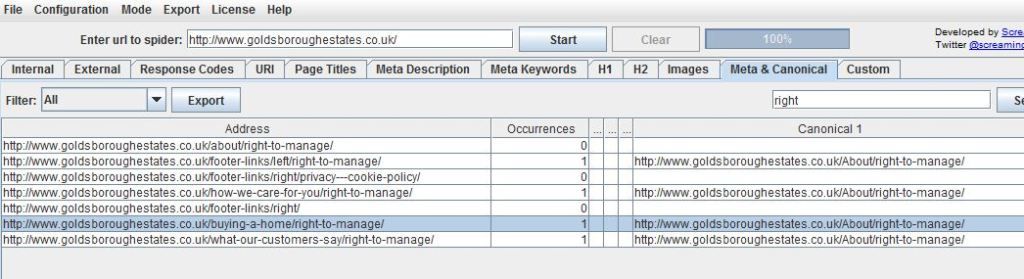
Ive used a package called screamong frog to diagnose canonical errors but can anyone tell me what this means? http://i216.photobucket.com/albums/cc53/zymurgy_bucket/understand-occurances-canonical.jpg
Thanks in advance.
David
-
Thank you for all your replies this was bugging me but the pain of not knowing has vanished like the morning mist as the warming glow of sunshine illumunates truth

-
David
Looks like you may have an issue there. The "address" and "canonical 1" should match about 99% of the time. Right now you're telling Google to index all those different address pages as a single URL (About/right-to-manage)... something to look at - and the suggestions below are both good as well.
-Dan
-
I agree with what Streamline Metrics said, I just want to add to this by linking you to a great SEOmoz post on canonicalization which may help you clear things up more.
In your case, having 1 rel="canonical" tag per page is what you want, so you should be fine with that, just make sure that the canonical tags (listed under canonical 1 in Screaming Frog) is the actual URL that you want.
Hope this helps
Zach -
It simply means how many canonical tags are found on that specific page. So if you had two rel=canonical tags on a page, it would say 2 occurrences. For more info, check out http://www.screamingfrog.co.uk/seo-spider/user-guide/tabs/





Got a burning SEO question?
Subscribe to Moz Pro to gain full access to Q&A, answer questions, and ask your own.
Browse Questions
Explore more categories
-
Moz Tools
Chat with the community about the Moz tools.
-
SEO Tactics
Discuss the SEO process with fellow marketers
-
Community
Discuss industry events, jobs, and news!
-
Digital Marketing
Chat about tactics outside of SEO
-
Research & Trends
Dive into research and trends in the search industry.
-
Support
Connect on product support and feature requests.
Related Questions
-

Trailing slash URLs and canonical links
Hi, I've seen a fair amount of topics speaking about the difference between domain names ending with or without trailing slashes, the impact on crawlers and how it behaves with canonical links.
Technical SEO | | GhillC
However, it sticks to domain names only.
What about subfolders and pages then? How does it behaves with those? Say I've a site structured like this:
https://www.domain.com
https://www.domain.com/page1 And for each of my pages, I've an automatic canonical link ending with a slash.
Eg. rel="canonical" href="https://www.domain.com/page1/" /> for the above page. SEM Rush flags this as a canonical error. But is it exactly?
Are all my canonical links wrong because of that slash? And as subsidiary question, both domain.com/page1 and domain.com/page1/ are accessible. Is it this a mistake or it doesn't make any difference (I've read that those are considered different pages)? Thanks!
G0 -

Does Google read dynamic canonical tags?
Does Google recognize rel=canonical tag if loaded dynamically via javascript? Here's what we're using to load: <script> //Inject canonical link into page head if (window.location.href.indexOf("/subdirname1") != -1) { canonicalLink = window.location.href.replace("/kapiolani", ""); } if (window.location.href.indexOf("/subdirname2") != -1) { canonicalLink = window.location.href.replace("/straub", ""); } if (window.location.href.indexOf("/subdirname3") != -1) { canonicalLink = window.location.href.replace("/pali-momi", ""); } if (window.location.href.indexOf("/subdirname4") != -1) { canonicalLink = window.location.href.replace("/wilcox", ""); } if (canonicalLink != window.location.href) { var link = document.createElement('link'); link.rel = 'canonical'; link.href = canonicalLink; document.head.appendChild(link); } script>
Technical SEO | | SoulSurfer80 -

301 redirect: canonical or non canonical?
Hi, Newbie alert! I need to set up 301 redirects for changed URLs on a database driven site that is to be redeveloped shortly. The current site uses canonical header tags. The new site will also use canonical tags. Should the 301 redirects map the canonical URL on the old site to the corresponding canonical for the new design . . . or should they map the non canonical database URLs old and new? Given that the purpose of canonicals is to indicate our preferred URL, then my guess is that's what I should use. However, how can I be sure that Google (for example) has indexed the canonical in every case? Thx in anticipation.
Technical SEO | | ztalk1120 -

Rel canonical between mirrored domains
Hi all & happy new near! I'm new to SEO and could do with a spot of advice: I have a site that has several domains that mirror it (not good, I know...) So www.site.com, www.site.edu.sg, www.othersite.com all serve up the same content. I was planning to use rel="canonical" to avoid the duplication but I have a concern: Currently several of these mirrors rank - one, the .com ranks #1 on local google search for some useful keywords. the .edu.sg also shows up as #9 for a dirrerent page. In some cases I have multiple mirrors showing up on a specific serp. I would LIKE to rel canonical everything to the local edu.sg domain since this is most representative of the fact that the site is for a school in Singapore but...
Technical SEO | | AlexSG
-The .com is listed in DMOZ (this used to be important) and none of the volunteers there ever respoded to requests to update it to the .edu.sg
-The .com ranks higher than the com.sg page for non-local search so I am guessing google has some kind of algorithm to mark down obviosly local domains in other geographic locations Any opinions on this? Should I rel canonical the .com to the .edu.sg or vice versa? I appreciate any advice or opinion before I pull the trigger and end up shooting myself in the foot! Best regards from Singapore!0 -

Canonical tag for Home page: with or without / at the end???
Setting up canonical tags for an old site. I really need advice on that darn backslash / at the end of the homepage URL. We have incoming links to the homepage as http://www.mysite.com (without the backslash), and as http://www.mysite.com/ (with the backslash), and as http://www.mysite.com/index.html I know that there should be 301 redirects to just one version, but I need to know more about the canonical tags... Which should the canonical tag be??? (without the backslash) or (with the backslash) Thanks for your help! 🙂
Technical SEO | | GregB1230 -

Do I need to add canonical link tags to pages that I promote & track w/ UTM tags?
New to SEOmoz, loving it so far. I promote content on my site a lot and am diligent about using UTM tags to track conversions & attribute data properly. I was reading earlier about the use of link rel=canonical in the case of duplicate page content and can't find a conclusive answer whether or not I need to add the canonical tag to these pages. Do I need the canonical tag in this case? If so, can the canonical tag live in the HEAD section of the original / base page itself as well as any other URLs that call that content (that have UTM tags, etc)? Thank you.
Technical SEO | | askotzko1 -

How to structure rel=canonical for a e commerce site
Hello, So I have searched the Q & A , Google, the zen cart forum and at this point I am looking for some one to give a concrete answer on what I should do. There is a lot of different opinions on " rel=canonical" and how to apply it , since there are many other variable in place. I have a zen cart site. I am using the latest 1.3.9 version. The default setting ( seem to me) uses the rel=canonical to point back to the specific link product or category respectively. Most of the time I have two scenarios. 1. Main category ---> Sub category----> Product 2. Main Category----> Product I'll give an example http://www.perfectindesign.com/awards ---main category http://www.perfectindesign.com/awards/acrylic-awards sub category http://www.perfectindesign.com/awards/acrylic-awards/slanted-award product (this example has three sub categories with maybe 12 products in one 4 in the second and 5 in the third) From looking at the source code for each url it the rel=canonical just points back to its own url. I want to avoid competing against my self, for the example above keyword "acrylic awards" so should the use of the re=canonical be changes site wide to have products point back to sub categories when they exist and have products point back to main categories when no sub categories exist? I am very new to seo, specifically eCommerce seo. If you have experience and have done this to a site you manage for a client or your own please advise how to proceed. Also if I'm missing some thing that will give me a better understanding of the bigger seo picture that would be great. Thanks, Yevgeny
Technical SEO | | Yevgeny0 -

URL query strings and canonical tag
Hi, I have recently been getting my comparison website redesigned and developed onto wordpress and the site is now 90% complete. Part of the redesign has meant that there are now dynamic urls in the format: http://www.mywebsite.com/10-pounds-productss/?display=cost&value=10 I have other pages similar to this but with different content for the different price ranges and these are linked to from the menus: http://www.mywebsite.com/20-pounds-products/?display=cost&value=20 Now my questions are: 1. I am using Joost's All-in-one SEO plugin and this adds a canonical tag to the page that is pointing to http://www.mywebsite.com/10-pounds-products/ which is the permalink. Is this OK as it is or should i change this to http://www.mywebsite.com/10-pounds-products/?display=cost&value=10 2. Which URL will get indexed, what gets shown as the display URL in the SERPs and what page will users land on? I'm a bit confused so apologies if these seem like silly questions. Thanks
Technical SEO | | bizarro10000