Moz Q&A is closed.
After more than 13 years, and tens of thousands of questions, Moz Q&A closed on 12th December 2024. Whilst we’re not completely removing the content - many posts will still be possible to view - we have locked both new posts and new replies. More details here.
Unsolved Why My site pages getting video index viewport issue?
-
Hello,
I have been publishing a good number of blogs on my site Flooring Flow. Though, there's been an error of the video viewport on some of my articles.
I have tried fixing it but the error is still showing in Google Search Console.
Can anyone help me fix it out?
-
@RyanPurkey Dear Sir, My theme, and setting all is good but I am also receiving the same issue. Here are a few links that you can check, please suggest the best solution.
https://theshoy.com/advantages-and-disadvantages-of-motorcycle/
https://theshoy.com/advantages-and-disadvantages-of-smartphones/
Check the attachment below from my search console.
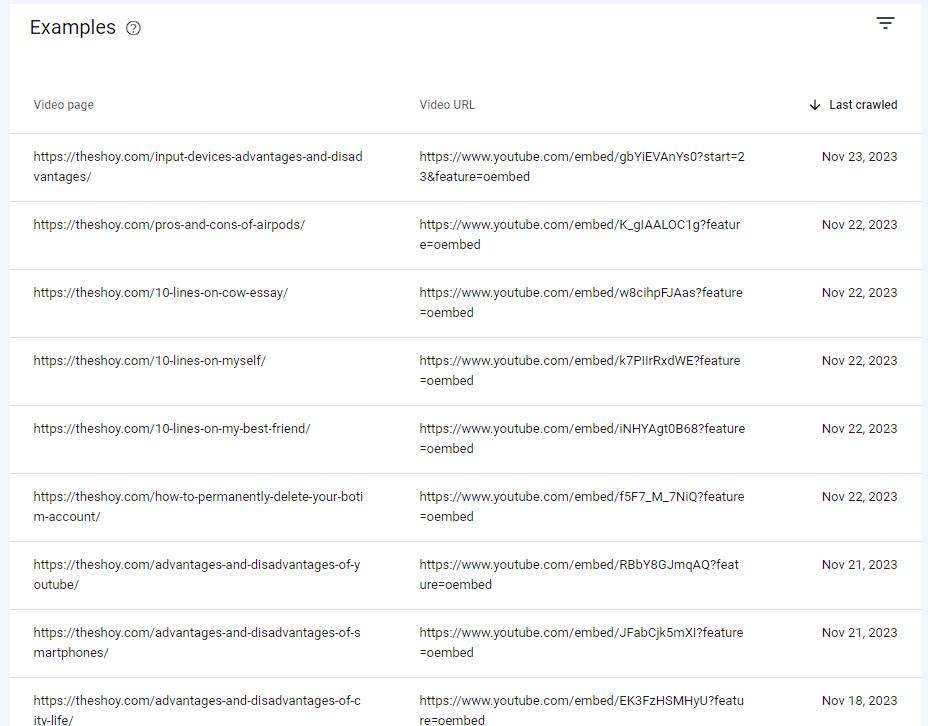
-
this is the link to my webstory https://stayenergies.com/web-stories/benefit-of-walking/ that getting issues with "video outside the viewport"
it is created in WordPress; is there any plugin or setting to solve it.
-
Viewport Configuration: The viewport meta tag is essential for responsive web design, as it tells the browser how to adjust the page's dimensions Ehsaas program and scale to fit different screen sizes. If the viewport is not configured correctly for video elements, search engines may have difficulty indexing and displaying videos properly.
Lazy Loading: Lazy loading is a technique used to improve page load times by deferring the loading of non-essential content, such as images and videos, until the user scrolls to that section of the page. If lazy loading is not correctly implemented for videos, it can lead to indexing issues.
Missing Video Sitemaps: Sitemaps are files that provide information about the content on your website to search engines. If you have videos on your site, it's essential to have a video sitemap that provides details about the videos, such as their titles, descriptions, and URLs. This helps search engines index your videos more effectively.
Accessibility Issues: Video content should be accessible to all users, including those with disabilities. If your videos lack proper captions, transcripts, or other accessibility features, it may lead to indexing issues.
-
If your site pages are experiencing a "video index viewport issue," it likely refers to problems related to how videos are indexed and displayed within the viewport on your website. The viewport is the visible area of a web page that a user can see without scrolling. Without further information, it's challenging to pinpoint the exact issue, but here are some common reasons and potential solutions for video index viewport problems:
Responsive Design: Ensure that your website has a responsive design, meaning it adapts and displays correctly on various screen sizes and devices. If the video container's size isn't adjusting properly to different viewports, the video may be cut off or not visible entirely.
Viewport Meta Tag: Make sure your web pages include the viewport meta tag in the <head> section. This tag helps the browser to correctly scale and render the content to fit different screen sizes.
Example viewport meta tag: <meta name="viewport" content="width=device-width, initial-scale=1">
Video Element Attributes: Check the HTML attributes of the video element. Setting the width and height attributes can help the browser allocate the correct space for the video player.Example video element:<video width="640" height="360" controls>
<source src="video.mp4" type="video/mp4">
Your browser does not support the video tag.
</video>
CSS Issues: Review your CSS styles to ensure that they don't interfere with the video's display. Sometimes, conflicting styles or positioning can lead to improper video rendering.Lazy Loading: If you are using lazy loading for videos, verify that it's implemented correctly. Lazy loading delays the loading of the video until it's about to come into the user's viewport, which might affect how it's indexed and displayed.
JavaScript Conflicts: Check if any JavaScript on your site is causing conflicts with video players or the viewport settings.
Browser Compatibility: Test your site on various browsers to ensure that the issue isn't browser-specific.
Video Format: Ensure that your videos are in a format supported by major browsers, such as MP4 with H.264 video codec and AAC audio codec.
Server Configuration: In some cases, server misconfigurations may lead to video loading issues. Ensure that your server is correctly configured to serve videos.
Testing and Debugging: Use browser developer tools to inspect the video element and check for any errors or warnings related to the video player or viewport.
Click here : Web Development company in Bangladesh -
the same issue is also occurring in my web stories when uploading any video to them. How to solve it. I have also added a video sitemap, also reduces the video size but does not solve the issue.
-
@mitty27 Your iFrame at the top of the page is hard set to 1200px width which could cause problems. Please provide some specific URLs that GSC has identified with the viewport issue for specific answers to those. Thanks and good luck!
-
Your site pages might be encountering Prestige Park Grove video index viewport issues due to improper implementation of the video index or viewport settings. It can lead to videos not displaying correctly within the visible area, affecting user experience. Check and adjust your site's code to ensure proper video indexing and viewport configuration for optimal performance.







Got a burning SEO question?
Subscribe to Moz Pro to gain full access to Q&A, answer questions, and ask your own.
Browse Questions
Explore more categories
-
Moz Tools
Chat with the community about the Moz tools.
-
SEO Tactics
Discuss the SEO process with fellow marketers
-
Community
Discuss industry events, jobs, and news!
-
Digital Marketing
Chat about tactics outside of SEO
-
Research & Trends
Dive into research and trends in the search industry.
-
Support
Connect on product support and feature requests.
Related Questions
-

Why Product pages are throwing Missing field "image" and Missing field "price" in Wordpress Woocommerce
I have a wordpress wocommerce website where I have uploaded 100s of products but it's giving me error in GSC under merchant listing tab. When I tested it show missing field image and missing field price. I have done everything according to https://developers.google.com/search/docs/appearance/structured-data/product#merchant-listing-experiences and applied fixed i.e. images are 800x800 and price range is also there. What else can be done here?!merchant listing.jpg
Technical SEO | | Ravi_Rana0 -

Unsolved Capturing Source Dynamically for UTM Parameters
Does anyone have a tutorial on how to dynamically capture the referring source to be populated in UTM parameters for Google Analytics? We want to syndicate content and be able to see all of the websites that provided referral traffic for this specific objective. We want to set a specific utm_medium and utm_campaign but have the utm_source be dynamic and capture the referring website. If we set a permanent utm_source, it would appear the same for all incoming traffic. Thanks in advance!
Technical SEO | | peteboyd0 -

Sudden Drop in Mobile Core Web Vitals
Web Vitals Screengrab.PNG For some reason, after all URLs being previously classified as Good, our Mobile Web Vitals report suddenly shifted to the above, and it doesn't correspond with any site changes on our end. Has anyone else experience something similar or have any idea what might have caused such a shift? Curiously I'm not seeing a drop in session duration, conversion rate etc. for mobile traffic despite the seemingly sudden change.
Technical SEO | | rwat0 -

Unsolved Duplicate LocalBusiness Schema Markup
Hello! I've been having a hard time finding an answer to this specific question so I figured I'd drop it here. I always add custom LocalBusiness markup to clients' homepages, but sometimes the client's website provider will include their own automated LocalBusiness markup. The codes I create often include more information. Assuming the website provider is unwilling to remove their markup, is it a bad idea to include my code as well? It seems like it could potentially be read as spammy by Google. Do the pros of having more detailed markup outweigh that potential negative impact?
Local Website Optimization | | GoogleAlgoServant0 -

Indexed pages
Just started a site audit and trying to determine the number of pages on a client site and whether there are more pages being indexed than actually exist. I've used four tools and got four very different answers... Google Search Console: 237 indexed pages Google search using site command: 468 results MOZ site crawl: 1013 unique URLs Screaming Frog: 183 page titles, 187 URIs (note this is a free licence, but should cut off at 500) Can anyone shed any light on why they differ so much? And where lies the truth?
Technical SEO | | muzzmoz1 -

How can I get a photo album indexed by Google?
We have a lot of photos on our website. Unfortunately most of them don't seem to be indexed by Google. We run a party website. One of the things we do, is take pictures at events and put them on the site. An event page with a photo album, can have anywhere between 100 and 750 photo's. For each foto's there is a thumbnail on the page. The thumbnails are lazy loaded by showing a placeholder and loading the picture right before it comes onscreen. There is no pagination of infinite scrolling. Thumbnails don't have an alt text. Each thumbnail links to a picture page. This page only shows the base HTML structure (menu, etc), the image and a close button. The image has a src attribute with full size image, a srcset with several sizes for responsive design and an alt text. There is no real textual content on an image page. (Note that when a user clicks on the thumbnail, the large image is loaded using JavaScript and we mimic the page change. I think it doesn't matter, but am unsure.) I'd like that full size images should be indexed by Google and found with Google image search. Thumbnails should not be indexed (or ignored). Unfortunately most pictures aren't found or their thumbnail is shown. Moz is giving telling me that all the picture pages are duplicate content (19,521 issues), as they are all the same with the exception of the image. The page title isn't the same but similar for all images of an album. Example: On the "A day at the park" event page, we have 136 pictures. A site search on "a day at the park" foto, only reveals two photo's of the albums. 3QolbbI.png QTQVxqY.jpg mwEG90S.jpg
Technical SEO | | jasny0 -
Site indexed by Google, but (almost) never gets impressions
Hi there, I have a question that I wasn't able to give it a reasonable answer yet, so I'm going to trust on all of you. Basically a site has all its pages indexed by Google (I verified with site:sitename.com) and it also has great and unique content. All on-page grades are A with absolutely no negative factors at all. However its pages do not get impressions almost at all. Of course I didn't expect it to be on page 1 since it has been launched on Dec, 1st, but it looks like Google is ignoring (or giving it bad scores) for some reason. Only things that can contribute to that could be: domain privacy on the domain, redirect from the www to the subdomain we use (we did this because it will be a multi-language site, so we'll assign to each country a subdomain), recency (it has been put online on Dec 1st and the domain is just a couple of months old). Or maybe because we blocked crawlers for a few days before the launch? Exactly a few days before Dec 1st. What do you think? What could be the reason for that? Thanks guys!
Technical SEO | | ruggero0 -

Same Video on Multiple Pages and Sites... Duplicate Issues?
We're rolling out quite a bit of pro video and hosting on a 3-party platform/player (likely BrightCove) that also allows us to have the URL reside on our domain. Here is a scenario for a particular video asset: A. It's on a product page that the video is relevant for. B. We have an entry on our blog with the video C. We have a separate section of our site "Video Library" that provides a centralized view of all videos. It's there too. D. We eventually give the video to other sites (bloggers, industry educational sites etc) for outreach and link-building. A through C on our domain are all for user experience as every page is very relevant, but are there any duplicate video issues here? We would likely only have the transcript on the product page (though we're open to suggestions). Any related feedback would be appreciated. We want to make this scalable and done properly from the beginning (will be rolling out 1000+ videos in 2010)
Technical SEO | | SEOPA0