Moz Q&A is closed.
After more than 13 years, and tens of thousands of questions, Moz Q&A closed on 12th December 2024. Whilst we’re not completely removing the content - many posts will still be possible to view - we have locked both new posts and new replies. More details here.
WordPress Sub-directory for SEO
-
Hi There,
I'm working on a WordPress site that includes a premium content blog with approx 900 posts.
As part of the project, those 900 posts and other membership functionality will be moved from the main site to another site built specifically for content/membership.
Ideally, we want the existing posts to remain on the root domain to avoid a loss in link juice/domain authority.
We initially began setting up a WordPress Multisite using the sub-directory option. This allows for the main site to be at www.website.com and the secondary site to be at www.website.com/secondary.
Unfortunately, the themes and plugins we need for the platform do not play nicely with WordPress Multisite, so we started seeking a new solution, and, discovered that a second instance of WordPress can be installed in a subdirectory on the server. This would give us the same subdirectory structure while bypassing WordPress Multisite and instead, having two separate single-site installs.
Do you foresee any issues with this WordPress subdirectory install? Does Google care/know these are two separate WordPress installs and do we risk losing any link juice/domain authority?
-
@himalayaninstitute said in WordPress Sub-directory for SEO:
WordPress can be installed in a subdirectory
I have done this a lot and I mean a lot what you want to do is set up a reverse proxy on your subdomain and this will allow you to not only bypass having to use multisite for subfolder but if you want to power it separately you can you do not have to it all. You should probably use your same server and power through Fastly our CloudFlare
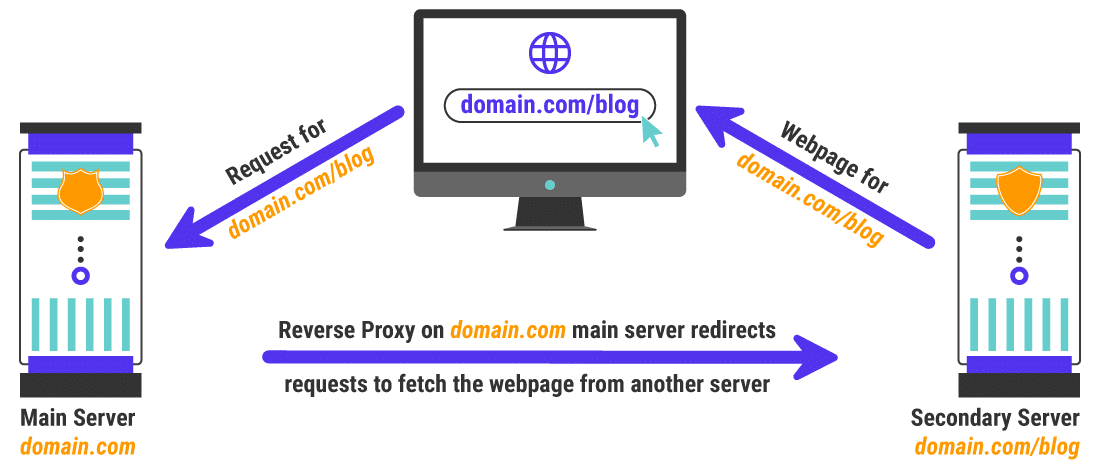
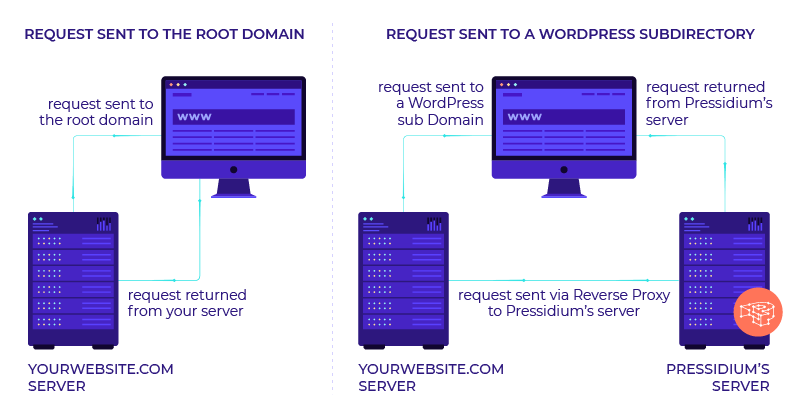
once you set this up it is super easy to keep it running in your entire site will be much faster as a result as well
my response to someone else that needed a subfolder
https://moz.rainyclouds.online/community/q/topic/69528/using-a-reverse-proxy-and-301-redirect-to-appear-sub-domain-as-sub-directory-what-are-the-seo-risksplease also look at it explained by these hosting companies is unbelievable easy to implement compared to how it looks and you can do so with Fastly or cloudflare in a matter of minutes
-
https://servebolt.com/help/article/cloudflare-workers-reverse-proxy/
-
https://support.pagely.com/hc/en-us/articles/213148558-Reverse-Proxy-Setup
-
https://wpengine.com/support/using-a-reverse-proxy-with-wp-engine/
-
https://thoughtbot.com/blog/host-your-blog-under-blog-on-your-www-domain
-
https://crate.io/blog/fastly_traffic_spike
*https://support.fastly.com/hc/en-us/community/posts/4407427792397-Set-a-request-condition-to-redirect-URL -
https://coda.io/@matt-varughese/guide-how-to-reverse-proxy-with-cloudflare-workers
-
https://www.cloudflare.com/learning/cdn/glossary/reverse-proxy/
-
https://gist.github.com/LimeCuda/18b88f7ad9cdf1dccb01b4a6bbe398a6
I hope this was of help
tom
-
-
@nmiletic The content section of the site requires a unique UI Design and other robust functionality, so having a separate theme/plugins in its own directory is going to be the way we go here. Thanks for your assistance!
-
@himalayaninstitute Have you thought about adding a page and making all of this new content a subpage? Or changing your permalink structure to include a category in the URL? You can then add all of these posts under that category and have the URL show up as www.example.com/category/page-or-post-name
-
The website at the subdirectory will be an online learning platform with a blog, online courses, memberships, gated content, etc. The content currently lives on the main site, so, it's great that we can move it into the subdirectory without taking a hit from Google.
Since these are fundamentally two separate websites, we're not concerned about needing to manage them independently.
Thanks again for your input and advice, we greatly appreciate it!
-
@amitydigital said in WordPress Sub-directory for SEO:
Google will view it as one site so you shouldn't have any issues from that perspective. The Google bot is just looking at pages and won't know/care that the underlying CMS that is running some pages is a different install than other pages. The downside is you now have two websites to maintain, two themes, two sets of files, etc... That may result in a bit of a headache in the future.
As @amitydigital put it, the issue with your approach would be repetitive tasks. You will not loose any DA nor PA (being that you implement a correct 301 redirection). What is going to be on the subdirectory?
-
Google will view it as one site so you shouldn't have any issues from that perspective. The Google bot is just looking at pages and won't know/care that the underlying CMS that is running some pages is a different install than other pages. The downside is you now have two websites to maintain, two themes, two sets of files, etc... That may result in a bit of a headache in the future.





Got a burning SEO question?
Subscribe to Moz Pro to gain full access to Q&A, answer questions, and ask your own.
Browse Questions
Explore more categories
-
Moz Tools
Chat with the community about the Moz tools.
-
SEO Tactics
Discuss the SEO process with fellow marketers
-
Community
Discuss industry events, jobs, and news!
-
Digital Marketing
Chat about tactics outside of SEO
-
Research & Trends
Dive into research and trends in the search industry.
-
Support
Connect on product support and feature requests.
Related Questions
-

Unsolved Need Wordpress Front-end Plugin With Moz API
Hi Guys,
On-Page Optimization | | mrezair
I'm looking for Moz SEO Front-end Wordpress Plugin To Audit My Visitors Website And Show Results in my site. Like This plugin for Moz DA Checker: https://www.724ws.net/domain-authority-checker/ It's not important to be a free plugin or Premium one. I need to increase leads and traffic by it. Any suggestion will be appreciated.0 -

Unsolved Huge Increase In Internal Links + Domain Authority Tanked
Hey, I am very concerned about the link metrics I am seeing, really hoping someone can help. In October last year there were a total of 34.7K 'total links' attributed to my E-commerce website . This compared to 41.2k and 213k links attributed to my two main competitors. In November, my website had a forced update due to incompatibility issues my shopping cart version was having with the server on which it is hosted. (I was told by my web developers / hosting company that their server was upgraded.) This update created many problems such as checkout issues, page layout issues, sitemaps not automatically regenerating and the big one - it reverted back to http instead of https. Along with my developers, I spent 2 weeks fixing all of the issues until everything worked correctly and https was reinstated. After initial warnings from Moz, I have not received any critical crawler issues or warnings, big ranking drops etc since November. I was satisfied that all was ok. However, in November my 'total links' jumped to 81.5k and have since continued to balloon. December - 309.1k, January -335k, February - 665k, March - 716k, April - 719k, May - 742k, June - 751k. In the same period (November - June), my external links went from 5.3k - 8.7k. So it appears the huge increase in links are internal. In my latest report it states that 'internal follow links' are up by 8k and 'internal no follow links' are up by 1k. This is insane. I cannot understand why I have so many internal links and why they keep increasing. I maintain the website with updates, blog articles etc but no more than I have in the past several years. Worryingly, once this increase in links started being reported, my Domain Authority has also tanked. In October my DA was 37 (higher than my competitors) and has since dropped as low as 19. It has gone up to 21 this month (still significantly lower than my competitors). I have spent hours researching why this huge increase in internal links could be happening but have got nowhere. If anyone could advise what the issue could be and how I can fix it, I would be eternally grateful. Issues I have discovered along the way that may help with analysis:
Link Explorer | | g3mmab
My site has many 404s (hundreds) - all relate to urls of old images that have been removed from the website. The 'Top Hits' on my website are from blogs (some spammy) to these deleted image urls that return a 404. I don't use any plugins. I do get 'duplicate content' notices as my blog posts archive themselves and generate new urls - as an example - 'blog post name' archived December 2023. It may be the case that the old http urls have been redirected to https but I have no warnings for 'redirect issues' in Moz. Thanks for taking the time to read this and thanks in advance for any help.0 -

Rel canonical tag from shopify page to wordpress site page
We have pages on our shopify site example - https://shop.example.com/collections/cast-aluminum-plaques/products/cast-aluminum-address-plaque That we want to put a rel canonical tag on to direct to our wordpress site page - https://www.example.com/aluminum-plaques/ We have links form the wordpress page to the shop page, and over time ahve found that google has ranked the shop pages over the wp pages, which we do not want. So we want to put rel canonical tags on the shop pages to say the wp page is the authority. I hope that makes sense, and I would appreciate your feeback and best solution. Thanks! Is that possible?
Intermediate & Advanced SEO | | shabbirmoosa0 -

looking for strategies to increase DA
any pointers or information on strategies to increase DA. I'm just starting to understand and get results on my website so I'm looking for any idea sharing.
Link Building | | libertyjumpers
my names mike, i have a Las Vegas bounce house party rental business.
website
https://www.libertypartyjumpers.com/0 -

My site DA did not increase even I built huge high-quality backlinks
I have created a lot of high DA backlinks for my website for 3 months. But the DA of my site is still less than 40 and it has not changed for 2 months. Why does my site DA stop increasing as I build huge backlinks? How and when Moz will update the DA score? Are there any other ways to increase DA? My site: CouponBirds
Link Building | | Jane0909870 -

Does changing template for a wordpress site affect SEO
Hi I work for an Inventory Management Software company and we already have a WordPress site but I am currently working on re-designing of our WordPress site and in this process, we are looking for moving to a new template. I want to know what will be the impact on SEO performance while taking a shift to a new template.
Intermediate & Advanced SEO | | Cin7_Marketing0 -

Yoast seo title question
I was referred to this plugin and have found it to be the most irritating and poorly designed plugin in the world. I want to be able to set my titles without it changing my page headers as well. For instance - If I set my title to be "This is my article name | site name" it will make my H1 tag read the same. I do not want or desire this nonsense. Why would they think this is something wise? Why would I want my site name on every single H1 tag on my site? How can I fix this? I only want my title to be my title. I want my H1 tag to remain the post/page name that I define in wordpress.
Intermediate & Advanced SEO | | Atomicx0 -

Are dropdown menus bad for SEO
I have an ecommerce shop here: http://m00.biz/UHuGGC I've added a submenu for each major category and subcategory of items for sale. There are over 60 categories on that submenu. I've heard that loading this (and the number of links) before the content is very bad for SEO. Some will place the menu below the content and use absolute positioning to put the menu where it currently is now. It's a bit ridiculous in doing things backwards and wondering if search engines really don't understand. So the question is twofold: (1) Are the links better in a bottom loading sidemenu where they are now? (2) Given the number of links (about 80 in total with all categories and subcategories), is it bad to have the sidemenu show the subcategories which, in this instance, are somewhat important? Should I just go for the drilldown, e.g. show only categories and then show subcategories after? Truth is that users probably would prefer the dropdown with all the categories and second level subcategories, despite the link number and placement.
Intermediate & Advanced SEO | | attorney1