Moz Q&A is closed.
After more than 13 years, and tens of thousands of questions, Moz Q&A closed on 12th December 2024. Whilst we’re not completely removing the content - many posts will still be possible to view - we have locked both new posts and new replies. More details here.
Solve Redirect Chains
-
I've gotten a few Redirect Issues that involve Redirect Chains, with the https:// version redirecting to the www. version and then redirecting to the right URL.
Here is an example:
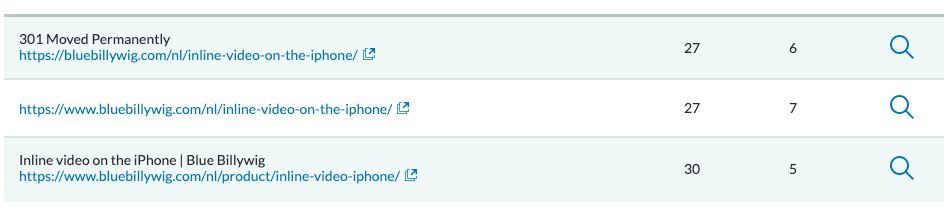
I've tried setting a direct redirect between the first and the last URL, but WordPress doesn't seem to allow that (it's overwritten). I've also tried checking the internal links to make sure that none of the links are the first one. They don't seem to be there.
Does anyone have any tips on solving these Redirect Chains?
-
Even if you've fixed the internal link, the old URL will still be periodically crawled by Google and other crawlers (including Moz!), so it's worth fixing.
The issue may be that you're using WordPress to handle a redirect between two different subdomains, where WordPress is hosted in just one of them. Ideally you would address this at server level.

Got a burning SEO question?
Subscribe to Moz Pro to gain full access to Q&A, answer questions, and ask your own.
Browse Questions
Explore more categories
-
Moz Tools
Chat with the community about the Moz tools.
-
SEO Tactics
Discuss the SEO process with fellow marketers
-
Community
Discuss industry events, jobs, and news!
-
Digital Marketing
Chat about tactics outside of SEO
-
Research & Trends
Dive into research and trends in the search industry.
-
Support
Connect on product support and feature requests.
Related Questions
-

How do I carry out a redirect? Is there a code I need to use?
How do I carry out a redirect? Is there a code I need to use? Thank you in advance.
On-Page Optimization | | laurentjb0 -

GoogleBot still crawling HTTP/1.1 years after website moved to HTTP/2
Whole website moved to https://www. HTTP/2 version 3 years ago. When we review log files, it is clear that - for the home page - GoogleBot continues to only access via HTTP/1.1 protocol Robots file is correct (simply allowing all and referring to https://www. sitemap Sitemap is referencing https://www. pages including homepage Hosting provider has confirmed server is correctly configured to support HTTP/2 and provided evidence of accessing via HTTP/2 working 301 redirects set up for non-secure and non-www versions of website all to https://www. version Not using a CDN or proxy GSC reports home page as correctly indexed (with https://www. version canonicalised) but does still have the non-secure version of website as the referring page in the Discovery section. GSC also reports homepage as being crawled every day or so. Totally understand it can take time to update index, but we are at a complete loss to understand why GoogleBot continues to only go through HTTP/1.1 version not 2 Possibly related issue - and of course what is causing concern - is that new pages of site seem to index and perform well in SERP ... except home page. This never makes it to page 1 (other than for brand name) despite rating multiples higher in terms of content, speed etc than other pages which still get indexed in preference to home page. Any thoughts, further tests, ideas, direction or anything will be much appreciated!
Technical SEO | | AKCAC1 -

Unsolved No replies from help@moz.rainyclouds.online - one of our IPs is blocked by Cloudflare so we cannot access Moz Community from there
Hi all,
Product Support | | DanielDL
I am a bit at my wits end trying to get some acknowledgement from MOZ. Have had no replies, no ticket auto-replies, no updates on any of the messages I have sent via the Moz Help Form on the website. Literally nothing. I wanted to avoid having to post publicly, but does anyone know how to raise a "technical problem" ticket with MOZ? help@moz.rainyclouds.online never replies and the Help Form doesn't generate any kind of ticket. From our main office we get an "Access denied" Error (via Cloudflare) specifically for the Moz Community area. This happened to us in February of this year and has been happening again all through May. After testing ourselves with our IT, we determine that MOZ's Cloudflare account has incorrectly blocked the dedicated IP address specific to the internet connection at our head office. This means that none of our Moz User accounts can access anything related to the Community area in our account when working at the studio. We can only do so when working remotely (ie. some other IP address). This is incredibly frustrating, particularly as we've been on a proper paid MOZ account for many years. And I have sent numerous email requests, messages via the Form, etc., and have never heard back from anyone at all. The problem has been on-going for some time and I guess it is my fault because I tried to politely wait a fair amount of time between each follow-up. Only to realize that, actually, I don't think anyone is monitoring help@moz.rainyclouds.online or even the Form submissions, or are even looking into the issue for me. Am hoping this message is seen by someone at Moz so they can let me know what is going on please? Guys..... c'mon.....0 -

How to add multiple locations to an existing GBP
Hi, I'm having trouble finding the option to add multiple locations to an existing GBP account. Can somebody help me?
Local Listings | | Trendi
I believe it can be done throught Google &/or MOZ.
Thank you,0 -

Should I redirect a popular but irrelevant blog post to the home page?
Hi. I'm trying to get my website; www.ciphr.com , to rank for keywords relevant to "HR Software" in the UK. It's a highly competitive industry and we rank ~mid to low on page one for some of our ideal keywords that are highly relevant and high volume. Years ago we took the decision to blog about topics more loosely related to the world of work. One of our blog posts, about plants in the office https://www.ciphr.com/advice/plants-in-the-office/ is popular. It gets decent traffic and consistently builds backlinks to the post without any further effort on our part. The specific page has a PA of 46 and DA of 55 with >500 domains linking to it. This compares to our home page with a PA of 47 and 700 linking domains. It is typically the home page that ranks for our money keywords "HR Software" "HR Systems" in the UK. Because this blog post is so loosely related to our actual business, the traffic it generates is highly unlikely to turn into a customer of ours. I am considering redirecting the blog post to the home page to pass link juice to the home page. The concern I have is that, based on the anchor text and contextual signals from linking pages, Google might then infer that our home page is less relevant for our money keywords and more relevant for "plants". Are my concerns unfounded? What are your thoughts? Should I redirect the blog post to the home page? Another internal page? Keep the blog post live? Thanks
On-Page Optimization | | crichardson19922 -

My site auto redirects http to https. This is causing redirect chains. What can I do?
I noticed that Moz flags a lot of redirect chain issues on my site. I realized that this is mostly because the site automatically redirects http to https, and when I create a new URL (when a URL changes, for example) it is automatically flagged as a chain. Example: http://www.example-link Auto directs to: https://www.example-link Which is then redirected to: https://www.example-link-changed (when the address actually changes) I don't seem to have any control over changing where the initial http redirect goes. Any advice on fixing this problem?
On-Page Optimization | | baystatemarketing0 -

301 Redirects - Large .htaccess file question
We are moving about 5000 pages from root into different folders. We need to individually 301 each page because the are sitting at root level now: mysite.com/page.com We want to move them to: mysite.com/folder/page.html etc I dont think redirect match can works because of the different files names and folders they are being moved in to. Will 5000 entries in .htacess slow site loading? Any other suggestions how to handle?
On-Page Optimization | | leadforms0 -

How to 301 redirect, without access to .htaccess and to a new domain
There are few ways to do this and I would like to ask other Mozzers if they have found the best way. We have a site .co.uk and are moving it back to .com. However we do not have any access to the site folders for .co.uk. (We have to move it anyway as our provider is withdrawing their service). We have built our URL 301 redirect file and it is ready to go, but how to impliment it? We can repoint .co.uk to another site, and then redirect all traffic for each URL but this is quite messy, or just forget trying to 301 each page and just rediect the whole site.
On-Page Optimization | | BruceA
the .com has more authority already, but we ready do not want to frustrate visitors who are using a link to reach a product, only to find they hit our homepage and not the product. Your thoughts would be very welcome or other ideas Bruce0