Moz Q&A is closed.
After more than 13 years, and tens of thousands of questions, Moz Q&A closed on 12th December 2024. Whilst we’re not completely removing the content - many posts will still be possible to view - we have locked both new posts and new replies. More details here.
Google My Business - bulk location upload vs. single upload
-
Hi there,
I have a question regarding Google My Business listings: We currently have a business with few offices (less than 10). Each office has it's Google listing under the same Google account.
We plan on opening new offices at a certain pace, let's say two a month, which means we'll have more than 10 listings in the near future.
As far as I recall, Google allows up to 10 listings per account, which means it won't suffice. On the other hand, We do not have 10 offices at the time being, which means we're not eligible for a bulk upload.Any ideas how to handle this situation?
-
Hi Gal,
Yes as far as i remember this is the process. You do not need to be uploading 10 NEW listings to request the bulk verification feature, you just need to have more than 10 locations in total. The bulk verification happens at the account level, not on an individual location level - if that makes sense.
-
Thanks for the response, Lynn!
Just to make sure I got it right: Let's say I reached 10 listings which I verified individually and now I want to open and verify 5 new listings. Can I submit the current listings I have in the bulk process, even though they have already been verified? Otherwise, I'm not reaching the minimum 10 listings required for the bulk verification.
-
Hi,
I believe the limit on local listings per account is 100, not 10 (see here), so you will be ok for a while yet. Since you are not eligible for bulk upload/verification the only option at the moment is to input your local listings individually as usual and verify them individually also. You can then add new locations as they become available and once you are over the 10 locations limit you can initiate the bulk verification request following the instructions here. There is no disadvantage in this process, you don't 'lose' anything starting out with less than 10 locations and then moving above that number and bulk verifying so nothing to worry about!


Got a burning SEO question?
Subscribe to Moz Pro to gain full access to Q&A, answer questions, and ask your own.
Browse Questions
Explore more categories
-
Moz Tools
Chat with the community about the Moz tools.
-
SEO Tactics
Discuss the SEO process with fellow marketers
-
Community
Discuss industry events, jobs, and news!
-
Digital Marketing
Chat about tactics outside of SEO
-
Research & Trends
Dive into research and trends in the search industry.
-
Support
Connect on product support and feature requests.
Related Questions
-

What do I need to do for SEO when moving a business out of state?
Hello! So I have a business that I run out of a single location for the last 3 years. I am unfortunately having to move here in the next few weeks My question is what do I need to do in order to have the best chance at SEO for the new location? When should I make the changes? Does it take a long time for me to stop showing up in the previous location? and is there something I need to do to remove those? Also, is there an app or a website where I can find and update all listings at once or at least a bulk of them? I know that there are some weird sites that have my business info in them that I did not put there. Obviously these would have the wrong address. Some do not have a contact info or a way for me to log into them. What would I do with these sites? Thank you!
Local Listings | | Rmarkjr810 -

Google Business Listing with no physical office location
Hey, everyone! As a business owner who works from home and doesn't have a physical office location. Is setting up a Google business listing without location going to hurt my local search ranking? Should I get a virtual office so I have a physical location? Thank you!! 😃
Local Listings | | ichorstudios0 -

Improve Google Business ranking
While my client's websites have been ranking well in SERP for their keyterms I'm at a lost on what I can do to improve their Google business/map presence. I'm referring to their listing where the top three come up or when you search on Google Maps.
Local Listings | | FPK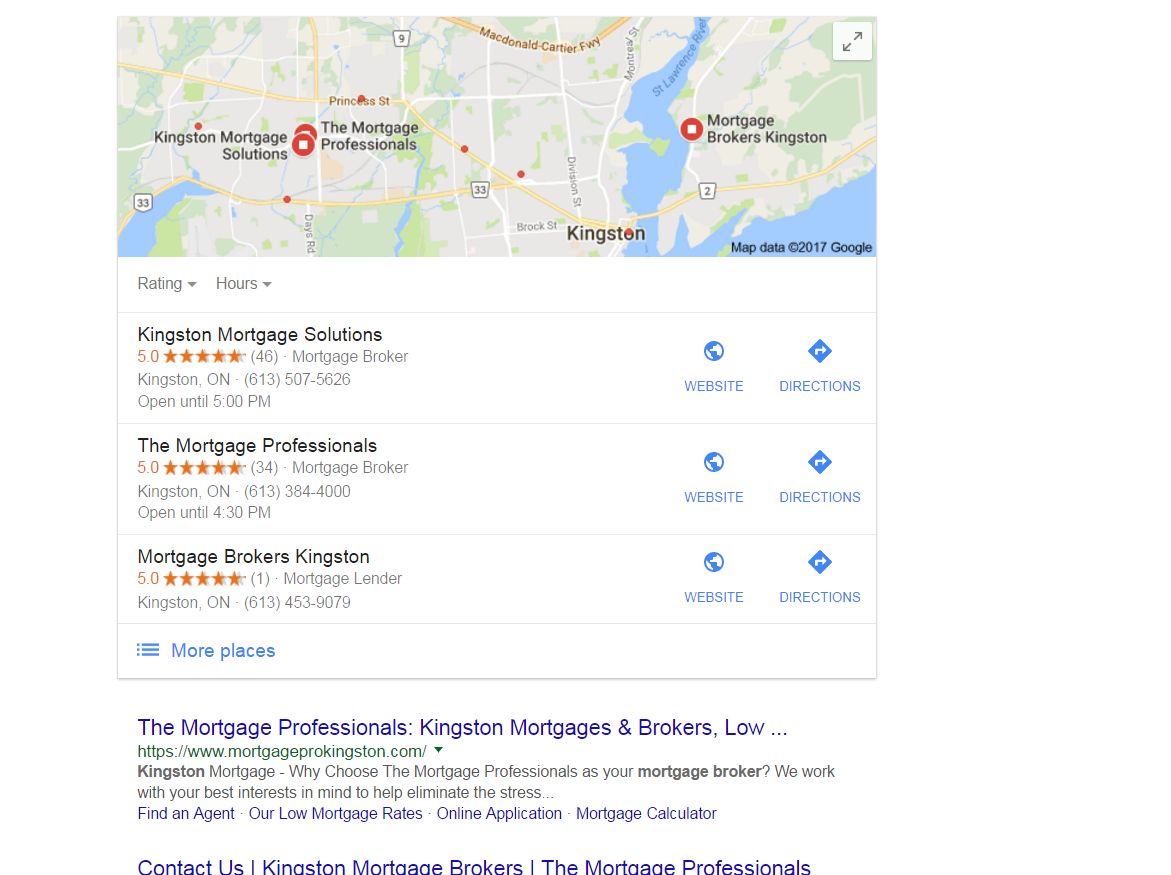
https://gyazo.com/26ec78ed7f712157ec72492199545431 Ex 1. Several months ago my client was ranked #1 both for SERP and maps until they dropped to 2nd on maps. Now they're ranked 1st in search yet 2nd for local business rankings as you can see from the screenshot above. At one point my client's business did have more reviews than the 1st ranking business yet they still weren't 1st. Ex. 2. Client(s) is ranked 4th in search and doesn't show in the top 3 map listings for their search term. If you click on More places to view Google Maps they're listed all the way down as the 15th listing or worse can't even be found when searching by their main SEO key term . Of course they are found by searching for their business name so it's not like there is a problem with the listing. I make sure to: Completely fill out their Google Business profile(NAP, hours and add pictures) Have my client try to gain positive reviews Manage and respond to reviews(mainly the negative ones) Add map and Google business link to their website Can anyone offer any other insight on what else can be done to improve their local presence on maps that I might be missing?0 -

Issue in "Suggest an Edit" feature of Google My Business
"Suggest an Edit" feature of Google My Business is allowing the competitors to change your business details, that too without your prior permission! I have put together a piece on the issue we faced and you can review the same here: https://www.kvrwebtech.com/blog/issue-in-suggest-an-edit-in-google-my-business-is-it-a-bug-or-a-major-pitfall/ What are your thoughts on the same and what should be the right solution?
Local Listings | | varun18001 -

Google My Business - two locations but same name and phone
Hello, I manage SEO for an orthopaedic practice and I'm wondering what to do about their GMB listings. They have two locations, but I'm starting to think we shouldn't have separate GMB pages for the two locations because of the advice about other GMB questions I've been reading on this forum. I read a helpful response that said you must ensure the following if you want to create separate GMB listings: Unique name Unique address (even if only a suite / office number) Unique phone number Clearly different categories on Google My Business I can only ensure one of those - unique address. The business has the same name, phone number, and categories at both addresses. What should I do about this? I would think it's important to list both addresses so that patients can be guided to the appropriate location, but is there a way to do that with just one GMB listing? Thank you, Susannah
Local Listings | | SusannahK.Noel0 -

Google My Business for 2 Websites With the Same Location
Hi,
Local Listings | | alihus
My client has two separate websites with different business names but under one location and phone number. The websites are for two separate services that he offers.
My question is that if creating two Google+ for business pages for the two businesses bad for their SEO or local ranks?
And what about creating local listings for both?(This does not seem logical to me personally!!)
Thank you for the kind answers in advance.0 -

My Evernote Notes showing up on Google Search page ?
I may just be living under a rock here in Reno, but tonight while doing a search (on desktop) for a phone number of a restaurant in Tahoe, Google served me a bunch of my Evernote notes along with my SERPS After the initial "WTFriday" moment, I realized that there was an "Evernote" bar above a series of images of what Google must think are related notes --- for example in a few weeks I am planning to take friends to Bliss & Rubicon - and I had saved the map in Evernote. Next to the map image were two notes related to daughters upcoming swim meet in South Tahoe. I did a similar search and this time a listing for hours at a local pool (near Tahoe) and two other documents came up. Since I live in Reno I thought it was odd to get all those Tahoe activities - but the fact that my Evernote on "Tahoe" things was there caught me off guard. The results were locate on the right hand where local business maps usually are -- the map and business info about the restaurant I was looking for appeared below that. ... while the left hand column features traditionals SERPs. . I am just trying to find out if I am late to the party on this ... or if serving data saved in my Evernote files is new... If anyone else has seen this, let me know. I could just be late to this. ...
Local Listings | | AJFanter0 -

Google Maps redirect notice on track-able URL's (how do I track maps visits in analytics?)
We've been using trackable URL's to track Google My Business visits in analytics for years.
Local Listings | | RedNovaLabs91
Example: ?utm_source=GoogleLocal&utm_medium=example&utm_campaign=example In the past month I've noticed Google showing a redirect notice on any listing with a trackable URL. It happened for a day or so a few weeks ago - and then it's been a more permanent situation since this past week. Redirect Notice
The previous page is sending you to: www.example.com
If you do not want to visit that page, you can return to the previous page. I'm fine with removing the trackable URL's - however - I'm not sure how to track maps visits via analytics without using them. I can't find any updated information on options. The last post on moz was in 2011 (http://moz.rainyclouds.online/blog/tracking-traffic-from-google-places-in-google-analytics). The alternate tactics in that post no longer work. So my question is:
- How do I track Google Maps (My Business) visits through analytics without using tracking URLs?1