Moz Q&A is closed.
After more than 13 years, and tens of thousands of questions, Moz Q&A closed on 12th December 2024. Whilst we’re not completely removing the content - many posts will still be possible to view - we have locked both new posts and new replies. More details here.
Removing Unverified Listing From Google
-
We have an old unverified listing that has our information on it, but we can't get it off google. I told them months ago it was closed, and it is marked as closed in Google...but it still shows up. Moz Local is telling me this is an inconsistency that hurts our local rankings. I went to delete the page from our Google Business/Place, but if I did that, the warning said that I would just not have access to the page, and that the listing would still show up on google.
How do I permanently get rid of those thing, so it's not longer an inconsistent listing?
- Ruben
-
Hi Josh,
Thanks so much for this link! Finally I was able to talk to someone who guided me what to do

-
Hey Ruben!
Eric is correct and this thread at the Google and Your Business Help Forum with the reply on it from a TC confirms Google's policy on this:
-
You can't get it removed. Google stopped removing My Business listings years ago. Basically what you've done is correct, mark it closed or relocated. By marking it as closed, it's removed from general search terms but will show up for branded searches. If you've changed locations, you should be cleaning up the old citations/directories to make sure they're showing users and bots the most up to date information. That would hurt you more than a single Google My Business page marked as closed (Google already knows you've moved from that location... sort of).
As Googlebot continues to crawl the web and find the old information it (they?) starts to distrust the "closed" location, since it's finding third party data contradicting what you submitted. Once you start building new citations, you need to correct the old data as well on major sites (use MozLocal as a guide to clean up some of the big ones). There are a few patents the US govt. granted Google on "scoring" (ranking) local results based on location prominence, which has a major component of how many sites reference the business online. The reference online is a citation through a local directory (structured) or through a news article, press release or other mention (unstructured). All these contribute to helping Google understand where your business is, which in turn will help you rank better in the local market.
So really long post short... TL;DR - Get your citations consistent with the actual address. Fix the old ones and make sure the data is correct. That will help you rank better. You can't delete Google My Business pages from the map, they will always show for branded searches.




Got a burning SEO question?
Subscribe to Moz Pro to gain full access to Q&A, answer questions, and ask your own.
Browse Questions
Explore more categories
-
Moz Tools
Chat with the community about the Moz tools.
-
SEO Tactics
Discuss the SEO process with fellow marketers
-
Community
Discuss industry events, jobs, and news!
-
Digital Marketing
Chat about tactics outside of SEO
-
Research & Trends
Dive into research and trends in the search industry.
-
Support
Connect on product support and feature requests.
Related Questions
-

Google Business Listing with no physical office location
Hey, everyone! As a business owner who works from home and doesn't have a physical office location. Is setting up a Google business listing without location going to hurt my local search ranking? Should I get a virtual office so I have a physical location? Thank you!! 😃
Local Listings | | ichorstudios0 -

Where does the small description on a business listing come from in google maps?
Hi All, Simple question, but I'm struggling to find the answer, so I hope someone is able to help. The business I run is Oakdene Forest Park; Google Maps URL: https://www.google.com/maps/place/Oakdene™+Forest+Park/@50.8114372,-1.8598721,18z/data=!4m12!1m6!3m5!1s0x4873980ce90e4ef7:0x755579d631c25b33!2sOakdene™+Forest+Park!8m2!3d50.8114796!4d-1.8582842!3m4!1s0x4873980ce90e4ef7:0x755579d631c25b33!8m2!3d50.8114796!4d-1.8582842?hl=en Under the business name, it has a small description and for the life of me I don't know where Google is getting it from because a part of it is wrong. It looks like this: Oakdene™ Forest Park Rural Resort with Entertainment & a Spa I would like to remove the term 'Rural Resort' but where do I find it?? Thanks in advance for your help.
Local Listings | | Shorefield_Holidays0 -

Improve Google Business ranking
While my client's websites have been ranking well in SERP for their keyterms I'm at a lost on what I can do to improve their Google business/map presence. I'm referring to their listing where the top three come up or when you search on Google Maps.
Local Listings | | FPK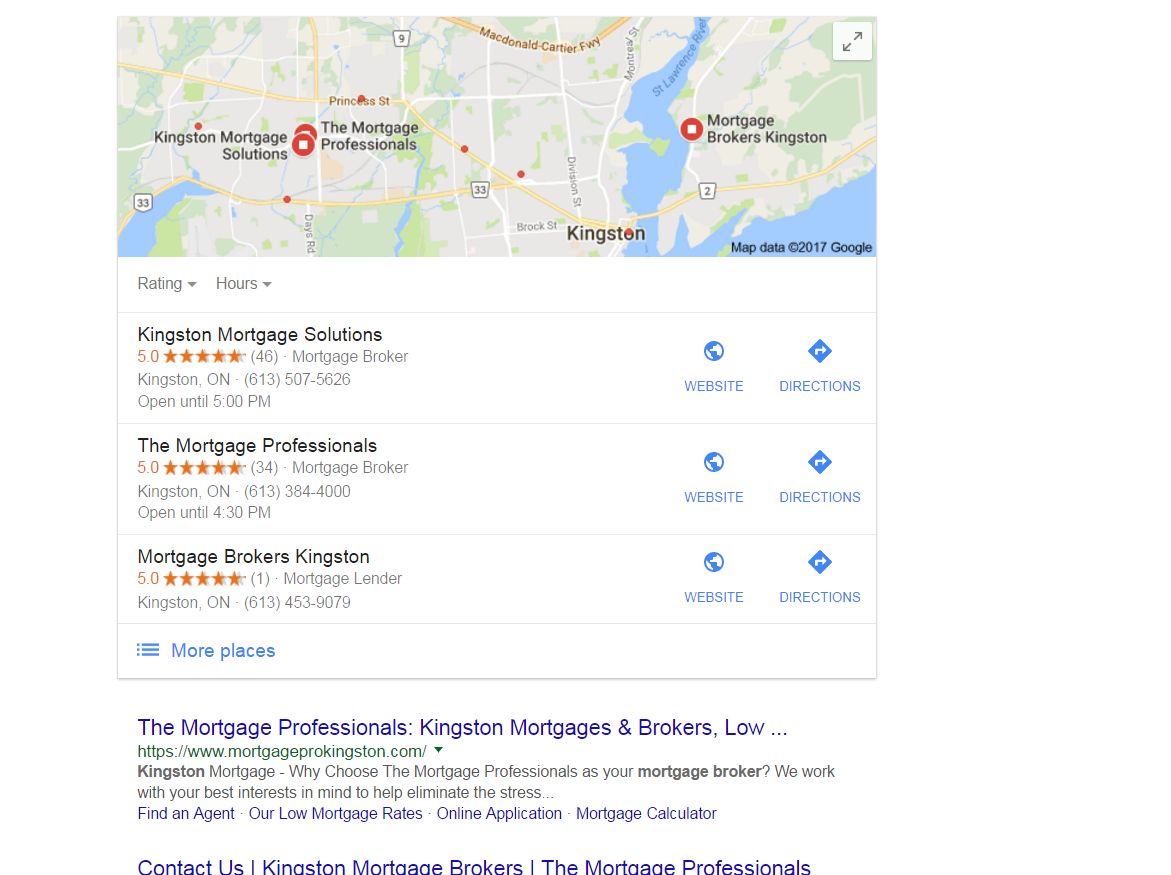
https://gyazo.com/26ec78ed7f712157ec72492199545431 Ex 1. Several months ago my client was ranked #1 both for SERP and maps until they dropped to 2nd on maps. Now they're ranked 1st in search yet 2nd for local business rankings as you can see from the screenshot above. At one point my client's business did have more reviews than the 1st ranking business yet they still weren't 1st. Ex. 2. Client(s) is ranked 4th in search and doesn't show in the top 3 map listings for their search term. If you click on More places to view Google Maps they're listed all the way down as the 15th listing or worse can't even be found when searching by their main SEO key term . Of course they are found by searching for their business name so it's not like there is a problem with the listing. I make sure to: Completely fill out their Google Business profile(NAP, hours and add pictures) Have my client try to gain positive reviews Manage and respond to reviews(mainly the negative ones) Add map and Google business link to their website Can anyone offer any other insight on what else can be done to improve their local presence on maps that I might be missing?0 -

How to verify Google My Business (GMB) account in Dubai, United Arab Emirates (UAE)
Hi folks, I know the majority of you are based in the US, so won't be experiencing the same problem as me. I have set up a Google My Business account for a company here in Dubai, United Arab Emirates. The only problem is that I can't verify it using the normal methods like a postcard being sent out as the UAE doesn't have a postal service, so there are no postcodes to target an address. Basically I go through the process of creating a GMB account, setting the address details and map marker, then try to verify the account by postcard (this is the only way). I wait 14+ days but still no postcard arrives for obvious reasons - no postal address! So - my question is, how do we get round this problem? I know it can be done as there are plenty of businesses out there in Dubai that are verified on Google maps and GMB. Any advice or input would be greatly appreciated. Thanks
Local Listings | | SeoSheikh0 -

Issue in "Suggest an Edit" feature of Google My Business
"Suggest an Edit" feature of Google My Business is allowing the competitors to change your business details, that too without your prior permission! I have put together a piece on the issue we faced and you can review the same here: https://www.kvrwebtech.com/blog/issue-in-suggest-an-edit-in-google-my-business-is-it-a-bug-or-a-major-pitfall/ What are your thoughts on the same and what should be the right solution?
Local Listings | | varun18001 -

Disadvantages to Hiding Business Address on Google Places?
From a Local SEO standpoint, wouldn't hiding a business address on Google Places for Business create an SEO disadvantage in that I would expect in the local portion of the search results, there would be a bias to showing businesses that have not hidden their address as then you can place a pin on the map at the location? Or from a Local SEO standpoint does it not matter if you hide your address or not?
Local Listings | | Jazee1 -

SEO - Should individual doctors at facility claim a Google My Business profile?
My client is a physician facility with several doctors practicing at the facility. When doing a Google search for some of their practices such as "family practice" one of the doctor's profiles will display in the Google Local pack - however it is not linked to the facility website where their profile exists. As of right now, we are using YEXT and other tools to claim Google Business Profiles for each practice, not the individual doctors. If there are unclaimed accounts for individual doctors, they are alerting Google that it’s a duplicate and should be taken down. Is this the right process to follow for SEO best practices or should we be claiming both the business and individual doctor profiles? The reason they are not claiming individual doctor profiles is to cut down on duplicate reviews as part of the Reputation Management Program. Advice much appreciated!
Local Listings | | chrisvogel0 -

Google Maps redirect notice on track-able URL's (how do I track maps visits in analytics?)
We've been using trackable URL's to track Google My Business visits in analytics for years.
Local Listings | | RedNovaLabs91
Example: ?utm_source=GoogleLocal&utm_medium=example&utm_campaign=example In the past month I've noticed Google showing a redirect notice on any listing with a trackable URL. It happened for a day or so a few weeks ago - and then it's been a more permanent situation since this past week. Redirect Notice
The previous page is sending you to: www.example.com
If you do not want to visit that page, you can return to the previous page. I'm fine with removing the trackable URL's - however - I'm not sure how to track maps visits via analytics without using them. I can't find any updated information on options. The last post on moz was in 2011 (http://moz.rainyclouds.online/blog/tracking-traffic-from-google-places-in-google-analytics). The alternate tactics in that post no longer work. So my question is:
- How do I track Google Maps (My Business) visits through analytics without using tracking URLs?1