Moz Q&A is closed.
After more than 13 years, and tens of thousands of questions, Moz Q&A closed on 12th December 2024. Whilst we’re not completely removing the content - many posts will still be possible to view - we have locked both new posts and new replies. More details here.
PDF for link building - avoiding duplicate content
-
Hello,
We've got an article that we're turning into a PDF. Both the article and the PDF will be on our site. This PDF is a good, thorough piece of content on how to choose a product.
We're going to strip out all of the links to our in the article and create this PDF so that it will be good for people to reference and even print. Then we're going to do link building through outreach since people will find the article and PDF useful.
My question is, how do I use rel="canonical" to make sure that the article and PDF aren't duplicate content?
Thanks.
-
Hey Bob
I think you should forget about any kind of perceived conventions and have whatever you think works best for your users and goals.
Again, look at unbounce, that is a custom landing page with a homepage link (to share the love) but not the general site navigation.
They also have a footer to do a bit more link love but really, do what works for you.
Forget conventions - do what works!
Hope that helps
Marcus -
I see, thanks! I think it's important not to have the ecommerce navigation on the page promoting the pdf. What would you say is ideal as far as the graphical and navigation components of the page with the PDF on it - what kind of navigation and graphical header should I have on it?
-
Yep, check the HTTP headers with webbug or there are a bunch of browser plugins that will let you see the headers for the document.
That said, I would push to drive the links to the page though rather than the document itself and just create a nice page that houses the document and make that the link target.
You could even make the PDF link only available by email once they have singed up or some such as canonical is only a directive and you would still be better getting those links flooding into a real page on the site.
You could even offer up some HTML to make this easier for folks to link to that linked to your main page. If you take a look at any savvy infographics etc folks will try to draw a link into a page rather than the image itself for the very same reasons.
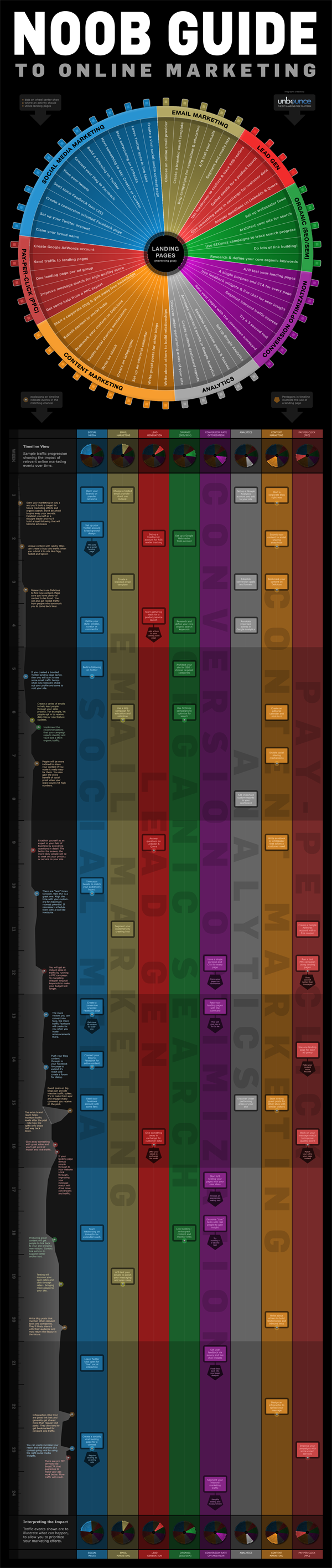
If you look at something like the Noobs Guide to Online Marketing from Unbounce then you will see something like this as the suggested linking code:
[](<strong>http://unbounce.com/noob-guide-to-online-marketing-infographic/</strong>)
[
 ](<strong>http://unbounce.com/noob-guide-to-online-marketing-infographic/</strong>)
[](<strong>http://unbounce.com/noob-guide-to-online-marketing-infographic/</strong>)
Unbounce – The DIY Landing Page Platform
So, the image is there but the link they are pimping is a standard page:
http://unbounce.com/noob-guide-to-online-marketing-infographic/
They also cheekily add an extra homepage link in as well with some keywords and the brand so if folks don't remove that they still get that benefit.
Ultimately, it means that when links flood into the site they benefit the whole site rather than just promote one PDF.
Just my tuppence!
Marcus -
Thanks for the code Marcus.
Actually, the pdf is what people will be linking to. It's a guide for websites. I think the PDF will be much easier to promote than the article.I assume so anyway.
Is there a way to make sure my canonical code in htaccess is working after I insert the code?
Thanks again,
Bob
-
Hey Bob
There is a much easier way to do this and simply have your PDFs that you don't want indexed in a folder that you block access to in robots.txt. This way you can just drop PDFs into articles and link to them knowing full well these pages will not be indexed.
Assuming you had a PDF called article.pdf in a folder called pdfs/ then the following would prevent indexation.
User-agent: * Disallow: /pdfs/
Or to just block the file itself:
User-agent: *
Disallow: /pdfs/yourfile.pdf Additionally, There is no reason not to add the canonical link as well and if you find people are linking directly to the PDF then having this would ensure that the equity associated with those links was correctly attributed to the parent page (always a good thing).Header add Link '<http: www.url.co.uk="" pdfs="" article.html="">; </http:> rel="canonical"'
Generally, there are better ways to block indexation than with robots.txt but in the case of PDFs, we really don't want these files indexed as they make for such poor landing pages (no navigation) and we certainly want to remove any competition or duplication between the page and the PDF so in this case, it makes for a quick, painless and suitable solution.
Hope that helps!
Marcus -
Thanks ThompsonPaul,
Say the pdf is located at
domain.com/pdfs/white-papers.pdf
and the article that I want to rank is at
domain.com/articles/article.html
do I simply add this to my htaccess file?:
Header add Link "<http: www.domain.com="" articles="" article.html="">; rel="canonical""</http:>
-
You can insert the canonical header link using your site's .htaccess file, Bob. I'm sure Hostgator provides access to the htaccess file through ftp (sometimes you have to turn on "show hidden files") or through the file manager built into your cPanel.
Check tip #2 in this recent SEOMoz blog article for specifics:
seomoz.org/blog/htaccess-file-snippets-for-seosJust remember too - you will want to do the same kind of on-page optimization for the PDF as you do for regular pages.
- Give it a good, descriptive, keyword-appropriate, dash-separated file name. (essential for usability as well, since it will become the title of the icon when saved to someone's desktop)
- Fill out the metadata for the PDF, especially the Title and Description. In Acrobat it's under File -> Properties -> Description tab (to get the meta-description itself, you'll need to click on the Additional Metadata button)
I'd be tempted to build the links to the html page as much as possible as those will directly help ranking, unlike the PDF's inbound links which will have to pass their link juice through the canonical, assuming you're using it. Plus, the visitor will get a preview of the PDF's content and context from the rest of your site which which may increase trust and engender further engagement..
Your comment about links in the PDF got kind of muddled, but you'll definitely want to make certain there are good links and calls to action back to your website within the PDF - preferably on each page. Otherwise there's no clear "next step" for users reading the PDF back to a purchase on your site. Make sure to put Analytics tracking tags on these links so you can assess the value of traffic generated back from the PDF - otherwise the traffic will just appear as Direct in your Analytics.
Hope that all helps;
Paul
-
Can I just use htaccess?
See here: http://www.seomoz.org/blog/how-to-advanced-relcanonical-http-headers
We only have one pdf like this right now and we plan to have no more than five.
Say the pdf is located at
domain.com/pdfs/white-papers.pdf
and the article that I want to rank is at
domain.com/articles/article.pdf
do I simply add this to my htaccess file?:
Header add Link "<http: www.domain.com="" articles="" article.pdf="">; rel="canonical""</http:>
-
How do I know if I can do an HTTP header request? I'm using shared hosting through hostgator.
-
PDF seem to not rank as well as other normal webpages. They still rank do not get me wrong, we have over 100 pdf pages that get traffic for us. The main version is really up to you, what do you want to show in the search results. I think it would be easier to rank for a normal webpage though. If you are doing a rel="canonical" it will pass most of the link juice, not all but most.
-
PDF seem to not rank as well as other normal webpages. They still rank do not get me wrong, we have over 100 pdf pages that get traffic for us. The main version is really up to you, what do you want to show in the search results. I think it would be easier to rank for a normal webpage though. If you are doing a rel="canonical" it will pass most of the link juice, not all but most.
-
Thank you DoRM,
I assume that the PDF is what I want to be the main version since that is what I'll be marketing, but I could be wrong? What if I get backlinks to both pages, will both sets of backlinks count?
-
Indicate the canonical version of a URL by responding with the
Link rel="canonical"HTTP header. Addingrel="canonical"to theheadsection of a page is useful for HTML content, but it can't be used for PDFs and other file types indexed by Google Web Search. In these cases you can indicate a canonical URL by responding with theLink rel="canonical"HTTP header, like this (note that to use this option, you'll need to be able to configure your server):Link: <http: www.example.com="" downloads="" white-paper.pdf="">; rel="canonical"</http:>Google currently supports these link header elements for Web Search only.
You can read more her http://support.google.com/webmasters/bin/answer.py?hl=en&answer=139394




Got a burning SEO question?
Subscribe to Moz Pro to gain full access to Q&A, answer questions, and ask your own.
Browse Questions
Explore more categories
-
Moz Tools
Chat with the community about the Moz tools.
-
SEO Tactics
Discuss the SEO process with fellow marketers
-
Community
Discuss industry events, jobs, and news!
-
Digital Marketing
Chat about tactics outside of SEO
-
Research & Trends
Dive into research and trends in the search industry.
-
Support
Connect on product support and feature requests.
Related Questions
-

How can I avoid duplicate content for a new landing page which is the same as an old one?
Hello mozers! I have a question about duplicate content for you... One on my clients pages have been dropping in search volume for a while now, and I've discovered it's because the search term isn't as popular as it used to be. So... we need to create a new landing page using a more popular search term. The page which is losing traffic is based on the search query "Can I put a solid roof on my conservatory" this only gets 0-10 searches per month according to the keyword explorer tool. However, if we changed this to "replacing conservatory roof with solid roof" this gets up to 500 searches per month. Muuuuch better! The issue is, I don't want to close down and re-direct the old page because it's got a featured snippet and sits in position 1. So I'd like to create another page instead... however, as the two are effectively the same content, I would then land myself in a duplicate content issue. If I were to put a rel="canonical" tag in the original "can I put a solid roof...." page but say the master page is now the new one, would that get around the issue?
Intermediate & Advanced SEO | | Virginia-Girtz0 -

Same site serving multiple countries and duplicated content
Hello! Though I browse MoZ resources every day, I've decided to directly ask you a question despite the numerous questions (and answers!) about this topic as there are few specific variants each time: I've a site serving content (and products) to different countries built using subfolders (1 subfolder per country). Basically, it looks like this:
Intermediate & Advanced SEO | | GhillC
site.com/us/
site.com/gb/
site.com/fr/
site.com/it/
etc. The first problem was fairly easy to solve:
Avoid duplicated content issues across the board considering that both the ecommerce part of the site and the blog bit are being replicated for each subfolders in their own language. Correct me if I'm wrong but using our copywriters to translate the content and adding the right hreflang tags should do. But then comes the second problem: how to deal with duplicated content when it's written in the same language? E.g. /us/, /gb/, /au/ and so on.
Given the following requirements/constraints, I can't see any positive resolution to this issue:
1. Need for such structure to be maintained (it's not possible to consolidate same language within one single subfolders for example),
2. Articles from one subfolder to another can't be canonicalized as it would mess up with our internal tracking tools,
3. The amount of content being published prevents us to get bespoke content for each region of the world with the same spoken language. Given those constraints, I can't see a way to solve that out and it seems that I'm cursed to live with those duplicated content red flags right up my nose.
Am I right or can you think about anything to sort that out? Many thanks,
Ghill0 -

Removing duplicate content
Due to URL changes and parameters on our ecommerce sites, we have a massive amount of duplicate pages indexed by google, sometimes up to 5 duplicate pages with different URLs. 1. We've instituted canonical tags site wide. 2. We are using the parameters function in Webmaster Tools. 3. We are using 301 redirects on all of the obsolete URLs 4. I have had many of the pages fetched so that Google can see and index the 301s and canonicals. 5. I created HTML sitemaps with the duplicate URLs, and had Google fetch and index the sitemap so that the dupes would get crawled and deindexed. None of these seems to be terribly effective. Google is indexing pages with parameters in spite of the parameter (clicksource) being called out in GWT. Pages with obsolete URLs are indexed in spite of them having 301 redirects. Google also appears to be ignoring many of our canonical tags as well, despite the pages being identical. Any ideas on how to clean up the mess?
Intermediate & Advanced SEO | | AMHC0 -

Contextual FAQ and FAQ Page, is this duplicate content?
Hi Mozzers, On my website, I have a FAQ Page (with the questions-responses of all the themes (prices, products,...)of my website) and I would like to add some thematical faq on the pages of my website. For example : adding the faq about pricing on my pricing page,... Is this duplicate content? Thank you for your help, regards. Jonathan
Intermediate & Advanced SEO | | JonathanLeplang0 -

Is a different location in page title, h1 title, and meta description enough to avoid Duplicate Content concern?
I have a dynamic website which will have location-based internal pages that will have a <title>and <h1> title, and meta description tag that will include the subregion of a city. Each page also will have an 'info' section describing the generic product/service offered which will also include the name of the subregion. The 'specific product/service content will be dynamic but in some cases will be almost identical--ie subregion A may sometimes have the same specific content result as subregion B. Will the difference of just the location put in each of the above tags be enough for me to avoid a Duplicate Content concern?</p></title>
Intermediate & Advanced SEO | | couponguy0 -

URL Value: Menu Links vs Body Content Links
Hi All, I'm a little confused. I have read a number of articles from authority sites that give mixed signals over the importance of menu links vs body content links. It is suggested that whilst all menu links spread link juice equally, Google does not see them as favourably. Inserting a link within the body will add more link juice value to the desired page. Any thoughts would be appreciated. Thanks Mark
Intermediate & Advanced SEO | | Mark_Ch0 -

How to Remove Joomla Canonical and Duplicate Page Content
I've attempted to follow advice from the Q&A section. Currently on the site www.cherrycreekspine.com, I've edited the .htaccess file to help with 301s - all pages redirect to www.cherrycreekspine.com. Secondly, I'd added the canonical statement in the header of the web pages. I have cut the Duplicate Page Content in half ... now I have a remaining 40 pages to fix up. This is my practice site to try and understand what SEOmoz can do for me. I've looked at some of your videos on Youtube ... I feel like I'm scrambling around to the Q&A and the internet to understand this product. I'm reading the beginners guide.... any other resources would be helpful.
Intermediate & Advanced SEO | | deskstudio0 -

Capitals in url creates duplicate content?
Hey Guys, I had a quick look around however I couldn't find a specific answer to this. Currently, the SEOmoz tools come back and show a heap of duplicate content on my site. And there's a fair bit of it. However, a heap of those errors are relating to random capitals in the urls. for example. "www.website.com.au/Home/information/Stuff" is being treated as duplicate content of "www.website.com.au/home/information/stuff" (Note the difference in capitals). Anyone have any recommendations as to how to fix this server side(keeping in mind it's not practical or possible to fix all of these links) or to tell Google to ignore the capitalisation? Any help is greatly appreciated. LM.
Intermediate & Advanced SEO | | CarlS0